11 Best Lead Enrichment Tools Compared: Match Rates, Pricing, and CRM Fit [2026]

ยท 9 min read
MarketBetter Team
Content Team, marketbetter.ai

Your SDR team just got a new lead. An email address. Maybe a company name. Now what?

Without enrichment, that lead is just a name in a spreadsheet. Your rep doesn't know the company size, industry, tech stack, or whether this person is even a decision-maker. They're flying blind.

Lead enrichment tools fill in the gaps โ€” turning anonymous contacts into complete profiles your sales team can actually work with.

But here's the problem most teams discover too late: enriched data without clear next steps is still just data. You need tools that not only enrich leads but help you act on them.

In this guide, we'll break down the best lead enrichment tools for 2026 โ€” what they do well, where they fall short, and which ones actually help your SDRs close deals.

What to Look for in Lead Enrichment Toolsโ€‹

Before diving into the list, here's what matters most:

FactorWhy It Matters
Data AccuracyBad data = wasted outreach. Look for verified contacts, not scraped databases.
CoverageDoes it work for your target market? Global? SMB? Enterprise?
Real-Time EnrichmentBatch enrichment is fine for lists. Real-time matters for inbound leads.
IntegrationNeeds to work with your CRM, not require manual exports.
ActionabilityGreat data is useless without clear next steps for your SDRs.

The Best Lead Enrichment Tools for 2026โ€‹

1. MarketBetterโ€‹

Best for: SDR teams who need enrichment + workflow in one platform

MarketBetter takes a different approach to enrichment. Instead of just adding data fields to your leads, it combines visitor identification, contact enrichment, and a daily playbook that tells your SDRs exactly what to do next.

Key Features:

  • Website visitor identification with contact-level data
  • Automatic enrichment of inbound leads
  • Daily SDR playbook with prioritized tasks
  • Built-in smart dialer for warm outreach
  • CRM sync with HubSpot and Salesforce

What Sets It Apart: Most enrichment tools give you data and say "good luck." MarketBetter tells you WHO to contact, WHEN to reach out, and WHAT to say. It's enrichment that actually drives action.

Pricing: Custom pricing based on team size

Ideal For: B2B companies with 3-20 SDRs who want to consolidate their tech stack

Book a Demo โ†’


2. Clearbit (Now Part of HubSpot)โ€‹

Best for: HubSpot users who need seamless enrichment

Clearbit was acquired by HubSpot in 2023, making it the go-to enrichment tool for HubSpot customers. It offers real-time enrichment, form shortening, and IP-based visitor identification.

Key Features:

  • Real-time form enrichment
  • Company and contact data append
  • IP intelligence for visitor identification
  • Native HubSpot integration
  • Lead scoring data

Strengths:

  • Extremely tight HubSpot integration
  • Reliable company data
  • Good for marketing automation triggers

Limitations:

  • Best value if you're already on HubSpot
  • Limited phone number coverage
  • No built-in outreach tools

Pricing: Bundled with HubSpot plans; standalone pricing available


3. Apollo.ioโ€‹

Best for: Outbound-heavy teams on a budget

Apollo combines a massive B2B database with outreach sequencing. It's one of the most feature-rich tools at an accessible price point.

Key Features:

  • 275M+ contact database
  • Email verification built-in
  • Sequence automation
  • Chrome extension for LinkedIn prospecting
  • Intent data signals

Strengths:

  • Generous free tier (50 credits/month)
  • All-in-one prospecting and outreach
  • Strong LinkedIn integration

Limitations:

  • Data quality varies (crowdsourced)
  • Can feel overwhelming for small teams
  • Limited visitor identification

Pricing: Free tier available; paid plans from $49/user/month


4. ZoomInfoโ€‹

Best for: Enterprise teams with big budgets

ZoomInfo is the 800-pound gorilla of B2B data. It offers the most comprehensive company and contact database, plus intent data, website visitor tracking, and more.

Key Features:

  • 100M+ business profiles
  • Intent data from Bombora
  • Website visitor tracking
  • Org chart mapping
  • Technographic data

Strengths:

  • Best-in-class data coverage
  • Strong intent signals
  • Comprehensive org charts

Limitations:

  • Expensive ($15K+ annual contracts)
  • Long sales cycles to buy
  • Overkill for SMB teams

Pricing: Custom pricing; typically $15,000-$50,000+/year


5. Cognismโ€‹

Best for: Teams targeting European markets

Cognism excels in GDPR-compliant data for European prospects. Their "Diamond Data" offers phone-verified mobile numbers โ€” critical for outbound calling.

Key Features:

  • Diamond Dataยฎ (phone-verified mobiles)
  • GDPR-compliant database
  • Intent data (12 topics included)
  • Job change alerts
  • Technographic data

Strengths:

  • Best European data coverage
  • Phone verification = higher connect rates
  • Strong compliance focus

Limitations:

  • Weaker US coverage than Apollo/ZoomInfo
  • Pricing not transparent
  • No built-in dialer

Pricing: Custom quotes; packages include Grow and Elevate tiers


6. Lushaโ€‹

Best for: Individual contributors and small teams

Lusha offers a simple credit-based model that works well for individual SDRs or small teams who need quick contact lookups.

Key Features:

  • Browser extension for LinkedIn
  • Credit-based pricing (1 credit = email, 10 credits = phone)
  • CRM integrations
  • Bulk enrichment
  • Team management

Strengths:

  • Simple, predictable pricing
  • Easy to get started
  • Good mobile number coverage

Limitations:

  • Credits add up fast
  • Limited enrichment depth
  • No workflow tools

Pricing: Free plan (70 credits/month); Pro plans from $49/user/month


7. Clayโ€‹

Best for: Growth teams who love automation

Clay is the Swiss Army knife of enrichment โ€” it combines 50+ data providers and lets you build custom enrichment workflows with AI.

Key Features:

  • 50+ data provider integrations
  • AI-powered research
  • Custom workflow builder
  • Waterfall enrichment (tries multiple sources)
  • Spreadsheet-like interface

Strengths:

  • Incredible flexibility
  • Best data coverage (aggregates sources)
  • AI can research anything

Limitations:

  • Steep learning curve
  • Requires technical setup
  • Can get expensive at scale

Pricing: Starter from $149/month


8. Demandbaseโ€‹

Best for: Account-based marketing teams

Demandbase is an ABM platform with strong enrichment capabilities. It's built for marketing and sales alignment on target accounts.

Key Features:

  • Account identification
  • Intent data
  • Advertising integration
  • CRM enrichment
  • Journey analytics

Strengths:

  • Excellent for ABM strategies
  • Strong intent signals
  • Good for marketing-sales alignment

Limitations:

  • Enterprise pricing
  • Complex implementation
  • More marketing than sales focused

Pricing: Enterprise custom pricing


9. LeadIQโ€‹

Best for: SDRs doing outbound prospecting

LeadIQ focuses on making prospecting fast. Its Chrome extension lets SDRs capture and enrich contacts directly from LinkedIn.

Key Features:

  • LinkedIn prospecting extension
  • One-click capture to CRM
  • Email verification
  • Sequence integration
  • Team collaboration

Strengths:

  • Fast prospecting workflow
  • Good Salesforce integration
  • Affordable for individuals

Limitations:

  • Limited to prospecting use case
  • Smaller database than competitors
  • No visitor identification

Pricing: Free tier available; paid from $39/user/month


10. FullContactโ€‹

Best for: Identity resolution and customer data

FullContact specializes in identity resolution โ€” connecting fragmented customer data across touchpoints.

Key Features:

  • Identity resolution
  • API-first approach
  • Privacy-compliant enrichment
  • Real-time data append
  • Multi-source matching

Strengths:

  • Best for customer data platforms
  • Strong privacy focus
  • Reliable API

Limitations:

  • Not built for sales teams
  • Requires technical implementation
  • Limited sales-specific features

Pricing: API pricing based on usage


11. Kasprโ€‹

Best for: European SDRs on LinkedIn

Kaspr is a LinkedIn-focused tool popular in Europe. It offers a Chrome extension with real-time data extraction.

Key Features:

  • LinkedIn Chrome extension
  • Phone and email extraction
  • GDPR compliance
  • Team management
  • CRM integrations

Strengths:

  • Strong LinkedIn integration
  • Good European data
  • Affordable pricing

Limitations:

  • LinkedIn-focused only
  • Limited automation
  • Smaller database

Pricing: Free tier; paid from โ‚ฌ49/user/month


Quick Comparison: Lead Enrichment Tools 2026โ€‹

ToolBest ForStarting PriceKey Strength
MarketBetterSDR workflowCustomEnrichment + daily playbook
ClearbitHubSpot usersBundledReal-time form enrichment
ApolloBudget teamsFree/$49All-in-one platform
ZoomInfoEnterprise$15K+/yearBest data coverage
CognismEuropean marketsCustomPhone-verified mobiles
LushaSmall teamsFree/$49Simple credit model
ClayGrowth teams$149/moWorkflow automation
DemandbaseABM teamsEnterpriseIntent + advertising
LeadIQOutbound SDRsFree/$39Fast prospecting
FullContactIdentity resolutionUsage-basedAPI reliability
KasprEuropean LinkedInFree/โ‚ฌ49LinkedIn extraction

The Real Question: Enrichment vs. Actionโ€‹

Here's what most lead enrichment comparison articles won't tell you:

Data alone doesn't close deals. Action does.

You can have perfect enrichment โ€” every field filled in, every phone number verified, every intent signal captured. But if your SDR still has to:

  1. Log into 5 different tools
  2. Decide who to call first
  3. Research what to say
  4. Manually log the activity

...then enrichment is just creating more work.

The SDR teams seeing the best results in 2026 aren't just enriching leads โ€” they're using tools that turn enriched data into specific daily actions.

That's why MarketBetter combines enrichment with a daily playbook. Instead of giving you data and wishing you luck, it tells your SDRs: "Call this person first. Here's why they're hot. Here's what to say."

Enrichment should be the beginning of the workflow, not the end.

How to Choose the Right Enrichment Toolโ€‹

Choose based on your actual workflow:

  • HubSpot all-in? โ†’ Clearbit makes sense
  • Tight budget, need everything? โ†’ Apollo is hard to beat
  • Enterprise with ABM strategy? โ†’ ZoomInfo or Demandbase
  • Targeting Europe? โ†’ Cognism or Kaspr
  • Want enrichment + SDR workflow? โ†’ MarketBetter

Questions to ask vendors:

  1. What's your data accuracy rate? (Ask for specifics, not marketing claims)
  2. How do you handle data decay? (B2B data goes stale fast)
  3. What happens after enrichment? (Do they help you act on it?)
  4. What integrations matter to you?
Free Tool

Try our AI Lead Generator โ€” find verified LinkedIn leads for any company instantly. No signup required.

The Bottom Lineโ€‹

Lead enrichment is table stakes in 2026. Every serious B2B sales team needs it.

But the winners aren't the teams with the most data โ€” they're the teams that turn data into action fastest.

If you're still jumping between enrichment tools, CRMs, and dialers, you're leaving money on the table. Look for solutions that combine enrichment with clear next steps for your SDRs.

Ready to see enrichment + workflow in action?

Book a MarketBetter Demo โ†’


Looking for more SDR tool comparisons? Check out our guides to the best website visitor identification tools and best sales dialers for SDR teams.

Intent Data Without Action Is Just Noise: A Framework for SDR Teams

ยท 8 min read
MarketBetter Team
Content Team, marketbetter.ai

Intent data has a dirty secret: most teams who buy it never act on it.

That's not a vendor problem. It's an execution problem. And in 2026, the gap between companies that have intent data and companies that use intent data is wider than ever.

I've watched B2B teams spend $50K+ annually on intent platforms, only to have the data live in a dashboard nobody checks. Or worseโ€”it gets exported to a spreadsheet, passed to SDRs, and promptly ignored because nobody knows what to do with it.

Here's the uncomfortable truth: intent data without action is just noise.

MarketBetter vs Clearbit (Breeze Intelligence): B2B Data Enrichment Comparison [2026]

ยท 5 min read
MarketBetter Team
Content Team, marketbetter.ai

If you've been researching B2B data enrichment tools, you've likely come across Clearbit โ€” or more recently, Breeze Intelligence, since Clearbit was acquired by HubSpot and integrated into their ecosystem.

The acquisition has left many sales teams wondering: Should we stick with Clearbit/Breeze, or explore alternatives that offer more than just data?

This comparison breaks down how MarketBetter and Clearbit (Breeze Intelligence) differ โ€” and helps you decide which fits your sales workflow better.

The Core Difference: Data vs. Directionโ€‹

Here's the fundamental distinction:

  • Clearbit/Breeze Intelligence: Enriches your records with company and contact data. You get firmographics, technographics, and IP-to-company identification.

  • MarketBetter: Enriches your records AND tells your SDRs exactly what to do next. You get the data plus a prioritized playbook of actions.

The analogy: Clearbit hands you a map. MarketBetter hands you the map AND turn-by-turn navigation.

Feature-by-Feature Comparisonโ€‹

CapabilityClearbit (Breeze)MarketBetter
Data Enrichmentโœ… Strong (firmographics, technographics, industry)โœ… Included (company + contact data)
IP-to-Company IDโœ… Core featureโœ… Real-time visitor identification
Intent Scoringโš ๏ธ Basic (page views)โœ… AI-powered intent + ICP scoring
SDR Task AssignmentโŒ Not includedโœ… Daily prioritized task list
Personalized OutreachโŒ Data onlyโœ… AI writes emails based on research
Smart DialerโŒ Not includedโœ… Built-in with call prioritization
Chatbot + Live HandoffโŒ Not includedโœ… Qualified-style engagement
CRM Integrationโœ… HubSpot native (others limited)โœ… HubSpot + Salesforce bidirectional
Pre-Meeting BriefsโŒ Manual researchโœ… Automated before every call

Pricing Comparisonโ€‹

Clearbit / Breeze Intelligence Pricingโ€‹

Clearbit's pricing has always been enterprise-oriented and has become even more opaque since the HubSpot acquisition:

  • Now bundled within HubSpot's higher tiers
  • Standalone pricing typically starts at $15,000-$20,000/year for basic enrichment
  • Visitor identification (Reveal) adds additional cost
  • Per-record pricing can add up quickly at scale

The catch: If you're not already on HubSpot, getting Clearbit's full value means committing to HubSpot's ecosystem.

MarketBetter Pricingโ€‹

  • Transparent pricing starting at $39/month for visitor identification
  • All-in-one plans include enrichment, tasks, outreach, and dialer
  • No per-record fees for standard usage
  • Works with HubSpot OR Salesforce

Who Should Choose Clearbit (Breeze Intelligence)?โ€‹

Clearbit is a good fit if you:

  • Are already deeply invested in HubSpot's ecosystem
  • Need data enrichment primarily for marketing operations (scoring, segmentation)
  • Have a mature RevOps team to build workflows around enriched data
  • Want best-in-class firmographic accuracy and don't need SDR automation
  • Have budget for enterprise pricing

Common Clearbit use cases:

  • Form shortening (auto-fill fields from email)
  • Lead scoring based on firmographics
  • Account-based marketing segmentation
  • Data hygiene and deduplication

Who Should Choose MarketBetter?โ€‹

MarketBetter is a good fit if you:

  • Have an SDR team that needs clear direction on daily priorities
  • Want visitor identification + action in one platform
  • Need AI-powered outreach that writes personalized emails
  • Are looking for a Clearbit alternative with more sales execution features
  • Want transparent, accessible pricing

Why teams switch from Clearbit to MarketBetter:

  1. "We enriched 10,000 leads but SDRs still didn't know who to call first"

    • Clearbit tells you WHO the lead is
    • MarketBetter tells you WHO to call, WHEN to call, and WHAT to say
  2. "We're not ready to go all-in on HubSpot"

    • Clearbit's future is HubSpot-native
    • MarketBetter works with your existing CRM without lock-in
  3. "We need more than data โ€” we need workflow"

    • Data enrichment alone doesn't move pipeline
    • SDRs need prioritized tasks, not more data to interpret

The Visitor Identification Questionโ€‹

Both platforms identify companies visiting your website. Here's how they differ:

Clearbit Reveal:

  • Shows company name, industry, size
  • Requires separate workflows to action the data
  • Best when feeding into HubSpot for marketing automation

MarketBetter Visitor Intelligence:

  • Shows company + estimated buying intent
  • Automatically creates SDR tasks for high-intent visitors
  • Prioritizes visitors against your ICP criteria
  • SDRs see exactly who to contact and what to say

Example workflow:

Clearbit: VP of Sales at 500-person SaaS company visits your pricing page โ†’ Record created โ†’ You build a HubSpot workflow โ†’ Lead gets scored โ†’ SDR eventually sees it in a queue

MarketBetter: Same visitor โ†’ System identifies high-intent signal โ†’ SDR gets a task: "Call John at Acme Corp - visited pricing page 3x this week, ICP match: 92%" with suggested talking points

Making the Switchโ€‹

If you're currently on Clearbit and considering MarketBetter:

  1. Data continuity: Your enriched CRM records stay intact. MarketBetter adds to your data, doesn't replace it.

  2. HubSpot compatibility: MarketBetter integrates with HubSpot bidirectionally โ€” you don't lose your HubSpot investment.

  3. Pilot approach: Many teams run MarketBetter alongside existing tools first, then consolidate once they see SDR productivity gains.

Free Tool

Try our AI Lead Generator โ€” find verified LinkedIn leads for any company instantly. No signup required.

The Bottom Lineโ€‹

Choose Clearbit (Breeze Intelligence) if you need best-in-class B2B data enrichment for marketing operations and are committed to HubSpot's ecosystem.

Choose MarketBetter if you want data enrichment PLUS an AI-powered SDR command center that tells your team exactly what to do with that data.

The reality: Data alone doesn't close deals. The teams hitting quota in 2026 aren't the ones with the most data โ€” they're the ones turning signals into actions fastest.


Ready to see the difference? Book a demo and we'll show you how MarketBetter turns website visitors into SDR tasks in real-time.

MarketBetter vs Cognism: B2B Sales Intelligence Comparison [2026]

ยท 6 min read
MarketBetter Team
Content Team, marketbetter.ai

Looking for a Cognism alternative? You're not alone.

Cognism is a premium B2B data provider with excellent European coverage. But at $1,500-$25,000+ per year, many teams wonder: is there a better way to spend that budget?

Here's the core difference:

Cognism gives you contact data. MarketBetter gives you contact data AND tells you exactly what to do with it.

Let's break it down.

What Is Cognism?โ€‹

Cognism is a UK-founded B2B sales intelligence platform specializing in contact and company data. Their key differentiator is Diamond Dataยฎ โ€” phone-verified mobile numbers with claimed 98% accuracy.

Cognism's strengths:

  • 400 million business profiles globally
  • 200 million verified business emails
  • Best-in-class European data coverage (EMEA, DACH, UK)
  • GDPR-native compliance from the ground up
  • Bombora intent data integration

Cognism is built for: Sales teams that need accurate contact data for cold outreach, particularly in European markets.

What Is MarketBetter?โ€‹

MarketBetter is an AI-powered SDR platform that combines visitor identification, contact data, and workflow automation into a unified system.

MarketBetter's strengths:

  • Website visitor identification (person-level)
  • AI-powered Daily SDR Playbook
  • Smart Dialer for outbound calls
  • AI Chatbot for real-time visitor engagement
  • Email automation with AI personalization
  • Built-in enrichment and sequencing

MarketBetter is built for: SDR teams that need an all-in-one platform to find, prioritize, and engage prospects.

Feature Comparison: Cognism vs MarketBetterโ€‹

FeatureCognismMarketBetter
Contact Databaseโœ… 400M+ profilesโœ… Integrated enrichment
Phone-Verified Mobilesโœ… Diamond Dataยฎโœ… Via enrichment
Website Visitor IDโŒ Not includedโœ… Person-level identification
Daily SDR PlaybookโŒ Not includedโœ… AI-prioritized task list
Smart DialerโŒ Not includedโœ… Built-in
AI ChatbotโŒ Not includedโœ… Real-time visitor engagement
Email SequencesโŒ Not includedโœ… AI-personalized
Intent Dataโœ… Via Bomboraโœ… First-party visitor signals
European Coverageโœ… Industry-leadingโœ… Good
GDPR Complianceโœ… Nativeโœ… Compliant

Pricing Comparisonโ€‹

Cognism Pricingโ€‹

Cognism doesn't publish pricing publicly. Based on market research:

TierPlatform FeePer UserAnnual Total (3 users)
Platinum$15,000/year$1,500/user/year~$19,500
Diamond$25,000/year$2,500/user/year~$32,500

Additional costs:

  • Implementation fees: $500-$1,500
  • Contact volume tiers: Price increases with exports
  • Renewal increases: 10-15% annually

MarketBetter Pricingโ€‹

MarketBetter offers transparent, predictable pricing:

PlanMonthly
Standard$99/user/month
EnterpriseCustom

Add-ons: +$200/5K actions | +$150/extra seat | +$100/500 enrichment credits per seat

What's included: All features โ€” visitor ID, playbook, dialer, chatbot, email automation. No per-seat fees. No contact export limits. Free trial available โ€” book a demo to get started.

The Mathโ€‹

For a 5-person SDR team:

  • Cognism Diamond: ~$37,500/year (platform + seats)
  • MarketBetter: $3,588/year

You save $33,900/year with MarketBetter โ€” and get visitor identification, a dialer, and a chatbot that Cognism doesn't offer.

The Real Difference: Data vs. Actionโ€‹

This is where Cognism and MarketBetter fundamentally diverge.

Cognism: Pure Data Playโ€‹

Cognism is excellent at what it does โ€” providing accurate contact data. But once you have the data, you need separate tools to:

  • Prioritize who to contact first
  • Write personalized outreach
  • Make calls (need a separate dialer)
  • Engage website visitors (need a chatbot)
  • Track engagement and follow up

You're buying ingredients, not the meal.

MarketBetter: Data + Executionโ€‹

MarketBetter starts where Cognism ends. Yes, you get contact enrichment. But you also get:

  1. Visitor identification โ€” Know who's on your site right now
  2. Daily SDR Playbook โ€” AI prioritizes your entire task list
  3. Smart Dialer โ€” Make calls without switching apps
  4. AI Chatbot โ€” Engage visitors in real-time
  5. Email automation โ€” AI-personalized sequences

You're buying the complete system, ready to drive pipeline.

When to Choose Cognismโ€‹

Cognism makes sense if you:

  • Need best-in-class European data โ€” Cognism's EMEA coverage is genuinely excellent
  • Already have your sales stack built โ€” You have a dialer, chatbot, sequencing tool, and just need data
  • Have enterprise budget โ€” $15K-30K+ per year for data alone
  • Focus purely on outbound โ€” No need for inbound visitor engagement

When to Choose MarketBetterโ€‹

MarketBetter makes sense if you:

  • Want one platform, not ten โ€” Tired of juggling visitor ID + data + dialer + sequences + chatbot
  • Need to act on signals, not just see them โ€” Daily Playbook tells you exactly what to do
  • Have an SDR team that needs prioritization โ€” Stop wasting time figuring out who to call
  • Want predictable pricing โ€” No surprise fees, no per-seat charges
  • Value speed-to-lead โ€” Website visitors get engaged immediately via chatbot and playbook

Real-World Scenarioโ€‹

Day in the life with Cognism:

  1. Export contact list from Cognism
  2. Upload to your CRM
  3. Check your website analytics separately
  4. Open your sequencing tool
  5. Open your dialer
  6. Figure out who to prioritize
  7. Start making calls

Day in the life with MarketBetter:

  1. Open MarketBetter
  2. See your Daily Playbook with prioritized tasks
  3. Start executing

The difference: 20 tabs vs. one task list.

What Cognism Users Sayโ€‹

From G2 and Capterra reviews:

Pros:

  • "Diamond Data mobile numbers are highly accurate"
  • "Best European B2B database I've used"
  • "GDPR compliance gives us peace of mind"

Cons:

  • "Pricing lacks transparency โ€” had to sit through demos"
  • "Outdated records and missing mobile numbers sometimes"
  • "Renewal processes felt misleading"
  • "US data coverage isn't as strong as European"

Common Questionsโ€‹

Does MarketBetter have European data?โ€‹

Yes. MarketBetter provides contact enrichment globally, including European markets. However, if your primary focus is EMEA and you need the absolute best European mobile coverage, Cognism specializes there.

Can I use both?โ€‹

Some teams use Cognism for data enrichment and MarketBetter for workflow/execution. This works, but you're paying for overlapping features. Most teams find MarketBetter's built-in enrichment sufficient.

What about intent data?โ€‹

Cognism partners with Bombora for third-party intent signals. MarketBetter uses first-party intent โ€” actual visitors on your website. First-party signals (someone visited your pricing page) are often more actionable than third-party signals (someone at that company searched "sales tools" somewhere).

Is Cognism better for enterprise?โ€‹

If you have an enterprise budget and an existing tech stack that just needs data, Cognism delivers. If you're an SMB/mid-market team looking for a complete solution, MarketBetter is more practical.

The Verdictโ€‹

Choose Cognism if:

  • European data coverage is your #1 priority
  • You already have dialer, chatbot, and sequencing tools
  • Budget isn't a constraint

Choose MarketBetter if:

  • You want one platform for SDR workflow
  • You need visitor identification + data + execution
  • You want transparent, predictable pricing
  • You're tired of managing multiple tools

Free Tool

Try our AI Lead Generator โ€” find verified LinkedIn leads for any company instantly. No signup required.

Ready to See the Difference?โ€‹

Stop paying premium prices for data you can't easily act on.

MarketBetter combines visitor identification, contact enrichment, AI-powered prioritization, smart dialing, and chatbot engagement โ€” all in one platform.

Book a Demo โ†’

See why SDR teams are switching from data-only tools to complete platforms.

MarketBetter vs Leadinfo (+ VisitorQueue): Complete Comparison [2026]

ยท 7 min read
MarketBetter Team
Content Team, marketbetter.ai

Breaking news: On January 20, 2026, Leadinfo acquired VisitorQueue, creating a transatlantic visitor identification powerhouse serving 9,000+ customers across Europe and North America.

If you were evaluating either tool, you're now looking at one combined entity. The question is: does bigger mean better for your SDR team?

This comparison breaks down what the Leadinfo + VisitorQueue combination offers versus MarketBetter's all-in-one SDR platform โ€” so you can make an informed choice.

The Acquisition: What It Meansโ€‹

Leadinfo (Netherlands-based, team.blue backed) absorbed VisitorQueue (Canada-based) to expand its North American footprint. This is Leadinfo's fifth acquisition since joining team.blue in 2022, following Futy and Leadcamp.

What changed:

  • VisitorQueue's website now redirects to leadinfo.com
  • Combined customer base: 9,000+ across EU and NAM
  • Positioning: "Global visitor intelligence platform"

What didn't change:

  • Still company-level identification only
  • Still no SDR execution tools (no playbook, no dialer, no chatbot)
  • Still a single-purpose visitor tracking tool

Quick Comparisonโ€‹

FeatureMarketBetterLeadinfo (+ VisitorQueue)
Starting Price$99/user/monthโ‚ฌ69/mo (~$75/mo)
Visitor IDโœ… Company + person-levelโœ… Company-level only
Daily Playbookโœ… Prioritized task listโŒ Manual workflow
AI Chatbotโœ… 24/7 visitor engagementโŒ None
Smart Dialerโœ… Built-inโŒ Requires separate tool
Email Sequencesโœ… Native automationโŒ Requires separate tool
CRM Integrationsโœ… Salesforce, HubSpot, Pipedriveโœ… 70+ integrations
GDPR Focusโœ… Compliantโœ… GDPR-native
Geographic StrengthUS-primaryEU-primary (expanding NAM)

What Leadinfo Does Wellโ€‹

The Leadinfo + VisitorQueue combination has genuine strengths:

GDPR-Native Architectureโ€‹

Built in the Netherlands, Leadinfo was designed for European privacy requirements from day one. If your visitors are primarily EU-based, their compliance positioning is solid.

Transparent, Volume-Based Pricingโ€‹

Starting at โ‚ฌ69/month (~$75), scaling based on visitor volume. No per-seat fees. Transparent, predictable costs.

Extensive Integrationsโ€‹

70+ integrations including Salesforce, HubSpot, Pipedrive, and major EU CRMs. The acquisition adds VisitorQueue's existing integration ecosystem.

Strong European Company Dataโ€‹

Leadinfo's database excels at identifying European companies. The VisitorQueue acquisition adds North American coverage, though it remains to be seen how the data merges.

Team.blue Backingโ€‹

As part of team.blue (major European SaaS holding company), Leadinfo has resources and stability that smaller visitor ID startups can't match.

Where Leadinfo Falls Shortโ€‹

The acquisition makes Leadinfo bigger. It doesn't make it complete.

Company-Level Onlyโ€‹

Neither Leadinfo nor VisitorQueue identifies individuals โ€” only companies. You know "someone from Acme Corp visited your pricing page." You don't know WHO at Acme Corp.

Your SDRs still need to:

  1. Research the company
  2. Find the right contact
  3. Figure out what to say
  4. Decide which channel to use

That's hours of work Leadinfo doesn't help with.

No Execution Layerโ€‹

After Leadinfo tells you "Company X visited," you need:

  • A contact database (Apollo, ZoomInfo, Cognism)
  • Email automation (Outreach, Salesloft)
  • A dialer (Aircall, Nooks, Orum)
  • A chatbot (Drift, Intercom, Qualified)
  • A task manager

That's 4-5 additional tools, 4-5 additional subscriptions, and the "20 tabs problem" SDRs know too well.

~30% Match Rateโ€‹

Both Leadinfo and VisitorQueue have historically reported approximately 30% of website visitors identified. That's decent for the industry โ€” but it means 70% of your visitors remain unknown.

More importantly: even for the 30% you DO identify, you still need other tools to act on that intelligence.

Post-Merger Growing Painsโ€‹

Acquisitions create integration challenges. Expect some turbulence as:

  • VisitorQueue customers migrate to Leadinfo systems
  • Two different data pipelines merge
  • Support teams consolidate
  • Pricing potentially adjusts

If you're a VisitorQueue customer today, watch for changes.

How MarketBetter Is Differentโ€‹

MarketBetter includes visitor identification. But that's just the starting point.

The Daily SDR Playbookโ€‹

Every morning, your SDRs get a prioritized task list:

  1. Call John at Acme Corp โ€” visited pricing page 3x this week, decision-maker
  2. Email Sarah at TechCo โ€” engaged with AI chatbot, requested case study
  3. Follow up with Mike โ€” opened yesterday's email twice

No guessing. No prioritization paralysis. No "let me check 5 different tools."

Just: "Here's what to do next."

AI Chatbot That Engages Visitorsโ€‹

While Leadinfo tracks who's on your site, MarketBetter's AI chatbot engages them in real-time:

  • Answers product questions 24/7
  • Books meetings directly into your calendar
  • Qualifies visitors before they bounce
  • Captures intent signals that feed the playbook

The visitors Leadinfo would just log? MarketBetter converts them.

Built-in Dialer and Emailโ€‹

When the playbook says "call," you call from MarketBetter. When it says "email," you send from MarketBetter.

One platform. One login. Full context on every interaction.

Person-Level Identificationโ€‹

When possible, MarketBetter identifies individual contacts โ€” not just companies. Combined with our data enrichment, your SDRs get names, titles, and contact info ready to act on.

Pricing Comparisonโ€‹

Leadinfo Pricingโ€‹

PlanMonthly CostNotes
Starterโ‚ฌ69/mo (~$75)Scales with visitor volume
Growth tiersโ‚ฌ99-299/moHigher limits, more features
EnterpriseCustomLarge volume, dedicated support

All prices scale based on identified visitors

The Hidden Cost: Your Execution Stackโ€‹

Leadinfo identifies visitors. To actually DO something with them, add:

Tool TypeMonthly Cost
Contact database$50-200/user
Email automation$50-150/user
Dialer$50-150/user
Chatbot$100-500/mo
Stack total$250-1,000/user/mo

MarketBetter (All-In-One)โ€‹

PlanMonthly Cost
Standard$99/user/month
EnterpriseCustom

Add-ons: +$200/5K actions | +$150/extra seat | +$100/500 enrichment credits per seat

All plans include: visitor ID + daily playbook + dialer + email + chatbot. Free trial available โ€” book a demo.

No additional tools needed. No stack to manage.

When to Choose Leadinfoโ€‹

Be honest โ€” Leadinfo makes sense when:

  • Your visitors are primarily European and GDPR-native compliance is non-negotiable
  • You already have a complete execution stack (Outreach, Salesloft, Apollo) and just need visitor data piped in
  • You're marketing-focused โ€” want analytics on traffic patterns, not SDR workflow
  • Budget is extremely tight โ€” their โ‚ฌ69/mo starter plan is accessible

When to Choose MarketBetterโ€‹

MarketBetter wins when:

  • You want SDRs executing, not tool-juggling โ€” one platform replaces 4-5 tools
  • Speed-to-lead matters โ€” AI chatbot engages visitors before they bounce
  • You're building or scaling an SDR team โ€” need the full workflow, not just identification
  • ROI depends on action, not just intel โ€” knowing who visited doesn't pay the bills; booked meetings do

The Bottom Lineโ€‹

The Leadinfo + VisitorQueue acquisition creates a larger visitor identification company. It doesn't create a more complete one.

Leadinfo answers: "Which companies visited my website?"

MarketBetter answers: "Which companies visited, who should you contact, what should you say, and here's the dialer to make the call."

If you already have 4-5 SDR tools humming and just need visitor data, Leadinfo works.

If you want to consolidate your stack and give SDRs a daily playbook that actually drives meetings, try MarketBetter free.


Free Tool

Try our AI Lead Generator โ€” find verified LinkedIn leads for any company instantly. No signup required.

Frequently Asked Questionsโ€‹

What happened to VisitorQueue?โ€‹

VisitorQueue was acquired by Leadinfo on January 20, 2026. The VisitorQueue website now redirects to leadinfo.com. Existing VisitorQueue customers are being migrated to the Leadinfo platform.

Does MarketBetter work in Europe?โ€‹

Yes. MarketBetter is fully GDPR-compliant and works globally. While Leadinfo has stronger European company data coverage, MarketBetter's execution capabilities work regardless of geography.

Can I identify individual visitors, not just companies?โ€‹

Leadinfo identifies companies only. MarketBetter identifies both companies and individual contacts when possible through a combination of first-party tracking and data enrichment.

How does pricing compare for a 5-person SDR team?โ€‹

Leadinfo: โ‚ฌ69-299/mo for visitor ID + $1,000-5,000/mo for your execution stack = ~$1,100-5,300/mo total

MarketBetter: $299-699/mo for everything (visitor ID + playbook + dialer + email + chatbot)

MarketBetter typically costs 70-80% less for equivalent functionality.

Will the Leadinfo acquisition affect VisitorQueue pricing?โ€‹

Unknown. Acquisitions often lead to pricing changes, especially when migrating customers to a new platform. If you're a current VisitorQueue user, watch your renewal terms carefully.


Ready to stop tool-juggling? Book a demo and see how MarketBetter turns website visitors into booked meetings โ€” not just analytics.

MarketBetter vs Seamless.AI: B2B Sales Tools Comparison [2026]

ยท 6 min read
MarketBetter Team
Content Team, marketbetter.ai

The core difference: Seamless.AI helps you find people you're already looking for. MarketBetter helps you find people who are already looking for YOU.

These tools solve fundamentally different problems. Seamless.AI is a contact database with real-time searchโ€”great for building outbound lists. MarketBetter is an SDR workflow platform that identifies anonymous website visitors and turns them into prioritized tasks with AI-powered outreach.

Let's break down where each tool wins.

Quick Comparisonโ€‹

FeatureMarketBetterSeamless.AI
Primary Use CaseInbound visitor โ†’ SDR workflowOutbound contact search
Website Visitor IDโœ… Yes (person + company)โŒ No
Daily SDR Playbookโœ… AI-prioritized tasksโŒ No
Smart Dialerโœ… Built-inโŒ No
AI Chatbotโœ… 24/7 visitor engagementโŒ No
Email Sequencesโœ… Hyper-personalizedโŒ No
Contact Databaseโœ… B2B enrichmentโœ… 700M+ contacts
Starting Price$99/user/month~$147/month (250 credits)
Pricing ModelFlat rateCredit-based

What is Seamless.AI?โ€‹

Seamless.AI is a real-time B2B contact search engine. You search for prospects by title, company, industry, or location, and Seamless uses AI to verify and return email addresses and phone numbers on the spot.

Seamless.AI's strengths:

  • 700M+ contacts in their database
  • Real-time verification โ€” searches return fresh data
  • Chrome extension โ€” prospect directly from LinkedIn
  • CRM integrations โ€” Salesforce, HubSpot, Outreach

What Seamless.AI does well: If you know WHO you want to target and need their contact info, Seamless can find it fast.

What is MarketBetter?โ€‹

MarketBetter is an AI-powered SDR platform that turns website visitors into pipeline. Instead of searching for contacts, MarketBetter tells you who's already interestedโ€”visitors on your site right nowโ€”and exactly what to do next.

MarketBetter's strengths:

  • Website visitor identification โ€” see who's browsing your site
  • Daily SDR Playbook โ€” AI-prioritized task list
  • Smart Dialer โ€” make calls without leaving the platform
  • AI Chatbot โ€” engage visitors 24/7
  • Hyper-personalized sequences โ€” AI writes the outreach

What MarketBetter does well: If you want to catch buyers while they're researching and give your SDRs a clear action plan, MarketBetter handles the full workflow.

The Fundamental Differenceโ€‹

Seamless.AI: "Here are 1,000 contacts that match your ICP. Go prospect them."

MarketBetter: "A VP of Sales from a target account just viewed your pricing page. Here's their contact info, a personalized email draft, and they're at the top of today's call list."

Seamless gives you data. MarketBetter gives you data + direction + execution.

Pricing Breakdownโ€‹

Seamless.AI Pricingโ€‹

Seamless.AI uses credit-based pricing. Every contact you reveal consumes credits.

PlanPriceCredits
Free$050 credits (one-time)
Basic~$147/month (annual)250 credits/month
Pro~$79-149/user/month1,000 daily credits (5+ users required)
EnterpriseCustom ($20K-100K+/year)Custom credits

The credit burn problem: Users report running out of credits within weeks. One Reddit user shared spending $177/month after top-ups when the plan was supposed to be $79. Another calculated they were paying $0.18 per verified contact.

Additional costs for:

  • AI Writer
  • Buyer intent data
  • Job change alerts
  • Prospecting automation
  • Data enrichment

Contract concerns: Seamless requires 60-day cancellation notice and auto-renews for a full year. Trustpilot has hundreds of complaints about billing surprises.

MarketBetter Pricingโ€‹

MarketBetter uses flat-rate pricing starting at $99/user/month with no credit limits on core features.

  • Visitor identification included
  • Daily SDR Playbook included
  • Smart Dialer included
  • AI Chatbot included
  • Email sequences included

No surprise overages. No credit burn. One price for the complete SDR workflow.

Feature Deep Diveโ€‹

Website Visitor Identificationโ€‹

CapabilityMarketBetterSeamless.AI
Identify website visitorsโœ… YesโŒ No
Company-level IDโœ… YesโŒ No
Person-level IDโœ… YesโŒ No
Real-time alertsโœ… YesโŒ No

Winner: MarketBetter

Seamless.AI doesn't offer visitor identification at all. It's a search tool, not a tracking tool. MarketBetter shows you exactly which companiesโ€”and often which individualsโ€”are browsing your site right now.

SDR Workflow & Prioritizationโ€‹

CapabilityMarketBetterSeamless.AI
Daily task listโœ… AI-prioritizedโŒ No
Lead scoringโœ… Behavior-basedโŒ No
Pre-meeting briefsโœ… AutomatedโŒ No
Activity trackingโœ… Full visibilityโŒ No

Winner: MarketBetter

Seamless finds contacts. What happens after that is on you. MarketBetter tells your SDRs exactly who to contact, in what order, and whyโ€”every single day.

Contact Data & Enrichmentโ€‹

CapabilityMarketBetterSeamless.AI
Contact databaseโœ… B2B enrichmentโœ… 700M+ contacts
Real-time searchโœ… Yesโœ… Yes
Email verificationโœ… Yesโœ… ~85% accuracy
Phone numbersโœ… Yesโš ๏ธ "Hit or miss" per reviews
Company dataโœ… Yesโœ… Yes

Winner: Tie (for different use cases)

Seamless has a massive database optimized for outbound list building. MarketBetter enriches inbound visitors and provides data for prioritized accounts.

Outreach & Engagementโ€‹

CapabilityMarketBetterSeamless.AI
Built-in dialerโœ… Smart DialerโŒ No
AI chatbotโœ… 24/7 engagementโŒ No
Email sequencesโœ… Hyper-personalizedโŒ No
LinkedIn automationโŒ NoโŒ No

Winner: MarketBetter

Seamless is data-onlyโ€”you need separate tools for calls, chat, and email. MarketBetter includes the dialer, chatbot, and sequences so your SDRs can act immediately.

What Customers Sayโ€‹

Seamless.AI Reviewsโ€‹

From G2 and Capterra:

"Sometimes the data isn't 100% accurate, so I have to double-check contacts. Also, the pricing can feel a bit high for smaller teams."

"It was very easy to run out of credits quickly."

From Reddit:

"The credit burn rate is real. I was doing about 40 lookups per day and constantly running out mid-month. What finally made me switch was when I calculated I was spending $0.18 per verified contact."

Common complaints:

  • Data accuracy issues (especially phone numbers)
  • Credits run out quickly
  • Contract/cancellation difficulties
  • Hidden costs add up

MarketBetter Reviewsโ€‹

From G2:

"MarketBetter tells us who's on our site and exactly what to do about it. Our SDRs actually follow the playbook because it works."

"We went from 20 tabs to one task list. Response times dropped from hours to minutes."

MarketBetter is rated 4.97/5 on G2 with recognition for Best Support, Easiest Setup, and Best ROI.

When to Choose Each Toolโ€‹

Choose Seamless.AI if:โ€‹

  • You're building outbound lists from scratch
  • You know your ICP but need contact info
  • Your team has a separate sales engagement platform
  • You need a large US contact database
  • You're okay with credit-based pricing

Choose MarketBetter if:โ€‹

  • You want to identify anonymous website visitors
  • Your SDRs need a daily prioritized task list
  • You want calling, chat, and email in one platform
  • You prefer flat-rate pricing without credit limits
  • You want to catch buyers while they're actively researching

The Bottom Lineโ€‹

Seamless.AI is a contact search engine. It helps you find prospects you're already looking for. Great for building cold outbound lists.

MarketBetter is an SDR workflow platform. It identifies visitors who are already looking at you and turns them into prioritized tasks with built-in outreach tools.

They're not really competitorsโ€”they solve different problems. But if you had to choose one:

  • For cold outbound at scale: Seamless.AI
  • For inbound-to-outbound conversion: MarketBetter

The real question: Would you rather chase cold contacts, or catch warm buyers who are already on your site?


Free Tool

Try our AI Lead Generator โ€” find verified LinkedIn leads for any company instantly. No signup required.

See MarketBetter in Actionโ€‹

Want to see how MarketBetter identifies visitors and prioritizes your SDR's day?

Book a Demo โ†’

Average response time: under 5 minutes. Because speed-to-lead matters.

OpenAI Codex vs Claude Code for Sales Automation [2026]

ยท 7 min read
MarketBetter Team
Content Team, marketbetter.ai

GPT-5.3-Codex dropped three days ago. Claude Code has been the go-to for AI-powered development. If you're building sales automation, which one should you use?

The honest answer: Both. For different things.

Codex vs Claude Comparison

This isn't a "which is better" post. It's a practical guide to when each tool excelsโ€”specifically for GTM use cases.

The Core Differenceโ€‹

Here's the fundamental distinction:

OpenAI Codex is optimized for building software. It excels at:

  • Writing code from scratch
  • Multi-file refactoring
  • Creating integrations
  • Building applications

Claude Code is optimized for reasoning and judgment. It excels at:

  • Analyzing unstructured data
  • Writing persuasive copy
  • Making nuanced decisions
  • Understanding context

For sales automation, you need both capabilities.

Head-to-Head: Sales Automation Tasksโ€‹

Let's get specific. Here's how each performs on common GTM automation tasks:

Task 1: Build a CRM Integrationโ€‹

Goal: Create a script that syncs data between HubSpot and your custom database.

CriteriaCodexClaude Code
Code qualityโญโญโญโญโญโญโญโญโญ
Speedโญโญโญโญโญโญโญโญ
Error handlingโญโญโญโญโญโญโญโญ
Documentationโญโญโญโญโญโญโญโญ

Winner: Codex

Codex was literally built for this. It understands API patterns, handles edge cases well, and the new mid-turn steering lets you course-correct as it builds.

Task 2: Analyze Sales Call Transcriptsโ€‹

Goal: Extract action items, objections, and next steps from call recordings.

CriteriaCodexClaude Code
Comprehensionโญโญโญโญโญโญโญโญ
Nuance detectionโญโญโญโญโญโญโญโญ
Context retentionโญโญโญโญโญโญโญโญ
Output qualityโญโญโญโญโญโญโญโญ

Winner: Claude Code

Claude's 200K context window and superior reasoning make it far better at understanding long, nuanced conversations. It catches subtleties that Codex misses.

Task 3: Write Personalized Cold Emailsโ€‹

Goal: Generate custom outreach based on prospect research.

CriteriaCodexClaude Code
Personalization qualityโญโญโญโญโญโญโญโญ
Tone consistencyโญโญโญโญโญโญโญโญ
Creativityโญโญโญโญโญโญโญ
Template variationโญโญโญโญโญโญโญโญ

Winner: Claude Code

Writing persuasive copy requires understanding human psychology. Claude consistently produces more natural, compelling emails.

Task 4: Build a Lead Scoring Modelโ€‹

Goal: Create a system that scores leads based on behavioral data.

CriteriaCodexClaude Code
Algorithm designโญโญโญโญโญโญโญโญโญ
Implementationโญโญโญโญโญโญโญโญ
Data pipelineโญโญโญโญโญโญโญโญ
Iteration speedโญโญโญโญโญโญโญโญ

Winner: Codex

Building a scoring model means writing code, connecting data sources, and iterating on logic. Codex handles this better.

Task 5: Prioritize Accounts for SDRsโ€‹

Goal: Analyze a list of accounts and rank them by likelihood to convert.

CriteriaCodexClaude Code
Data processingโญโญโญโญโญโญโญโญ
Qualitative assessmentโญโญโญโญโญโญโญโญ
Reasoning explanationโญโญโญโญโญโญโญโญ
Pattern recognitionโญโญโญโญโญโญโญโญโญ

Winner: Claude Code

Account prioritization requires judgmentโ€”understanding market signals, company trajectory, buying patterns. Claude's reasoning shines here.

The Winning Stack: Use Bothโ€‹

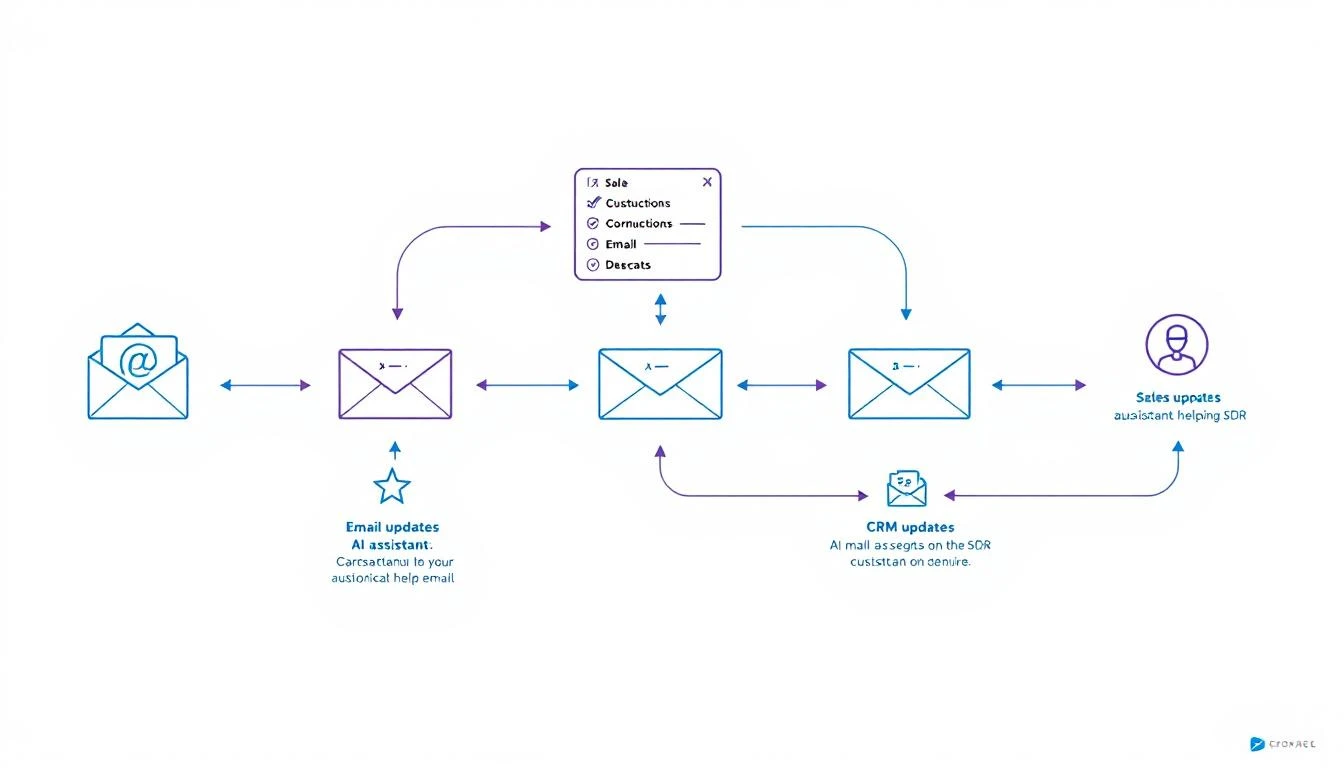
Sales Automation Workflow

Here's the pattern that works best for most GTM teams:

Data Processing / Infrastructure โ†’ Codex
Analysis / Judgment / Writing โ†’ Claude
Orchestration / 24/7 Operation โ†’ OpenClaw

Real Example: Automated Competitive Intelโ€‹

Let's say you want to monitor competitors and alert sales when relevant changes happen.

Step 1: Build the monitoring system (Codex)

  • Create web scrapers for competitor pricing pages
  • Set up alerts for their job postings
  • Build RSS feed aggregation for their blogs
  • Store everything in a database

Step 2: Analyze and prioritize (Claude)

  • Read new competitor content and extract key messages
  • Identify changes that affect specific deals
  • Generate briefings for sales team
  • Write custom battle card updates

Step 3: Orchestrate everything (OpenClaw)

  • Run scrapers on schedule
  • Route data to Claude for analysis
  • Send alerts to appropriate channels
  • Maintain state across sessions

Real Example: SDR Research Assistantโ€‹

Step 1: Build data pipelines (Codex)

  • LinkedIn profile scraper
  • Company database enrichment
  • News aggregation system
  • CRM integration layer

Step 2: Generate insights (Claude)

  • Analyze prospect's recent activity for conversation hooks
  • Identify likely pain points based on company signals
  • Write personalized research summaries
  • Suggest specific talking points

Step 3: Deploy as always-on agent (OpenClaw)

  • Trigger research when new lead enters pipeline
  • Deliver summary to rep via Slack
  • Update research weekly for active deals

Speed vs. Quality Trade-offsโ€‹

When Speed Matters Mostโ€‹

Use Codex when:

  • You need working code fast
  • You're iterating on infrastructure
  • The task is well-defined
  • You'll review the output anyway

Codex's 25% speed improvement over the previous version makes it noticeably faster for rapid prototyping.

When Quality Matters Mostโ€‹

Use Claude when:

  • The output goes directly to prospects
  • You need nuanced judgment
  • Context is complex or ambiguous
  • Mistakes would be embarrassing

Claude's longer context window (200K tokens) means it can hold entire conversation histories, deal contexts, and company profiles in memory.

Cost Comparisonโ€‹

Both tools charge by token usage. Here's a rough comparison for typical sales automation tasks:

TaskCodex CostClaude Cost
Build CRM integration~$0.50~$0.80
Analyze 10 call transcripts~$2.00~$1.50
Generate 50 personalized emails~$1.00~$0.75
Weekly competitive analysis~$0.30~$0.50

Monthly estimate for active GTM automation: $30-80 (using both tools for their strengths)

Compare this to enterprise sales automation platforms at $35-50K/year.

Integration Considerationsโ€‹

Codex Strengths for Integrationโ€‹

  • Native support for most programming languages
  • Better at handling API authentication flows
  • Superior error handling for production code
  • Mid-turn steering allows real-time debugging

Claude Strengths for Integrationโ€‹

  • Better at explaining what it's doing (self-documenting)
  • More reliable for structured output (JSON formatting)
  • Superior at following complex, multi-step instructions
  • Better at handling ambiguous requirements

The OpenClaw Layerโ€‹

Both Codex and Claude are powerful, but they're toolsโ€”not agents.

OpenClaw turns them into always-on systems that:

  • Run on schedules
  • Respond to events
  • Maintain memory
  • Connect to your channels

The architecture:

Your Sales Process
โ†“
OpenClaw
โ†“
Routes to:
โ”œโ”€โ”€ Codex (for building/coding tasks)
โ””โ”€โ”€ Claude (for analysis/writing tasks)
โ†“
Delivers via:
โ”œโ”€โ”€ Slack
โ”œโ”€โ”€ Email
โ””โ”€โ”€ CRM updates

Practical Recommendationsโ€‹

If You're Just Startingโ€‹

Pick one tool first. Claude is more forgiving for beginners because it explains its reasoning. Once you're comfortable, add Codex for infrastructure work.

If You're Building Production Systemsโ€‹

Use both from the start. Design your architecture to route tasks to the appropriate model. The cost difference is negligible compared to the quality improvement.

If You're Budget-Constrainedโ€‹

Start with Claude. It's more versatile for sales tasks specifically. Add Codex when you need to build more complex integrations.

If You Need Maximum Speedโ€‹

Lead with Codex. The 25% speed improvement in GPT-5.3-Codex makes it noticeably faster for iteration. Use Claude for final review of customer-facing content.

Common Mistakes to Avoidโ€‹

1. Using Codex for Copywritingโ€‹

Codex can write functional copy, but Claude writes persuasive copy. For anything customer-facing, use Claude.

2. Using Claude for Complex Infrastructureโ€‹

Claude can write code, but Codex handles multi-file projects and API integrations more reliably.

3. Not Combining Themโ€‹

The tools complement each other. Building with one while ignoring the other limits what you can achieve.

4. Manual Orchestrationโ€‹

Without OpenClaw (or similar), you're manually running prompts. Automation requires an agent layer.

Future-Proofing Your Stackโ€‹

Both OpenAI and Anthropic are shipping improvements constantly. The pattern that will survive:

  1. Keep your prompts modular. You should be able to swap models without rewriting your entire system.

  2. Abstract the orchestration layer. OpenClaw (or your own framework) should handle routing, not your application code.

  3. Store your context externally. Don't rely on model memory. Keep prospect data, conversation history, and preferences in your own database.

Free Tool

Try our AI Lead Generator โ€” find verified LinkedIn leads for any company instantly. No signup required.

The Bottom Lineโ€‹

Use CaseBest Tool
Build integrations and pipelinesCodex
Analyze conversations and dataClaude
Write customer-facing contentClaude
Create automation infrastructureCodex
Make judgment callsClaude
Rapid prototypingCodex
Always-on operationOpenClaw (orchestrating both)

Don't pick a side. The teams winning with AI automation in 2026 are using the right tool for each job.


Want to see how MarketBetter combines visitor intelligence with AI automation? We identify who's on your site and what they care aboutโ€”then help you act on it. Book a demo โ†’

Why General AI Won't Replace Your SDR Stack (Claude Cowork Analysis)

ยท 6 min read
MarketBetter Team
Content Team, marketbetter.ai

On February 1, 2026, Anthropic launched 11 new plugins for Claude Coworkโ€”including a Sales plugin that can connect to CRMs, research prospects, and handle follow-ups.

Wall Street panicked.

$285 billion evaporated from software stocks in a single day. Salesforce, ServiceNow, and DocuSign fell 6-8%. Jefferies dubbed it the "SaaSpocalypse"โ€”the moment investors realized AI might not just help software companies, but replace them.

But here's what the panic missed: General-purpose AI and purpose-built SDR tools solve completely different problems.

Let me explain why Claude Cowork won't replace your SDR stackโ€”and might actually make it more important.

What Claude Cowork Actually Doesโ€‹

Claude's new Sales plugin is impressive. It can:

  • Connect to CRMs like Salesforce or HubSpot
  • Research prospects using web search and company data
  • Draft follow-up emails with context from previous conversations
  • Log activities back to your CRM

For a general-purpose AI, this is genuinely useful. But notice what's missing?

What Claude Cowork Can't Doโ€‹

โŒ Identify Anonymous Website Visitorsโ€‹

Claude has no visibility into who's visiting your website right now. It can't tell you that a VP of Sales from a target account just spent 4 minutes on your pricing page.

That's not a plugin limitationโ€”it's an architectural impossibility. Website visitor identification requires pixel tracking, IP intelligence, and identity resolution infrastructure that no general AI has.

โŒ Prioritize Your Dayโ€‹

Claude can help you research a prospect once you know who they are. But it can't:

  • Rank your 200 open accounts by buying signals
  • Tell you which 5 calls to make first
  • Alert you when a hot lead goes cold
  • Sequence your outreach for maximum efficiency

A general AI answers questions. A purpose-built SDR platform tells you what to do next.

โŒ Make Callsโ€‹

Claude can draft a call script. It can't pick up the phone. It has no dialer, no click-to-call, no local presence numbers, no voicemail drop.

For SDRs who live on the phone, this is kind of important.

โŒ Engage Visitors in Real-Timeโ€‹

A prospect lands on your site at 2:47 PM. They're browsing use cases, clearly evaluating solutions.

Claude is sitting in a tab somewhere, waiting for you to prompt it.

A purpose-built AI chatbot is already saying: "Hey! I noticed you're looking at our enterprise features. Want me to schedule a quick call with someone who can walk you through them?"

Speed-to-lead matters. Inbound leads contacted within 5 minutes have dramatically higher conversion rates. General AI can't interceptโ€”it can only respond when asked.

โŒ Execute Multi-Channel Sequencesโ€‹

Claude can draft one email at a time. It can't:

  • Execute a 12-touch sequence across email, phone, and LinkedIn
  • A/B test subject lines automatically
  • Pause sequences when a prospect engages
  • Manage deliverability across domains

These aren't AI problemsโ€”they're infrastructure problems. And general AI doesn't come with infrastructure.

The "Swiss Army Knife vs. Surgical Scalpel" Problemโ€‹

Claude is brilliant at general tasks. Need to summarize a document? Excellent. Draft a strategy memo? Great. Research a company before a call? Perfect.

But SDR productivity isn't about general tasks. It's about specific workflows executed at scale:

  1. Identify โ†’ Who should I call?
  2. Prioritize โ†’ Who should I call first?
  3. Prepare โ†’ What context do I need?
  4. Execute โ†’ Dial, email, messageโ€”now.
  5. Track โ†’ What worked? What didn't?

General AI can help with step 3. Purpose-built tools handle all five.

The Real Lesson from the SaaSpocalypseโ€‹

Here's the nuance Wall Street missed:

General AI makes individual contributors more productive. It doesn't replace specialized systems.

Claude Cowork will make SDRs better at research, writing, and preparation. That's genuinely valuableโ€”especially for the 47% of sales teams still struggling with basic personalization.

But it won't:

  • Replace your CRM (Claude needs somewhere to log activities)
  • Replace your dialer (Claude can't make calls)
  • Replace your engagement platform (Claude can't execute sequences)
  • Replace your visitor ID tool (Claude can't see anonymous traffic)

AI agents are entering the Gartner "trough of disillusionment" in 2026. MIT Sloan Management Review predicts we'll see a reality check as companies realize that autonomous agents require significant technical and compliance work.

The winners won't be pure AI plays. They'll be platforms that combine AI intelligence with execution infrastructureโ€”the companies that give SDRs both the insight AND the tools to act on it.

What This Means for Your Tech Stackโ€‹

If you're evaluating AI SDR tools in 2026, here's the framework:

CapabilityGeneral AI (Claude, GPT)Purpose-Built SDR Platform
Prospect researchโœ… Goodโœ… Great (built-in enrichment)
Email draftingโœ… Goodโœ… Great (knows your sequences)
Website visitor IDโŒ Noโœ… Yes
Daily task prioritizationโŒ Noโœ… Yes
DialerโŒ Noโœ… Yes
Real-time chatโŒ Noโœ… Yes
Sequence executionโŒ Noโœ… Yes
Deliverability managementโŒ Noโœ… Yes

The question isn't Claude vs. SDR tools. It's Claude + SDR tools vs. SDR tools alone.

How MarketBetter Approaches Thisโ€‹

Full transparency: We built MarketBetter as a purpose-built SDR platform.

We don't think general AI is the enemyโ€”we think it's a complement. Here's our approach:

AI for intelligence:

  • AI-powered email personalization based on intent signals
  • Smart lead scoring that learns from your wins
  • Automated research enrichment at scale

Infrastructure for execution:

  • Website visitor identification (company + person level)
  • Daily SDR playbook that ranks and sequences tasks
  • Built-in smart dialer with local presence
  • AI chatbot that engages visitors in real-time

Human judgment where it matters:

  • SDRs approve messaging before it sends
  • Reps control call cadence and timing
  • Managers see performance at a glance

The result? Your SDRs spend less time figuring out what to do and more time doing it.

Free Tool

Try our AI Lead Generator โ€” find verified LinkedIn leads for any company instantly. No signup required.

The Bottom Lineโ€‹

Claude Cowork is a powerful tool. Use it for research. Use it for drafting. Use it as a thinking partner.

But don't expect it to replace the infrastructure that actually makes SDRs productive. General AI tells you things. Purpose-built tools help you do things.

The companies that win in 2026 won't be the ones betting everything on autonomous AI agents. They'll be the ones that give their reps:

  1. The right intelligence (AI-powered insights)
  2. The right tools (dialer, email, chat)
  3. The right workflow (prioritized daily playbook)

That's not a bet against AI. It's a bet on AI + humans + infrastructure beating AI alone.


Ready to see what a purpose-built SDR platform looks like? Book a demo โ†’

10 Best Codex Prompts: Copy-Paste Templates + Best Practices [2026]

ยท 13 min read
MarketBetter Team
Content Team, marketbetter.ai

Last updated: July 2026.

Codex isn't just for developers. It's one of the most capable AI assistants for anyone willing to describe what they want in plain English โ€” which makes it a quietly powerful tool for sales development.

This is a working library of Codex prompt templates for SDRs: copy them, swap in the bracketed placeholders, and start reclaiming hours every week. Below the templates you'll also find the anatomy of a great Codex prompt, a set of 2026 best practices, and a short FAQ โ€” so you can go from copying prompts to writing your own. Want more depth? See our full library of the 30 best Codex prompts for sales and GTM.

SDR Productivity Prompts

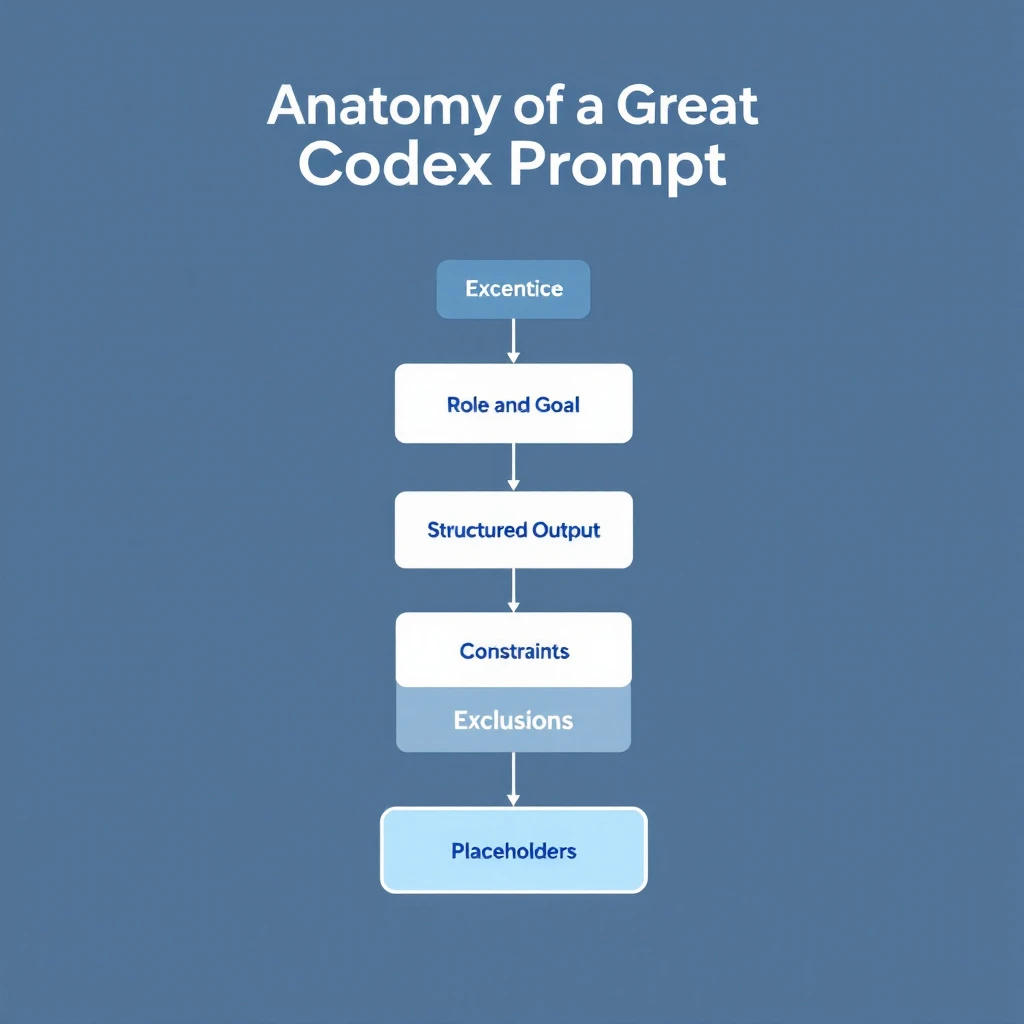
Anatomy of a Great Codex Promptโ€‹

Anatomy of a great Codex prompt: role and goal, structured output, constraints, exclusions, placeholders

Every high-performing prompt in this library shares the same five-part structure. Learn it once and you can write your own instead of hunting for templates:

  1. Role and goal โ€” Tell Codex what job it's doing and what "done" looks like ("Create a sales briefing," not "tell me about this company").
  2. Structured output โ€” Ask for numbered sections, bullets, or a table. Vague prompts get vague answers; specifying the format is the single biggest quality lever.
  3. Constraints โ€” Word limits, tone, and hard rules ("under 100 words," "no corporate buzzwords") force quality more than adding requirements.
  4. Exclusions โ€” Listing what you don't want ("skip anything you can't verify," "don't use 'just following up'") reliably beats listing more things you do want.
  5. Placeholders โ€” Mark the variables with [BRACKETS] so the same template works across every prospect, deal, and industry.

Keep that skeleton in mind as you read โ€” every template below is just these five parts, filled in for a specific SDR task.

Before You Start: Quick Setupโ€‹

Install the Codex CLI:

npm install -g @openai/codex

Or use Codex directly in the OpenAI dashboard at codex.openai.com.

Pro tip: Use mid-turn steering. When Codex starts going in the wrong direction, just interrupt with corrections.


Prompt 1: Instant Company Research Summaryโ€‹

Use case: Before reaching out, get a 60-second briefing on any company.

Research [COMPANY NAME] and create a sales briefing. Include:

1. What they do (2 sentences max)
2. Recent news (funding, acquisitions, product launches, leadership changes)
3. Their likely tech stack (based on job postings)
4. Pain points companies like them typically face
5. Potential conversation starters based on recent events

Format as bullet points. Be specific. Skip anything you can't verify.

Output example:

Acme Corp Briefing

  • B2B logistics software for mid-market freight companies (Series B, 200 employees)
  • Recent: Raised $45M in January, expanding to European markets
  • Tech stack: Salesforce, Snowflake, AWS (based on job postings)
  • Likely pains: Scaling customer support, data integration complexity, international compliance
  • Conversation starter: "Congrats on the European expansionโ€”how's the team handling GDPR compliance for your customer data?"

Time saved: ~15 minutes per prospect

Want this to run automatically instead of copy-pasting each time? See our full walkthrough on how to automate lead research with Claude Code โ€” it turns a company name into a complete prospect brief in minutes.


Prompt 2: LinkedIn Profile Analyzerโ€‹

Use case: Understand your prospect's priorities and communication style.

Analyze this LinkedIn profile and tell me:

[PASTE LINKEDIN PROFILE TEXT]

1. What they care about (based on posts, interests, experience)
2. Their communication style (formal/casual, technical/business)
3. Best topics to lead with
4. What NOT to mention (based on their apparent values)
5. Suggested subject line for a cold email

Be specific. Don't guessโ€”only include what's supported by the profile.

Why it works: Codex picks up on subtle signals in how people present themselves. The "what NOT to mention" is often the most valuable insight.

Prospecting mostly out of LinkedIn? Pair this with our guide to automating LinkedIn Sales Navigator to build lists and research profiles at scale.

Time saved: ~10 minutes per prospect


Prompt 3: CRM Data Cleanup Scriptโ€‹

Use case: Fix inconsistent data in your CRM without manual editing.

Write a script that:
1. Connects to HubSpot using their API (I'll provide API key later)
2. Finds all contacts where:
- Job title is blank but company is filled
- Phone number format is inconsistent
- Email domain doesn't match company domain
3. For job titles: Enriches using the company's LinkedIn page
4. For phone numbers: Standardizes to E.164 format
5. For mismatched emails: Flags for review (don't auto-change)

Output a report of what would change before actually making changes.

Use Node.js with proper error handling.

Why it works: Codex handles the tedious API work. You get a working script instead of spending hours in the HubSpot UI.

Time saved: 5+ hours of manual cleanup


Prompt 4: Meeting Prep One-Pagerโ€‹

Use case: Walk into every meeting prepared without the prep work.

I have a meeting with [PROSPECT NAME] at [COMPANY] about [TOPIC/PRODUCT].

Create a one-page meeting prep doc:

1. **Key Facts** โ€” Company size, industry, recent news (3-5 bullets)
2. **Likely Objections** โ€” What will they push back on?
3. **Discovery Questions** โ€” 5 questions that uncover real pain
4. **Competitive Position** โ€” Who else might they be talking to?
5. **Success Metrics** โ€” What would make this a "win" for them?
6. **Next Step Options** โ€” 3 logical next steps if the meeting goes well

Keep each section to 3-5 bullets. Prioritize actionable info.

Time saved: ~20 minutes per meeting


Prompt 5: Objection Response Generatorโ€‹

Use case: Never get caught off-guard by common objections.

Generate responses for these sales objections in [INDUSTRY].

For each objection, provide:
1. A brief acknowledgment (show you understand)
2. A reframe (shift the perspective)
3. A proof point (specific example or stat)
4. A question to continue the conversation

Objections:
- "We're already using [COMPETITOR]"
- "We don't have budget this quarter"
- "We need to talk to [OTHER STAKEHOLDERS] first"
- "Can you just send me some info?"
- "The timing isn't right"

Keep responses conversational, not scripted. SDRs need to sound human.

Why it works: You get battle-tested frameworks, not generic scripts. The "question to continue" keeps the conversation moving.


Prompt 6: Email Sequence Builderโ€‹

Use case: Create a multi-touch sequence in minutes.

SDR Prompts Checklist

Build a 5-email sequence for [ICP DESCRIPTION] selling [PRODUCT/SERVICE].

Sequence structure:
- Email 1: Pattern interrupt (day 1)
- Email 2: Social proof (day 3)
- Email 3: Pain agitation (day 6)
- Email 4: Different angle/use case (day 10)
- Email 5: Breakup email (day 14)

Requirements:
- Subject lines under 40 characters
- Body under 100 words each
- One clear CTA per email
- Personalization placeholders marked with [BRACKETS]
- Tone: professional but not corporate, direct but not pushy

Don't use: "Hope this email finds you well," "Just following up," or "Checking in"

Why it works: The constraints force quality. Specifying what NOT to include prevents generic AI-speak.

For ready-to-adapt copy, grab our library of AI sales email templates built with Claude Code.

Time saved: 1-2 hours per sequence


Prompt 7: Call Script Frameworkโ€‹

Use case: Structure your cold calls without sounding robotic.

Create a cold call framework for calling [ICP TITLE] at [COMPANY TYPE].

Structure:
1. **Opening** (5 seconds) โ€” Pattern interrupt, state name/company
2. **Permission** (5 seconds) โ€” Brief reason for call + ask for 30 seconds
3. **Hook** (15 seconds) โ€” Specific pain point or insight
4. **Qualify** (30 seconds) โ€” 2-3 questions to confirm fit
5. **Bridge to meeting** โ€” How to transition if qualified
6. **Objection handlers** โ€” Top 3 objections and responses
7. **Exit** โ€” Graceful close if not interested

Include exact language options, not just concepts. Make it sound natural.

Time saved: 30+ minutes crafting talk tracks


Prompt 8: Lead Prioritization Logicโ€‹

Use case: Build a scoring system for your specific pipeline.

Create a lead scoring model for my sales process.

Context:
- We sell [PRODUCT] to [ICP]
- Average deal size: [AMOUNT]
- Average sales cycle: [LENGTH]
- Our best customers tend to have: [CHARACTERISTICS]

Build a scoring system (1-100) that weighs:
- Company fit signals (industry, size, tech stack)
- Behavioral signals (website visits, content downloads, email opens)
- Timing signals (funding, hiring, tech changes)

Output as a decision matrix with specific thresholds:
- 80+ โ†’ Hot lead, prioritize
- 60-79 โ†’ Warm lead, nurture
- 40-59 โ†’ Potential, needs more info
- Below 40 โ†’ Low priority

Include the logic so I can implement it in my CRM.

Why it works: Codex creates a customized scoring model based on YOUR sales process, not a generic template.


Prompt 9: Competitive Battle Cardโ€‹

Use case: Win more deals against specific competitors.

Create a battle card for competing against [COMPETITOR NAME].

Include:

1. **Positioning Summary** โ€” How they describe themselves vs. how we do
2. **Their Strengths** โ€” What they're actually good at (be honest)
3. **Their Weaknesses** โ€” Where they fall short (with specific examples)
4. **Common Objections** โ€” What prospects say when evaluating them
5. **Discovery Questions** โ€” Questions that expose their weaknesses
6. **Landmines to Plant** โ€” Things to mention early that hurt them later
7. **Proof Points** โ€” Specific wins/case studies against them
8. **Quick Comeback Sheet** โ€” 5 common competitor claims and how to respond

Be specific and tactical. This is for reps who encounter them weekly.

Time saved: 2-3 hours of competitive research


Prompt 10: Proposal Customization Engineโ€‹

Use case: Customize templates instantly for each prospect.

I have a proposal template for [PRODUCT]. Customize it for [COMPANY NAME].

Original template sections to customize:
- Executive summary (make it about THEIR goals)
- Problem statement (reference THEIR specific challenges)
- Solution overview (connect features to THEIR use case)
- Timeline (adjust for THEIR urgency)
- Investment section (frame ROI for THEIR situation)

Context about this deal:
- [DEAL CONTEXT]

Maintain my company's voice and formatting. Only change the content to reflect this specific prospect's situation.

Output the full customized proposal with changes highlighted.

Why it works: You keep your proven template structure but personalize the substance. Prospects feel like it was written for themโ€”because it was.

Time saved: 45+ minutes per proposal


Bonus: Combining Prompts with OpenClawโ€‹

These prompts are powerful on their own. They're unstoppable when automated.

With OpenClaw, you can:

Trigger prompt 1 automatically when a new lead enters your CRM

Run prompt 3 on a weekly schedule to keep data clean

Chain prompts together:

  1. New deal created โ†’ Run company research (Prompt 1)
  2. Meeting scheduled โ†’ Generate prep doc (Prompt 4)
  3. Proposal requested โ†’ Customize template (Prompt 10)

The prompts become agents that work while you sleep. If you want to see this end to end, follow our tutorial on building your first AI sales agent in 30 minutes โ€” free and open source.

Prefer Claude over Codex? We break down the trade-offs in Claude vs ChatGPT for sales teams.


Codex Prompt Best Practices for 2026โ€‹

The templates get you started. These practices are what separate SDRs who get generic AI output from the ones who get usable, first-draft-final results.

1. Be Specific About What You Don't Wantโ€‹

Listing exclusions ("don't use buzzwords," "no generic openers") improves output more than adding requirements. Codex is better at avoiding a named pattern than inferring good taste.

2. Include Examplesโ€‹

When asking for a specific format or style, paste an example of what good looks like. One strong example beats three paragraphs of description.

3. Use Mid-Turn Steeringโ€‹

Codex lets you redirect while it's generating. If you see it going off-track, interrupt and correct instead of waiting for a bad answer and starting over.

4. Iterate in the Same Sessionโ€‹

Codex maintains context within a session. Follow up with "make it more concise" or "add more specific data points" rather than re-pasting the whole prompt.

5. Front-Load the Constraintsโ€‹

Put word limits, tone, and hard rules near the top of the prompt, not buried at the end. The model weights early instructions more heavily.

6. Save and Version Your Best Promptsโ€‹

Build a library of prompts that work for YOUR sales process, and keep the winning versions. A refined prompt you reuse 50 times a week compounds far more than a clever one-off.


Free Tool

Try our AI Lead Generator โ€” find verified LinkedIn leads for any company instantly. No signup required.

The Productivity Mathโ€‹

TaskManual TimeWith CodexWeekly OccurrencesWeekly Time Saved
Company research15 min2 min204.3 hours
Meeting prep20 min3 min82.3 hours
Email sequences90 min15 min22.5 hours
CRM cleanup3 hours30 min12.5 hours
Proposal customization45 min10 min31.75 hours

Total weekly time saved: ~13 hours

That's 13 hours back for actual sellingโ€”calls, meetings, relationship building.


Codex Prompts FAQโ€‹

What is a Codex prompt?โ€‹

A Codex prompt is the plain-English instruction you give OpenAI's Codex to get a specific result โ€” a research brief, an email sequence, a data-cleanup script. A good one names the task, specifies the output format, and sets constraints, so you get a usable first draft instead of a vague answer.

What makes a good Codex prompt for sales?โ€‹

The best sales prompts follow the five-part structure above: a clear role and goal, structured output (numbered sections or a table), constraints (word limits, tone), explicit exclusions, and [BRACKET] placeholders so one template works across every prospect.

Are these Codex prompts free to use?โ€‹

Yes โ€” every template on this page is free to copy, edit, and adapt to your own sales process. You only need access to Codex itself.

Can I turn these prompts into an automated workflow?โ€‹

Yes. Each prompt runs manually today, but you can chain and schedule them so they fire on CRM triggers โ€” new lead, meeting booked, proposal requested. See the OpenClaw automation section above and our guide to building your first AI sales agent in 30 minutes.

Codex or Claude for sales prompts?โ€‹

Both work well; the right choice depends on your stack and workflow. We compare them head-to-head in Claude vs ChatGPT for sales teams and lay out the full Claude workflow in Claude for SDRs: The Complete Guide.


Want to supercharge these prompts with real buyer intent data? MarketBetter shows you who's on your site and what they care about, so your AI-powered outreach hits even harder. Book a demo โ†’

12 Best B2B Website Visitor Identification Software 2026

ยท 32 min read
Sunder Iyer
Founder, marketbetter.ai

Comparison of the 12 best B2B website visitor identification tools and software for 2026

Updated September 2026 โ€” re-verified match rates, pricing, and free tiers for all 12 tools.

Short answer: The best B2B website visitor identification software in 2026 depends on what you do after the match. MarketBetter is the top pick for SDR teams (visitor ID plus automated outreach, $99/user/mo flat), RB2B wins for cheap person-level ID in the US, Leadfeeder has the best free company-level tier, and 6sense/Demandbase fit enterprise ABM budgets. Real person-level match rates run 8โ€“41% โ€” nowhere near the 80%+ vendors advertise.

98% of your B2B website visitors leave without filling out a form. They read your pricing page, ran a competitor comparison, and vanished. Your CRM never sees them. Your SDR team never knows they were there.

B2B website visitor identification software reveals who those anonymous visitors actually are โ€” company name, contact info, even which pages they viewed โ€” so your sales team can reach out while intent is hot. Pair it with a signal-to-meeting workflow and a visitor ID setup playbook and you stop bleeding pipeline to anonymous traffic.

But here's what the vendors won't tell you: "80% match rate" usually means 80% of companies identified, not people. Person-level identification is much harder, and most tools quietly inflate their numbers by mixing the two. We tested 12 platforms and tracked the real match rates across company-level and person-level identification, with actual pricing for each โ€” see the full B2B intent data tools comparison for adjacent options.

This guide covers the 12 best B2B website visitor identification tools for 2026, with honest match rates, real pricing, and which ones actually turn identified visitors into booked meetings.

โšก Quick Pick Guide

Limited budget (<$200/mo): RB2B free tier or Leadfeeder free SMB wanting person-level ($100-500/mo): RB2B Pro, Leadpipe, or Snitcher Mid-market teams ($500-2K/mo): Warmly or Koala (PLG) Want action, not just data: MarketBetter โ€” book a demo โ†’ Enterprise ABM ($50K+/yr): 6sense or Demandbase Already in HubSpot: Clearbit Breeze Already in ZoomInfo: WebSights add-on Already in Instantly: Instantly Pixel (built-in)


Table of Contentsโ€‹

  1. How Website Visitor Identification Actually Works
  2. The Remote Work Problem Nobody Talks About
  3. Comparison Table: All 12 Tools
  4. MarketBetter | Warmly | Leadfeeder | RB2B | Koala | 6sense | ZoomInfo | Clearbit Breeze | Demandbase | Instantly | Leadpipe | Snitcher
  5. The Real Question: Data vs Action
  6. How to Calculate ROI
  7. Implementation Guide
  8. How to Choose
  9. FAQ

How Website Visitor Identification Actually Worksโ€‹

Before we compare tools, let's get honest about what these products can (and can't) do.

The Three Identification Methodsโ€‹

  1. IP-to-Company Matching

    • Matches visitor IP addresses against databases of known business networks
    • Identifies the company, not the individual person
    • Works best for corporate office traffic; struggles with remote workers
    • Most mature technology โ€” nearly every tool uses this as a baseline
  2. First-Party Cookie + Data Enrichment

    • Combines browsing behavior with third-party data to infer contact identity
    • Can identify specific people at visiting companies
    • Match rates vary wildly (5-40% depending on traffic source)
    • Privacy regulations increasingly limit cookie-based tracking
  3. Reverse Email Lookup / Identity Graph

    • When visitors have previously engaged (clicked an email, filled a form), systems track return visits
    • Some tools use cross-site identity graphs to match visitors to known profiles
    • Most reliable method, but limited to known contacts or opted-in users
    • B2C-oriented tools (like Leadpipe) lean heavily on this approach

Match Rate Reality Checkโ€‹

Don't believe vendors claiming 80%+ match rates. Here's what's actually achievable in 2026:

Identification LevelRealistic Match RateNotes
Company-level30-65%Corporate traffic only; remote workers much lower
Person-level5-20%US traffic typically higher than international
Combined (company + person fallback)60-80%What most tools actually deliver

Key insight: Anyone promising 80%+ contact-level identification is likely counting company matches, not individual people. Always ask vendors: "What percentage of my traffic will you identify to a specific person with an email address?"

What Most Guides Get Wrongโ€‹

Most comparison articles rank tools by feature count or vendor claims. That's backwards. What actually matters:

  1. Match rate for YOUR traffic โ€” A tool that matches 30% of US enterprise traffic might match 5% of international SMB traffic
  2. Data quality โ€” 1,000 accurate identifications beat 5,000 stale contacts
  3. What happens next โ€” Does the tool just show you names, or does it tell your SDR what to do?
  4. Time to value โ€” An enterprise ABM platform that takes 3 months to deploy isn't "better" than a tool that works in 30 minutes

The Remote Work Problem Nobody Talks Aboutโ€‹

Here's the elephant in the room that every visitor ID vendor avoids discussing: remote work has fundamentally broken IP-based identification.

Before 2020, most B2B website visitors browsed from corporate office networks. These networks have static IP addresses mapped to company names. Identification was straightforward.

In 2026, over 60% of knowledge workers are remote or hybrid. They browse from home networks, coffee shops, and coworking spaces. These IP addresses map to ISPs like Comcast or AT&T โ€” not their employer.

What This Means for Your Match Ratesโ€‹

Traffic SourceExpected Company-Level Match RateWhy
Enterprise visitors from offices50-65%Static corporate IPs well-mapped
SMB visitors from offices30-45%Smaller firms have less IP coverage in databases
Remote workers at enterprise companies10-20%VPN traffic may still resolve; otherwise lost
Remote workers at SMBs5-10%Residential IPs rarely map to employers
International traffic15-30%US databases are richest; EU/APAC much sparser

The implication: If your target market is SMB companies with remote teams, pure IP-based tools will underperform. You need tools that layer person-level identification (cookies, identity graphs, data enrichment) on top of IP matching.

How Top Tools Handle Remote Workโ€‹

  • RB2B and Leadpipe: Use identity graphs and cross-site matching to identify individuals regardless of IP
  • Warmly: Stacks 20+ data providers in a "data waterfall" to compensate for IP gaps
  • 6sense and Demandbase: Add third-party intent data (what companies are researching elsewhere) to supplement weak on-site identification
  • MarketBetter: Combines visitor identification with daily playbook intelligence โ€” even when you can't identify every visitor, the AI prioritizes the ones you can identify and tells your SDR exactly what to do with them

Best Website Visitor Identification Tools: Comparison Tableโ€‹

ToolBest ForID LevelStarting PriceMatch RateSDR Workflow
MarketBetterSDR teams wanting actionCompany + Contact + TasksCustomVaries by sourceโœ… Full
WarmlyReal-time chat engagementCompany (65%) + Person (15%)$700/mo15-25% personโš ๏ธ Partial
LeadfeederEuropean companiesCompany onlyFree / โ‚ฌ99/mo10-15%โŒ No
RB2BFreemium person-levelPerson (US only)Free / $79/mo10-20% personโŒ No
KoalaPLG companiesCompany + Product signalsCustomVariesโš ๏ธ Partial
6senseEnterprise ABMCompany + Intent~$55K/yr median10-20%โš ๏ธ Partial
ZoomInfoEnterprise data teamsCompany + Intent$15K+/yr15-30%โš ๏ธ Partial
Clearbit BreezeHubSpot usersCompany + EnrichmentCredit-based15-20%โŒ No
DemandbaseEnterprise ABMCompany + Intent$18K+/yr<30%โš ๏ธ Partial
InstantlyOutbound-first teamsCompany + Contact$37/mo (CRM plan)Variesโš ๏ธ Partial
LeadpipePerson-level at scalePerson + Company$98/moClaims 35%+ personโŒ No
SnitcherBudget-friendly company IDCompany only$39/mo30-50% companyโŒ No

SDR Workflow column explained: โœ… Full = prioritized task lists, AI outreach, dialer built in. โš ๏ธ Partial = some automation but requires other tools. โŒ No = data only, requires separate tools for execution.


1. MarketBetterโ€‹

Best for: SDR teams who want to ACT on visitor data, not just view it

Most visitor identification tools stop at "Company X visited your pricing page." Then your SDR has to:

  • Research the company
  • Find the right decision-maker
  • Prioritize against dozens of other signals
  • Write personalized outreach
  • Actually make the call

That's 15-30 minutes of work per visitor โ€” which means 90% of visitor data goes unused.

MarketBetter takes a fundamentally different approach. We don't just identify WHO visited. We identify them, find the decision-maker, score the opportunity, and create a prioritized task for your SDR โ€” complete with AI-generated outreach and a click-to-dial button.

Key Featuresโ€‹

  • Website visitor identification via IP-to-company + contact enrichment
  • Daily SDR Playbook with AI-prioritized tasks (not just a dashboard)
  • AI-generated email sequences and call scripts personalized to each prospect
  • Smart dialer with call recording and coaching
  • AI chatbot that qualifies visitors and books meetings 24/7
  • CRM sync with HubSpot and Salesforce
  • Chrome extension for LinkedIn prospecting and real-time enrichment

What Makes It Differentโ€‹

When your SDR opens MarketBetter each morning, they see exactly:

  • Who to call (prioritized by fit + intent)
  • Why they're a fit (company size, tech stack, recent activity)
  • What to say (AI-drafted outreach based on their browsing behavior)

No research. No prioritization paralysis. Just execute.

"MarketBetter tells you WHO + WHAT TO DO. Other tools just tell you WHO."
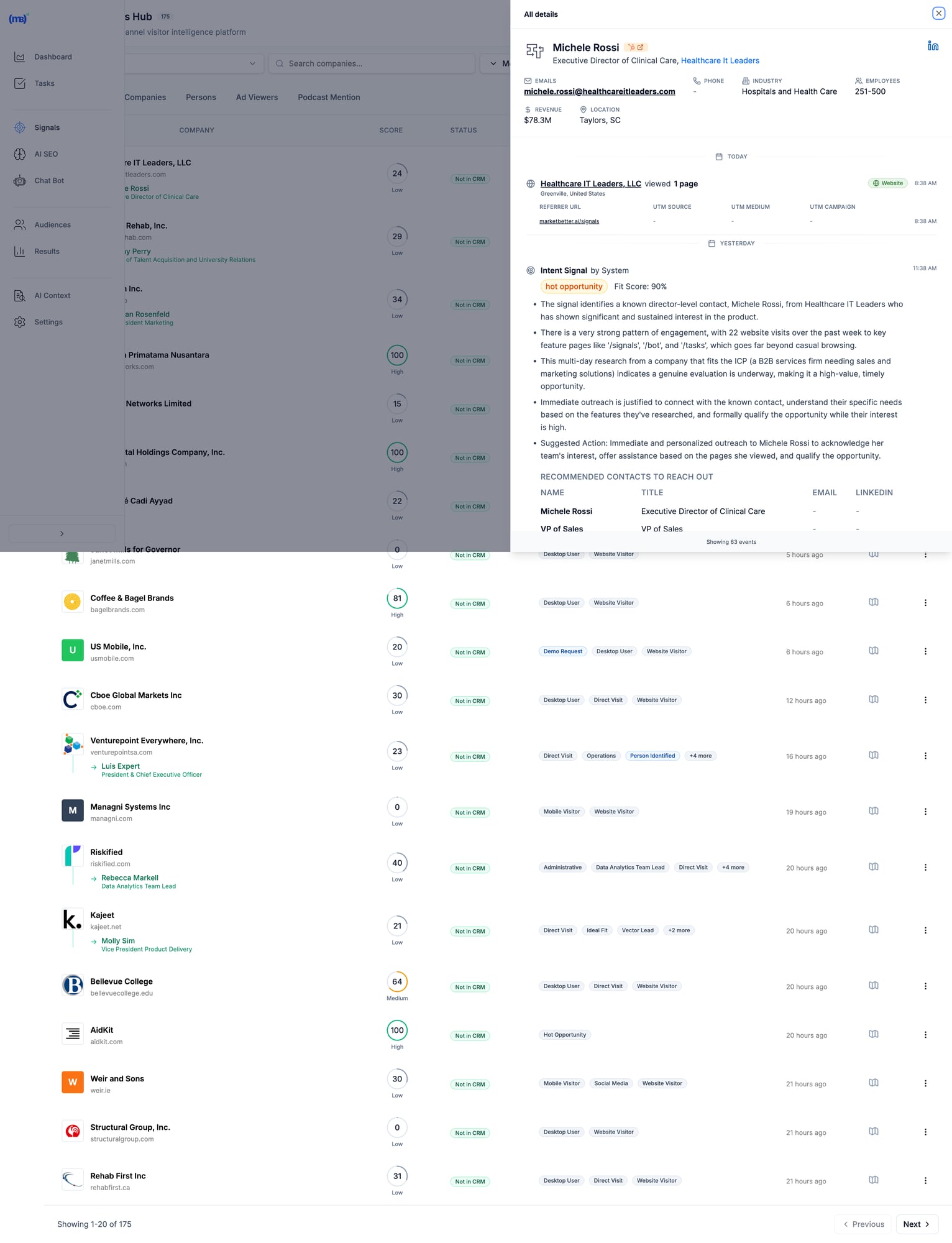
MarketBetter Signals Hub showing visitor intelligence with contact details, intent scores, and recommended actions MarketBetter's Signals Hub shows AI-prioritized visitor signals with intent scoring, identified contacts, and suggested actions โ€” all in one view.

Pricingโ€‹

Custom based on team size and volume. Transparent pricing โ€” no hidden fees or long-term contracts. Book a demo โ†’

When MarketBetter Is Betterโ€‹

โœ… You have an SDR team that needs to execute, not analyze โœ… You want one platform instead of 5+ tools stitched together โœ… Visitor data currently sits unused in dashboards โœ… You care about pipeline, not just "visibility" โœ… Speed-to-lead matters (90% faster lead response)

When To Look Elsewhereโ€‹

โš ๏ธ You only need raw data for your existing ABM stack โš ๏ธ Enterprise with 6sense/Demandbase already deployed and working โš ๏ธ Pure marketing use case with no SDR execution

Read more: MarketBetter vs Warmly | MarketBetter vs Apollo | MarketBetter vs ZoomInfo | MarketBetter vs 6sense


2. Warmlyโ€‹

Best for: Companies wanting real-time visitor engagement via chat

Warmly bundles visitor identification with AI chatbot engagement. Their strength is catching visitors while they're still on your site and starting conversations immediately. In 2026, they've expanded with an "AI Data Agent" tier that automates more of the outreach workflow.

Key Featuresโ€‹

  • 65% company-level identification (claimed) via 20+ data providers in a "data waterfall"
  • 15-25% person-level identification via enrichment partnerships
  • AI chatbot for real-time visitor engagement
  • Slack/Teams alerts for high-intent visitors
  • Bombora intent data integration
  • Video calling widget for live sales conversations on-site
  • Orchestrator for automated outreach sequences

Pricingโ€‹

PlanPriceWhat You Get
Free$0500 visitors/mo, 10 Bombora signals/week
Startup~$700/moHigher limits, basic automation
Business$1,440-1,740/mo10K-100K visitors, full features
AI Data Agent$10,000/yrAdvanced AI features, automated outreach

When Warmly Is Betterโ€‹

โœ… Real-time chat engagement is your primary use case โœ… You already have outbound tools (Outreach, Apollo) and need signals โœ… Catching visitors while they're on-site matters most โœ… Budget of $700+/mo for a dedicated visitor ID tool

When To Look Elsewhereโ€‹

โš ๏ธ You need a full SDR workflow (no smart dialer, no daily task prioritization) โš ๏ธ Budget under $700/mo (free tier is very limited) โš ๏ธ You want person-level at scale (15-25% may not be enough) โš ๏ธ You need multi-channel execution beyond chat

Read more: MarketBetter vs Warmly Comparison | Warmly Review 2026 | Warmly Pricing Breakdown | Best Warmly Alternatives


3. Leadfeeder (Dealfront)โ€‹

Best for: European companies prioritizing GDPR compliance

Dealfront (the merger of Leadfeeder and Echobot) focuses on the European market with strong GDPR compliance. Solid company-level identification with good CRM integrations at a reasonable price. They've been in the visitor ID game longer than most, which means deep integration partnerships.

Key Featuresโ€‹

  • Company-level visitor identification (IP-to-company)
  • GDPR-compliant data handling โ€” a real differentiator for EU companies
  • Strong European company database (best coverage outside US)
  • CRM integrations with Salesforce, HubSpot, Pipedrive
  • Lead scoring and filtering by company attributes
  • Google Analytics integration for enhanced insights

Pricingโ€‹

PlanPriceWhat You Get
Freeโ‚ฌ0100 companies/mo, 7-day data retention
Paidโ‚ฌ99-165/moUnlimited companies, 365-day retention

Annual billing gives 40% discount. The free tier is genuinely useful for testing.

When Leadfeeder Is Betterโ€‹

โœ… European market focus (best EU company database in the category) โœ… GDPR compliance is non-negotiable for your team โœ… Budget-conscious teams wanting basic visitor ID to test the concept โœ… Already using Pipedrive or European CRMs

When To Look Elsewhereโ€‹

โš ๏ธ You need person-level identification (company-only) โš ๏ธ US market focus (weaker coverage than US-focused tools) โš ๏ธ You want SDR workflow, not just data and dashboards โš ๏ธ You need real-time alerts for high-intent visitors


4. RB2Bโ€‹

Best for: Freemium person-level identification (US traffic)

RB2B has become the go-to for teams wanting to test person-level identification without a big commitment. Their free tier is genuinely generous, and the Slack integration makes it easy to see results immediately. Founded by Adam Robinson, they've built strong community momentum on LinkedIn.

Key Featuresโ€‹

  • Person-level identification targeting 10-20% match rate
  • Slack notifications with LinkedIn profiles (the "killer feature")
  • Simple setup (just add a script tag โ€” 5 minutes)
  • Free tier with 150 credits/month
  • Demandbase partnership for company-level fallback
  • Coworker filtering on Pro plans (remove known contacts)

Pricingโ€‹

PlanPriceWhat You Get
Free$0150 credits/mo, company-level only, LinkedIn profiles
Starter$79/moPerson-level identification, basic integrations
Pro$349+/moBusiness emails, all integrations, coworker filtering

Match Rates (Honest Assessment)โ€‹

  • Person-level: 10-20% (US traffic only)
  • Company-level: 70-80% when combined with Demandbase fallback
  • International: Not supported for person-level โ€” this is a US-only tool

When RB2B Is Betterโ€‹

โœ… You want to test person-level ID before committing serious budget โœ… US-focused B2B traffic (mandatory โ€” doesn't work internationally) โœ… You have existing outreach tools and just need the names โœ… PLG company wanting LinkedIn profiles of engaged users

When To Look Elsewhereโ€‹

โš ๏ธ International traffic (US-only for person-level identification) โš ๏ธ You need workflow, not just names dropped in Slack โš ๏ธ Business emails required (need Pro at $349+/mo โ€” significant jump) โš ๏ธ You want a complete SDR platform, not a point solution


5. Koalaโ€‹

Best for: PLG companies tracking product intent signals

Koala stands out by combining website visitor identification with product usage signals. If you have a freemium or trial product, Koala shows you which trial users are showing buying intent โ€” a capability most visitor ID tools completely lack.

Key Featuresโ€‹

  • Website + product activity tracking in one unified platform
  • Account scoring based on engagement patterns and product usage
  • Real-time Slack alerts for high-intent accounts
  • CRM sync with automatic enrichment
  • Built for PLG motions (trial โ†’ paid conversion signals)
  • ICP scoring to filter noise and focus on fits

Pricingโ€‹

Custom pricing based on volume. Free trial available. Generally positioned between SMB tools and enterprise platforms.

When Koala Is Betterโ€‹

โœ… You have a freemium/trial product (PLG motion is your core GTM) โœ… Product engagement signals matter more than just website visits โœ… You want to identify which trial users are ready for a sales conversation โœ… Engineering resources to implement product-level tracking

When To Look Elsewhereโ€‹

โš ๏ธ No freemium/trial product (pure sales-led GTM) โš ๏ธ You need full SDR workflow (no dialer, no sequences built in) โš ๏ธ Enterprise ABM programs (better options exist at that budget) โš ๏ธ Non-technical team (requires dev work to instrument product events)


6. 6senseโ€‹

Best for: Large marketing teams running enterprise ABM programs

6sense is a full ABM platform with visitor identification as one component of a broader intent data suite. Powerful but complex โ€” built for large marketing teams with dedicated ops resources. In 2026, they've added AI-powered "Revenue AI" features, though the core platform remains enterprise-focused.

Key Featuresโ€‹

  • Account identification via IP + intent signals
  • Predictive buying stage scoring (Awareness โ†’ Decision) โ€” genuinely useful for ABM
  • Third-party intent data (Bombora + proprietary 6sense data)
  • Multi-channel ABM orchestration (ads, email, sales activation)
  • AI account summaries and recommendations (Revenue AI)
  • Deep CRM integrations with Salesforce, HubSpot
  • Audience creation for targeted advertising

Pricingโ€‹

6sense doesn't publish pricing. Based on Vendr and third-party data:

TierTypical CostWhat You Get
Free$050 credits/mo, Chrome extension
Team~$25K-50K/yrBasic platform, limited seats
Growth~$55K/yr (median)Full platform, intent data
Enterprise$100K-200K+/yrAdvanced features, custom integrations

Source: Vendr reports median buyer pays $55,211/year. Implementation takes 1-3 months.

When 6sense Is Betterโ€‹

โœ… Enterprise budget ($50K+ annually) and you can justify the ROI โœ… Marketing-led ABM programs where you're running coordinated campaigns โœ… You have ops resources to manage the platform (RevOps or dedicated admin) โœ… Multi-channel orchestration across ads + email + sales is the goal

When To Look Elsewhereโ€‹

โš ๏ธ SMB or mid-market budget (minimum ~$25K/yr) โš ๏ธ Sales-first teams (6sense is marketing-first, sales activation is secondary) โš ๏ธ You want simplicity (3-6 month implementation typical) โš ๏ธ Contact-level identification priority (6sense is company/account-level)

G2 reviewer feedback:

"My problem with 6sense is that the tool's visitor identification reveals only companies and not individuals."

Read more: MarketBetter vs 6sense | 6sense Review 2026 | 6sense Pricing Breakdown | Best 6sense Alternatives


7. ZoomInfo WebSightsโ€‹

Best for: Enterprise GTM teams already using ZoomInfo data

ZoomInfo is the 800-pound gorilla of B2B data. WebSights is their visitor identification product, plugging into their massive database of 320M+ contacts and 100M+ company profiles. If you're already paying for ZoomInfo, WebSights is a natural add-on. If you're not, the total cost makes this an enterprise play.

Key Featuresโ€‹

  • Account-level visitor identification with deep company intel
  • Buyer intent signals (1B+ monthly data points)
  • Deep CRM/MAP integrations (native Salesforce, HubSpot, Marketo)
  • Form enrichment for progressive lead capture
  • DSP integration for retargeting ads to identified accounts
  • Copilot AI for account research and outreach drafting

Pricingโ€‹

ZoomInfo bundles WebSights with their core platform. Expect:

ComponentTypical Cost
SalesOS$15,000-25,000/yr starting
WebSights add-onIncluded or ~$5K extra
Intent data$9K-20K additional
Engage (sequences/dialer)~$15K additional

Total cost for full suite: $40K-100K+/yr depending on seats and features. Annual contracts, difficult to exit mid-term.

When ZoomInfo Is Betterโ€‹

โœ… Already a ZoomInfo customer (marginal cost is low) โœ… Enterprise data needs where database size matters โœ… Budget for $15K+ annually โœ… Dedicated ops team to manage the platform

When To Look Elsewhereโ€‹

โš ๏ธ SMB budget (minimum $15K/yr for the base platform) โš ๏ธ You want SDR workflow, not just data enrichment โš ๏ธ Quick implementation needed (enterprise complexity and training required) โš ๏ธ Contact data accuracy concerns (G2 reviews flag stale data as #1 issue)

Read more: MarketBetter vs ZoomInfo | ZoomInfo Review 2026 | ZoomInfo Pricing Breakdown | Best ZoomInfo Alternatives


8. Clearbit Breeze (HubSpot)โ€‹

Best for: HubSpot users wanting native enrichment

Now owned by HubSpot, Clearbit excels at form enrichment and real-time company identification. If you're already in the HubSpot ecosystem, it's the most seamless option โ€” no integration work, no data syncing issues. The rebranding to "Breeze Intelligence" has been a bit confusing, but the core product remains strong.

Key Featuresโ€‹

  • Real-time form enrichment (shorter forms, same data)
  • Company and contact data appending to existing CRM records
  • Native HubSpot integration (zero setup if you're already a customer)
  • Reveal for anonymous visitor identification at account level
  • API for custom enrichment workflows (developers love this)
  • Auto-enrichment triggers based on lifecycle stage changes

Pricingโ€‹

Credit-based system integrated into HubSpot. Contact HubSpot for details. Historically:

  • Enterprise plans include Clearbit/Breeze credits
  • Standalone was $12,000+/yr before acquisition
  • Credits consumed per enrichment (form fill, reveal, or API call)

When Clearbit Is Betterโ€‹

โœ… You're committed to the HubSpot ecosystem (this is a natural extension) โœ… Form enrichment is the priority (reduce form fields, increase conversions) โœ… You want seamless CRM data without export/import workflows โœ… Marketing-first use case with existing HubSpot workflows

When To Look Elsewhereโ€‹

โš ๏ธ Not a HubSpot user (ecosystem lock-in makes this pointless) โš ๏ธ Person-level visitor identification priority (better options exist) โš ๏ธ You need SDR workflow beyond enrichment (no dialer, no task lists) โš ๏ธ Budget-conscious (credit system can get expensive at scale)


9. Demandbaseโ€‹

Best for: Enterprise ABM with advertising + sales intelligence

Demandbase is a full ABM platform competing with 6sense at the enterprise level. Their strength is combining account identification with ABM advertising capabilities โ€” if you're running targeted ads to identified accounts, Demandbase's DSP integration is best-in-class.

Key Featuresโ€‹

  • Account identification (AI-powered anonymous visitor reveal)
  • Identity graph (cookies, IP, device IDs, cross-channel matching)
  • Intent data + engagement scoring with proprietary signals
  • ABM advertising platform with native DSP
  • Sales intelligence with account insights and buyer journey mapping
  • GDPR-safe global reach (better international coverage than 6sense)

Pricingโ€‹

Demandbase doesn't publish pricing. Based on Vendr and third-party data:

TierTypical Cost
Minimum$18,000+/yr
Median~$65,000/yr
Enterprise$100K+/yr

When Demandbase Is Betterโ€‹

โœ… Enterprise budget ($50K+ annually) โœ… ABM advertising is part of your strategy (best DSP integration) โœ… Global reach with GDPR compliance matters (stronger internationally than 6sense) โœ… Marketing + sales alignment on target accounts

When To Look Elsewhereโ€‹

โš ๏ธ SMB or mid-market budget โš ๏ธ Person-level identification priority (company/account-level focus) โš ๏ธ Quick implementation needed (enterprise onboarding) โš ๏ธ You need SDR workflow, not marketing dashboards


10. Instantly Pixelโ€‹

Best for: Outbound-first teams already using Instantly for cold email

Instantly โ€” best known as a cold email platform โ€” has added website visitor identification via their "Instantly Pixel." If you're already using Instantly for outbound sequences, adding visitor ID data into the same workflow is seamless. It's not the deepest visitor ID tool, but the workflow integration is hard to beat for existing customers.

Key Featuresโ€‹

  • Website visitor identification via pixel tracking
  • Built into Instantly CRM โ€” visitor data flows directly into your outreach workflows
  • Custom views for filtered visitor segments (e.g., pricing page visitors only)
  • Contact enrichment from Instantly's B2B database
  • Automated sequence enrollment โ€” identified visitors auto-added to campaigns
  • Multi-channel (email + call + SMS from one platform)

Pricingโ€‹

Visitor identification is included in Instantly's CRM plans:

PlanPriceWhat You Get
Growth CRM$37/moBasic CRM + visitor tracking
Hyper Growth CRM$97/moAI features + advanced sequences

Note: You may also need a sending plan ($30-78/mo) for the outreach side. Total cost: $67-175/mo for the full stack.

When Instantly Is Betterโ€‹

โœ… Already using Instantly for cold email (natural extension, no new tools) โœ… Outbound-first GTM where visitor ID supplements cold outreach โœ… Budget-conscious (cheapest "all-in-one" option at $67-175/mo total) โœ… Want email + calling + visitor ID in one platform

When To Look Elsewhereโ€‹

โš ๏ธ Visitor ID is your primary need (Instantly's pixel is secondary to their email product) โš ๏ธ You need deep visitor analytics and segmentation (basic compared to Warmly or 6sense) โš ๏ธ Enterprise-grade identification with intent data (not their strength) โš ๏ธ Inbound-first GTM (Instantly is built for outbound)


11. Leadpipeโ€‹

Best for: Person-level identification at scale with aggressive pricing

Leadpipe is a newer entrant focused on high-volume person-level identification. They claim 35%+ person-level match rates โ€” aggressive but worth testing. Their pricing model is credit-based and straightforward, making it easy to forecast costs.

Key Featuresโ€‹

  • Person-level identification โ€” names, emails, phone numbers, LinkedIn profiles
  • Company + contact enrichment in one view
  • Real-time visitor tracking with page-level behavior data
  • Automated list building โ€” identified visitors auto-exported to your email tool
  • Simple pixel installation (similar to RB2B)
  • No contract โ€” month-to-month pricing

Pricingโ€‹

PlanPriceCredits
Starter$98/mo100 identified visitors
Growth$147/mo500 identified visitors
Scale$248/mo1,000 identified visitors
Pro$398/mo2,000 identified visitors
Business$819/mo5,000 identified visitors
Enterprise$1,579/mo10,000 identified visitors

Per-credit cost: $0.16-0.98 depending on volume. 200 free credits to test.

When Leadpipe Is Betterโ€‹

โœ… Person-level identification is the priority (not just company names) โœ… You want transparent, predictable pricing per identified visitor โœ… High-traffic site where per-credit pricing scales well โœ… Need email addresses + phone numbers for outreach (not just LinkedIn profiles)

When To Look Elsewhereโ€‹

โš ๏ธ You need SDR workflow (data-only, no task management or dialer) โš ๏ธ International traffic (US-focused, like most person-level tools) โš ๏ธ Enterprise security requirements (newer vendor, less established) โš ๏ธ You want intent data beyond just page visits


12. Snitcherโ€‹

Best for: Budget-friendly company-level identification

Snitcher is a straightforward, no-frills company identification tool starting at just $39/month. No person-level ID, no intent data, no AI โ€” just solid IP-to-company matching with clean reporting. Sometimes simple is exactly what you need.

Key Featuresโ€‹

  • Company-level visitor identification via IP matching
  • Google Analytics integration (enhances existing GA data)
  • CRM integrations (Salesforce, HubSpot, Pipedrive)
  • Custom alerts based on company attributes or page visits
  • Clean dashboard with session-level detail
  • GDPR-compliant (EU-based, privacy-first approach)

Pricingโ€‹

Usage-based starting at $39/month, scaling with identified companies. Affordable option for teams testing the visitor ID concept before committing to larger platforms.

When Snitcher Is Betterโ€‹

โœ… Budget under $200/mo and you want to test visitor identification โœ… Company-level is sufficient (you have separate tools for contact finding) โœ… European company wanting GDPR-compliant solution (EU-based) โœ… Clean, simple tool without enterprise complexity

When To Look Elsewhereโ€‹

โš ๏ธ You need person-level identification (company-only) โš ๏ธ You want SDR workflow or outreach automation โš ๏ธ US-focused team (US-centric tools have better North American coverage) โš ๏ธ Need intent data or buying stage signals


The Real Question: What Happens AFTER Identification?โ€‹

Here's what most comparison guides won't tell you:

Identifying visitors is the easy part.

The hard part is turning that data into action. Most SDRs don't have time to:

  • Research every identified company
  • Find the right decision-maker
  • Write personalized outreach
  • Prioritize who to contact first
  • Actually make the call

That's why 90% of visitor ID data goes unused. It sits in a dashboard. Nobody acts on it. And the tool becomes shelfware within 3 months.

The "Data vs Action" Gapโ€‹

Data-First ToolsAction-First Tools
Show you WHO visitedShow you WHO + WHAT TO DO
Require manual researchAuto-enrich with decision-makers
Leave prioritization to youAI-prioritize by fit + intent
Integrate with your sequence toolsInclude sequences + dialer
Dashboards for analysisTasks for execution
Value depends on SDR disciplineValue is built into the workflow

Most tools on this list are data-first. They give you visibility. What happens next is your problem.

MarketBetter is action-first. We turn every visitor into a prioritized task with AI-drafted outreach and click-to-dial. Your SDR opens a list and executes. No research required, no prioritization paralysis.

The Multi-Tool Problemโ€‹

Here's how most teams cobble together a visitor ID workflow today:

  1. Visitor identification (RB2B or Warmly) โ†’ $79-700/mo
  2. Contact enrichment (Apollo or ZoomInfo) โ†’ $49-$15,000/yr
  3. Email sequences (Outreach or Salesloft) โ†’ $100-150/seat/mo
  4. Dialer (Orum or Nooks) โ†’ $150-200/seat/mo
  5. CRM (HubSpot or Salesforce) โ†’ $50-150/seat/mo

Total: $500-2,000+/mo per SDR across 5 different tools, with manual data transfer between each one.

MarketBetter replaces tools 1-4 in one platform. Visitor identification, enrichment, sequences, and dialer โ€” with AI connecting them so data flows into action automatically.

See how it works โ†’


How to Calculate Visitor Identification ROIโ€‹

Before investing in any visitor ID tool, run these numbers:

Step 1: Estimate Your Identifiable Trafficโ€‹

MetricYour Number
Monthly website visitors_______
ร— Realistic match rate (use 15% for company-level)ร— 0.15
= Identified companies per month_______

Step 2: Estimate Pipeline Impactโ€‹

MetricYour Number
Identified companies per month_______
ร— % that fit your ICP (use 20%)ร— 0.20
= ICP-fit leads_______
ร— Outreach-to-meeting rate (use 5%)ร— 0.05
= Meetings booked per month_______

Step 3: Calculate Revenueโ€‹

MetricYour Number
Meetings per month_______
ร— Demo-to-close rate (use 20%)ร— 0.20
= New customers per month_______
ร— Average deal sizeร— $_______
= Monthly revenue from visitor ID$_______

Example Scenarioโ€‹

MetricExample
10,000 monthly visitors
ร— 15% company match rate= 1,500 identified
ร— 20% ICP fit= 300 ICP leads
ร— 5% meeting rate= 15 meetings/month
ร— 20% close rate= 3 new customers
ร— $15,000 ACV= $45,000/month revenue

Even at conservative rates, a tool costing $500-2,000/month that generates $45,000 in monthly revenue is a 20-90x return. The math almost always works โ€” the question is whether your team will actually act on the data.


Implementation Guide: Getting Started in Under 30 Minutesโ€‹

No matter which tool you choose, here's how to get maximum value fast:

Week 1: Install and Baselineโ€‹

  1. Add the tracking pixel/script โ€” Every tool on this list requires adding a JavaScript snippet to your site. Most take under 5 minutes.
  2. Connect your CRM โ€” Sync identified visitors with your existing pipeline. HubSpot and Salesforce integrations are standard.
  3. Set up alerts โ€” Configure Slack or email notifications for high-intent page visits (pricing page, demo page, comparison pages).
  4. Establish your baseline โ€” How many visitors does the tool identify in the first week? What's your actual match rate?

Week 2: Prioritize and Filterโ€‹

  1. Define your ICP filter โ€” Set company size, industry, and geography filters so you only see relevant visitors. Without filters, your SDR drowns in noise.
  2. Set up lead scoring โ€” Prioritize visitors by behavior: pricing page > blog > homepage. Multiple visits > single visit.
  3. Test outreach on 20 leads โ€” Manually reach out to the first batch. Measure response rates. Refine your messaging.

Week 3-4: Automate and Scaleโ€‹

  1. Build sequences โ€” Create automated email sequences triggered by visitor identification events.
  2. Assign territory rules โ€” If you have multiple SDRs, set up round-robin or territory-based lead routing.
  3. Measure pipeline โ€” Track how many identified visitors become meetings, opportunities, and closed deals.

Common Mistakes to Avoidโ€‹

โŒ Contacting every identified visitor โ€” Most are researchers, not buyers. Filter by ICP and intent signals. โŒ Mentioning you tracked them โ€” "I saw you visited our pricing page" is creepy. Frame outreach around their company's challenges. โŒ Setting and forgetting โ€” Review match rates and outreach results monthly. Adjust ICP filters as you learn. โŒ Buying enterprise tools for SMB problems โ€” A $55K/yr platform won't help if your team has 2 SDRs and 5,000 monthly visitors. โŒ Expecting person-level magic โ€” Realistic person-level match rates are 5-20%. If your traffic is low, the absolute number of identified individuals will be small. Supplement with company-level identification + manual prospecting.


How to Choose the Right Visitor ID Toolโ€‹

After evaluating all 12 tools, here are the three questions that matter:

1. Do You Need Data or Action?โ€‹

If you have a mature ops team that can turn visitor data into SDR workflows (research, enrich, prioritize, sequence, call), tools like ZoomInfo, 6sense, or Warmly give you rich data to feed those workflows.

If you want visitors to become prioritized SDR tasks automatically โ€” no manual research, no tool-switching โ€” look at MarketBetter.

2. Company-Level or Person-Level?โ€‹

  • Company-level (30-65% match rate) = table stakes, every tool on this list does this
  • Person-level (5-20% match rate) = harder, consider RB2B, Leadpipe, Warmly, or MarketBetter

If person-level is critical, verify the vendor's methodology. Many claim high rates by counting company matches in their headline number.

3. What's Your Budget?โ€‹

BudgetBest Options
Free/$0RB2B free, Leadfeeder free
Under $200/moSnitcher ($39), RB2B Starter ($79), Leadpipe Starter ($98)
$200-500/moRB2B Pro ($349), Leadpipe Growth ($147-248)
$500-2,000/moWarmly ($700+), MarketBetter, Instantly stack ($67-175)
$2,000+/moMarketBetter, Warmly Business
$25K+/yr6sense, ZoomInfo
$50K+/yr6sense Enterprise, Demandbase, ZoomInfo Enterprise

Decision Frameworkโ€‹

Choose MarketBetter if your SDRs need a daily playbook that tells them who to call, why, and what to say โ€” not another dashboard to monitor.

Choose Warmly if real-time chat engagement while visitors are on-site is your highest priority.

Choose RB2B or Leadpipe if you just need person-level data piped into Slack and you'll handle outreach separately.

Choose 6sense or Demandbase if you're running enterprise ABM programs with $50K+ budgets and dedicated RevOps.

Choose ZoomInfo if you already have their data platform and want to add visitor ID as an incremental capability.

Choose Snitcher or Leadfeeder if you want affordable company-level identification to test the concept before scaling up.

Choose Instantly if you're already running cold email campaigns and want to layer in visitor identification without adding another vendor.


Frequently Asked Questionsโ€‹

What is the best free website visitor identification tool?โ€‹

RB2B offers the best free tier for person-level identification (US traffic only, 150 credits/month with LinkedIn profiles). Leadfeeder offers free company-level identification (100 companies/month, 7-day retention). Both are limited but useful for testing the concept before committing budget.

What is a realistic match rate for visitor identification?โ€‹

Expect 30-65% for company-level identification and 5-20% for person-level. Rates are higher for corporate office traffic and lower for remote workers. Any vendor claiming 80%+ contact-level match rates is likely counting company matches. Always ask: "What percentage of my traffic will you identify to a specific person with a verified email?"

Do I need visitor identification if I have Google Analytics?โ€‹

Google Analytics shows you anonymous traffic patterns โ€” pages visited, time on site, traffic sources, conversion funnels. Visitor identification reveals who those visitors are (company names, sometimes individual contacts with emails). They serve completely different purposes. Most teams use both: GA4 for marketing analytics, visitor ID for sales activation.

Is website visitor identification GDPR compliant?โ€‹

It depends on the method. IP-to-company matching is generally compliant as it identifies organizations, not individuals. Person-level identification tools must ensure proper consent mechanisms and legal basis for processing. European-focused tools like Leadfeeder (Dealfront) and Snitcher prioritize GDPR compliance. If you operate in the EU, consult your legal team and look for tools with explicit GDPR documentation.

What's the difference between visitor identification and intent data?โ€‹

Visitor identification tells you WHO visited your website specifically โ€” first-party data. Intent data tells you WHO is researching your category across the web โ€” third-party signals from publishers, review sites, etc.

Some tools (6sense, Demandbase, Warmly) combine both. Others focus on one or the other. Intent data is broader but noisier; visitor identification is narrower but higher-signal (they're on YOUR site, not just reading about the category).

How long does implementation take?โ€‹

  • Simple tools (RB2B, Leadpipe, Snitcher): 5-30 minutes (add a script tag)
  • Mid-market tools (Warmly, Koala, MarketBetter): 1-2 weeks (includes CRM setup and workflow configuration)
  • Enterprise tools (6sense, Demandbase, ZoomInfo): 1-3 months (training, custom integrations, change management)

Can I use multiple visitor ID tools together?โ€‹

Yes, and many teams do. A common stack: RB2B for person-level identification (free tier) + Leadfeeder for company-level (free tier) to test both approaches. Then consolidate into one paid tool once you know which data type (person vs company) drives more pipeline for your specific business.

What's the biggest mistake teams make with visitor identification?โ€‹

Buying the tool without a plan for what happens after identification. 90% of visitor ID data goes unused because there's no workflow to turn "Company X visited" into "SDR calls Jane at Company X with this pitch." Before choosing a tool, define your process: Who reviews the data? How fast do they act? What do they say? If you can't answer those questions, the tool won't help โ€” you need a workflow-first platform like MarketBetter that handles this automatically.

Should I care about AI features in visitor ID tools?โ€‹

In 2026, every tool has slapped "AI" on their marketing. What actually matters: AI for prioritization (which visitors to contact first), AI for personalization (writing outreach based on visitor behavior), and AI for automation (auto-enrolling high-intent visitors into sequences). Skip tools where "AI" just means a chatbot that answers FAQ. Look for AI that saves your SDRs 15-30 minutes per lead.


Free Tool

Try our AI Lead Generator โ€” find verified LinkedIn leads for any company instantly. No signup required.

The Bottom Lineโ€‹

Website visitor identification is only valuable if someone acts on it.

The best tools don't just show you dashboards of anonymous visitors turned into company names. They turn those visitors into prioritized tasks your SDRs execute every day.

Ask yourself: Do you need another dashboard? Or do you need more booked meetings?

If the answer is booked meetings, you need a tool that bridges the gap between "identified visitor" and "SDR picks up the phone." That's what separates a data product from a revenue product.


Ready to turn anonymous visitors into pipeline?

Book a demo with MarketBetter โ†’

We'll show you how visitor identification becomes SDR execution โ€” not just another data source collecting dust.

Related reading: