30 Best Codex Prompts for Sales & GTM Teams [2026]: The Complete Library

Most "AI prompt" lists are the same ten generic prompts rewritten a hundred times. This isn't that.
Below are 30 Codex prompts organized by the actual job you're trying to do — research a prospect, write the email, prep the meeting, clean the pipeline, win the deal. Each one is copy-paste ready and built for GPT-5.3-Codex. At the end, you'll get the reusable prompt template that lets you write your own from scratch, so you're never dependent on someone else's list again.
If you want the shorter starter set first, our 10 Codex prompts that 10x SDR productivity is the fastest place to begin. This library goes deeper and covers the full GTM motion.

Before You Start: 60-Second Setup
Install the Codex CLI:
npm install -g @openai/codex
Or run Codex in the browser at codex.openai.com. New to the tool? Our OpenAI Codex CLI GTM guide walks through the full setup, and if you're deciding between models, read Codex vs Claude vs ChatGPT for GTM before you commit.
Three rules that make every prompt below work better:
- Fill in every
[BRACKET]. The prompts are templates. Vague inputs get vague outputs. - Steer mid-generation. When Codex drifts, interrupt and correct it — don't restart. See mid-turn steering for GTM.
- Iterate in one session. Codex holds context. Follow up with "tighten this" or "add a data point" instead of starting over.
Category 1: Research & Prospecting
The prep work that eats your morning. These four prompts turn an hour of tab-switching into a few minutes.
Prompt 1: Account Deep-Dive Brief
Use case: A full account brief before you touch the phone.
Build a research brief on [COMPANY]. Structure it as:

1. One-line description of what they sell and to whom
2. Company stage (headcount, funding, growth signals)
3. Top 3 strategic priorities you can infer from recent news, job posts, and their site
4. The single team most likely to feel the pain [YOUR PRODUCT] solves
5. One specific, non-generic opener referencing something real from the last 90 days

Only include facts you can support. Mark anything speculative as "inferred."
Prompt 2: Buying-Committee Map
Use case: Know who to multithread before you send a single email.
For [COMPANY] evaluating [PRODUCT CATEGORY], map the likely buying committee:

- Economic buyer (title + why they care)
- Champion (title + the win that makes them look good)
- Technical evaluator (title + their top concern)
- Likely blocker (title + their objection)

For each, give me one message angle that resonates with that specific role.
Pair this with our multithreading stakeholder playbook to turn the map into a sequence.
Prompt 3: Trigger-Event Scanner
Use case: Find a real reason to reach out today.
Given these recent signals about [COMPANY]:
[PASTE NEWS / JOB POSTS / FUNDING / PRODUCT LAUNCHES]

Rank the top 3 as outreach triggers. For each, tell me:
- Why it creates urgency for [YOUR PRODUCT]
- The exact first sentence of an email that references it
- What NOT to say so it doesn't feel like I'm just name-dropping the news
Prompt 4: ICP Look-Alike Builder
Use case: Turn your best customer into a target list definition.
My best customer is [CUSTOMER + why they're ideal]. Reverse-engineer the
firmographic and technographic profile that made them a great fit:

- Industry, size band, and growth stage
- Tech stack signals that indicate readiness
- Org signals (roles hiring, team structure) that predict need
- 3 disqualifiers that mean "don't bother"

Output as a checklist I can score prospects against.
For scoring the list you build, see AI lead scoring with Codex.
Prompt 5: Rep-Ready Research Digest
Use case: Compress five sources into one scannable card.
Turn the raw notes below into a 5-bullet pre-call card an SDR can read in
20 seconds. No fluff, no restating the company name. Lead with the most
useful fact for booking a meeting.

[PASTE RAW RESEARCH]
Category 2: Personalized Outreach & Email
Volume is easy. Relevance is hard. These prompts optimize for reply rate, not send count.
Prompt 6: First-Touch Cold Email
Use case: One email, one idea, one ask.
Write a cold email to [TITLE] at [COMPANY] about [PROBLEM YOU SOLVE].

Constraints:
- Under 90 words
- Subject line under 40 characters, no clickbait
- One specific observation about their business (use: [TRIGGER])
- One clear, low-friction CTA (not "hop on a 30-min call")
- No "hope this finds you well," no "just reaching out," no "circling back"

Tone: peer-to-peer, direct, mildly curious. Not salesy.
Prompt 7: Reply-Rate Rewrite
Use case: Fix an email that isn't landing.
Here's an email getting a [X]% reply rate:
[PASTE EMAIL]

Diagnose why it's underperforming, then rewrite it. Show:
1. The 3 biggest problems (be blunt)
2. A rewritten version
3. One A/B variation with a different angle

Keep it human. If it reads like AI wrote it, you failed.
Prompt 8: Multi-Touch Sequence with a Thesis
Use case: A sequence where every email earns the next.
Build a 5-touch sequence for [ICP] selling [PRODUCT]. Each touch must
introduce a NEW idea, not repeat the last one:

- Touch 1: Provocative observation about their world
- Touch 2: Proof (customer story or stat)
- Touch 3: Reframe the problem they think they have
- Touch 4: Direct, specific ask
- Touch 5: Honest breakup

Under 90 words each. Mark personalization with [BRACKETS]. One CTA per email.
Prompt 9: LinkedIn-to-Email Bridge
Use case: Convert a LinkedIn interaction into a real conversation.
I [connected with / got a like from / commented alongside] [NAME], [TITLE]
at [COMPANY]. Context: [WHAT HAPPENED].

Write a short follow-up that references the interaction naturally, adds value,
and earns a reply — without pitching in the first message.
If LinkedIn is your primary channel, there's a full workflow for this — personalized connection notes and DMs at volume, without the automation patterns that get accounts restricted — in Claude LinkedIn Outreach Without Getting Banned.
Prompt 10: Objection-Preempting P.S.
Use case: Neutralize the obvious objection before they raise it.
For an email to [TITLE] about [PRODUCT], the most likely brush-off is
"[OBJECTION]." Write 3 one-line P.S. options that quietly defuse it without
sounding defensive.
Category 3: Discovery & Meetings
Walk in prepared, run a tighter call, follow up faster.
Prompt 11: Discovery Question Set
Use case: Questions that surface real pain, not surface-level nods.
Generate a discovery guide for a [MEETING TYPE] with [TITLE] at [COMPANY].

Give me:
- 3 situation questions (fast, build rapport)
- 4 problem questions (surface pain)
- 3 implication questions (make the cost of inaction real)
- 2 vision questions (paint the after-state)

For each, add a one-line note on what a good answer tells me.
Prompt 12: Live Meeting Prep One-Pager
Use case: Everything you need on a single screen.
Meeting with [NAME] at [COMPANY] about [TOPIC]. Build a one-pager:

- 3 key facts about them
- 2 likely objections + my response
- Top 3 discovery questions
- Who else they might be evaluating
- 3 next-step options if it goes well

Keep every section to bullets. Prioritize what helps me advance the deal.
Selling the demo itself? Pair this with demo personalization with Codex.
Prompt 13: Real-Time Objection Handler
Use case: A comeback sheet you can glance at mid-call.
For [PRODUCT] sold to [ICP], generate a comeback sheet for the 6 most common
objections. For each: a 1-line acknowledgment, a reframe, a proof point, and
a question that moves the conversation forward. Conversational, not scripted.
Want a repeatable in-call diagnostic? See our discovery call diagnostic: 8 signals that predict close.
Prompt 14: Post-Call Follow-Up in 60 Seconds
Use case: Send the recap while the call is still warm.
Turn these call notes into a follow-up email:
[PASTE NOTES]

Include: a one-line recap of their goal, the 2-3 points that mattered most
to them, the agreed next step with a date, and nothing they didn't actually
say. Under 120 words. Founder-to-buyer tone.
Prompt 15: Deal Recap for the Champion
Use case: Arm your champion to sell internally without you.
My champion [NAME] needs to pitch [PRODUCT] to their [BOSS/COMMITTEE].
Write a short internal-forward doc they can paste into Slack or email:

- The problem in their words
- The 3 outcomes that matter to leadership
- The cost of doing nothing
- The simple next step

Make my champion look smart. Zero jargon.
Category 4: Pipeline, CRM & Ops
The unglamorous work that quietly kills quota. Automate it.
Prompt 16: Pipeline Hygiene Audit
Use case: Find the deals lying to your forecast.
Given this pipeline export:
[PASTE DEALS: name, stage, amount, last activity, close date]

Flag every deal that is: stalled (no activity in 14+ days), slipping (close
date pushed twice), or mis-staged (stage doesn't match activity). For each,
give me the one action that unsticks it. Output as a prioritized list.
More on this in Codex CRM pipeline cleanup and CRM hygiene automation with Codex.
Prompt 17: CRM Field Standardizer
Use case: Fix messy data without hand-editing rows.
Write a Node.js script that reads a CRM contact export (CSV) and:
- Standardizes phone numbers to E.164
- Title-cases names and job titles
- Flags (does not auto-change) email domains that don't match company domain
- Outputs a change-preview report before writing anything

Include error handling and a dry-run flag.
Prompt 18: Weekly Forecast Summary
Use case: Turn a spreadsheet into a narrative your manager reads.
From this deal list [PASTE], write a 6-line forecast summary:
- Committed vs best-case number
- The 2 deals most likely to close this period and why
- The 2 biggest risks
- The one thing I need help with

No hedging. If the number is soft, say so.
For accuracy tuning, see AI sales forecasting accuracy with Codex.
Prompt 19: Lead Router
Use case: Route inbound to the right rep instantly.
Design routing logic for inbound leads. Inputs available: [LIST FIELDS].
Rules I care about: [e.g., enterprise by headcount to AE tier 1, SMB to SDR
pod, existing customers to CSM]. Output a decision tree plus edge-case
handling for missing data.
Deeper build in AI lead routing system with Codex.
Prompt 20: Activity-to-Insight Rollup
Use case: Turn raw activity logs into coaching signal.
Here are my last 2 weeks of activity [PASTE: calls, emails, meetings].
Tell me: where I'm spending time vs where deals actually move, my highest
and lowest ROI activity, and the one habit to change next week. Be direct.
Category 5: Competitive & Deal Strategy
Win the deals that are genuinely up for grabs.
Prompt 21: Battle Card Generator
Use case: A tactical card for a competitor you hit weekly.
Build a battle card for competing against [COMPETITOR] when selling [PRODUCT]:

1. How they position vs how we should
2. Their real strengths (be honest)
3. Their weaknesses with specific examples
4. 4 discovery questions that expose the gaps
5. 3 traps to set early that hurt them later
6. Quick comebacks to their 5 most common claims

Tactical and specific. This is for reps, not marketing.
Automate the whole thing with AI sales battle card automation.
Prompt 22: Deal Risk Diagnosis
Use case: Get an honest second opinion on a stuck deal.
Here's a deal: [CONTEXT — stage, stakeholders, timeline, what's happened].
Play skeptical sales manager. Tell me: the 3 biggest risks, the question I'm
avoiding, whether this is real or happy ears, and the single next move with
the highest leverage.
Prompt 23: Mutual Action Plan
Use case: A shared close plan that keeps the deal on rails.
Create a mutual action plan to get [COMPANY] from [CURRENT STAGE] to signed
by [DATE]. List every step, owner (us or them), and date working backward
from close. Flag the 2 steps most likely to slip.
Prompt 24: Pricing & Packaging Framer
Use case: Present price as value, not sticker shock.
For [PRODUCT] priced at [PRICE MODEL], and a prospect who cares most about
[THEIR PRIORITY], write 3 ways to frame the investment around ROI and cost
of inaction. Include the exact language for the "why this is worth it" moment.
No discounting.
Prompt 25: Loss Post-Mortem
Use case: Extract a lesson from every closed-lost.
We lost [DEAL] to [COMPETITOR / no-decision] because [WHAT HAPPENED].
Diagnose the real root cause (not the stated one), the earliest point I could
have changed the outcome, and the one process change that prevents a repeat.
Category 6: Manager & Team Enablement
For the people who carry a number and a team.
Prompt 26: 1:1 Coaching Prep
Use case: Walk into every 1:1 with a plan.
My rep [NAME] has this pipeline and activity [PASTE]. Prep my 1:1:
- 2 genuine wins to open with
- The single metric holding them back
- 3 coaching questions (not lectures)
- One deal to inspect together and why

Coach, don't manage.
Prompt 27: Playbook Builder
Use case: Codify what your best rep does.
Turn these notes on our top performer's process [PASTE] into a repeatable
playbook: the motion stage by stage, the "if this, then that" plays, and the
3 habits that separate them from the median rep. Written so a new hire can run it.
Full walkthrough in AI sales playbook generator with Codex.
Prompt 28: Onboarding Ramp Plan
Use case: Get new reps productive faster.
Design a 30-60-90 ramp for a new [ROLE] selling [PRODUCT] to [ICP]. For each
phase: the outcome, the skills to build, the certifications to pass, and the
leading indicator that predicts they'll hit quota.
Prompt 29: Team Performance Benchmark
Use case: See where the team really stands.
Given this team's metrics [PASTE], benchmark each rep on activity, conversion,
and deal velocity. Identify the top pattern among winners, the common failure
mode among laggards, and the one team-wide change with the biggest upside.
See SDR performance benchmarking with Codex for the full method.
Prompt 30: Cold Call Script Optimizer
Use case: A talk track that doesn't sound like a robot.
Write a cold call framework for calling [TITLE] at [COMPANY TYPE]:
opening (5 sec), permission ask, 15-second hook on [PAIN], 2 qualifying
questions, bridge to meeting, top 3 objection handlers, graceful exit.
Give exact language, not concepts. Make it sound like a human, not a script.
More at AI cold call script optimizer with Codex.
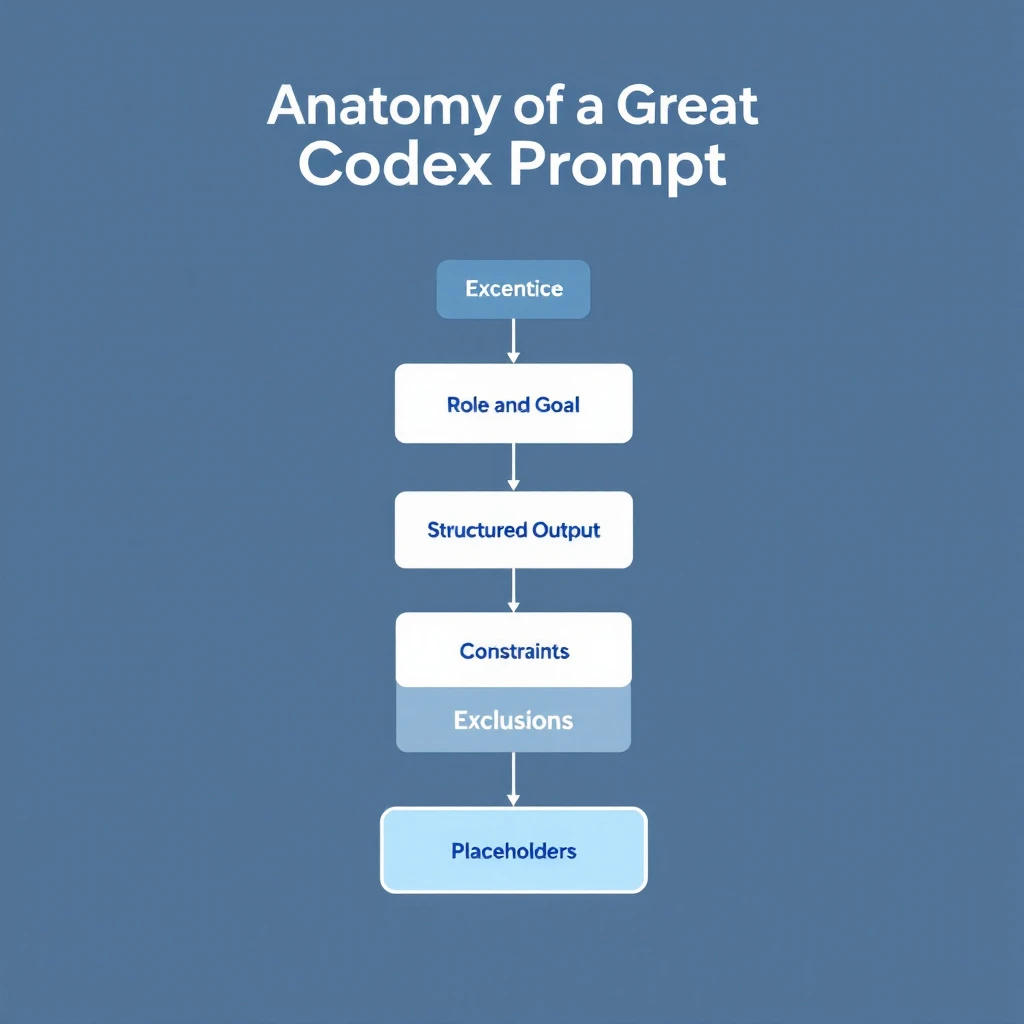
The Anatomy of a Great Codex Prompt (Steal This Template)
The prompts above work because they share a structure. Once you internalize it, you'll stop hunting for lists and start writing better prompts than any list gives you.
Here's the reusable template:
[ROLE / CONTEXT]      -> Who you are and the situation
[TASK]                -> The one job, stated plainly
[INPUTS]              -> The real data, marked with [BRACKETS]
[CONSTRAINTS]         -> Length, tone, format, and what to avoid
[OUTPUT FORMAT]       -> Exactly how you want it back
[EXCLUSIONS]          -> What NOT to do (the secret weapon)
Filled in, it looks like this:
You're an SDR selling [PRODUCT] to [ICP].
Task: write a first-touch cold email.
Inputs: prospect is [TITLE] at [COMPANY]; trigger is [EVENT].
Constraints: under 90 words, one CTA, peer tone.
Output: subject line + body.
Don't: use "hope this finds you well," buzzwords, or a hard ask.
Five rules that separate good prompts from great ones:
- State the exclusions. Telling Codex what to avoid improves output more than piling on requirements. "No buzzwords, no generic openers" does more than three extra instructions.
- Give real inputs, not placeholders. The prompt is a template; your data makes it useful. Paste the actual trigger, the real notes, the true numbers.
- Specify the output format. "Return a 5-bullet card" beats "summarize this" every time.
- Constrain length up front. Unbounded prompts produce unbounded fluff. Set the word count.
- Iterate, don't restart. Codex keeps context in a session. "Tighten this" and "make it more specific" refine faster than a fresh prompt.
For choosing the right tool for these prompts, compare Codex vs Claude Code for sales automation. If you lean Claude, our Claude SDR daily routine and how to use Claude for lead generation cover the same motion.
From Prompts to Autopilot
Prompts save you minutes. Automation saves you the job entirely.
Each prompt above can become a trigger:
- New lead lands in the CRM → run the Account Deep-Dive Brief (Prompt 1) automatically
- Meeting booked → generate the Live Meeting Prep One-Pager (Prompt 12)
- Every Friday → run the Pipeline Hygiene Audit (Prompt 16)
Chain them and the prompts stop being things you run and start being work that runs itself.
Try our AI Lead Generator — find verified LinkedIn leads for any company instantly. No signup required.
The Real Unlock
Even the best prompt is only as good as the input you feed it. "Research this company" gets you public info anyone can find. The reps who win know who's actually on their site right now and what those buyers care about — then feed that into prompts like the ones above.
That's the gap MarketBetter closes. We tell you who's showing intent and what to do next, so your Codex prompts run on real buying signals instead of guesses.
Want to feed your prompts real buyer intent? Book a demo →