12 Best Website Visitor Identification Tools in 2026 (We Tested Match Rates — Most Vendors Lie)

98% of your website visitors leave without filling out a form. They read your pricing page, compared you to competitors, and vanished.
Website visitor identification software reveals who those anonymous visitors are — company name, contact info, even which pages they viewed — so your sales team can reach out while intent is hot.
But here's what the vendors won't tell you: "80% match rate" usually means 80% of companies identified, not people. Person-level identification is much harder, and most tools quietly inflate their numbers by mixing the two. We tested 12 platforms and tracked the real match rates across company-level and person-level identification, with actual pricing for each.
This guide covers the 12 best tools for 2026, with honest match rates, real pricing, and which ones actually turn identified visitors into booked meetings.
Limited budget (<$200/mo): RB2B free tier or Leadfeeder free SMB wanting person-level ($100-500/mo): RB2B Pro, Leadpipe, or Snitcher Mid-market teams ($500-2K/mo): Warmly or Koala (PLG) Want action, not just data: MarketBetter — book a demo → Enterprise ABM ($50K+/yr): 6sense or Demandbase Already in HubSpot: Clearbit Breeze Already in ZoomInfo: WebSights add-on Already in Instantly: Instantly Pixel (built-in)
Table of Contents
- How Website Visitor Identification Actually Works
- The Remote Work Problem Nobody Talks About
- Comparison Table: All 12 Tools
- MarketBetter | Warmly | Leadfeeder | RB2B | Koala | 6sense | ZoomInfo | Clearbit Breeze | Demandbase | Instantly | Leadpipe | Snitcher
- The Real Question: Data vs Action
- How to Calculate ROI
- Implementation Guide
- How to Choose
- FAQ
How Website Visitor Identification Actually Works
Before we compare tools, let's get honest about what these products can (and can't) do.
The Three Identification Methods
-
IP-to-Company Matching
- Matches visitor IP addresses against databases of known business networks
- Identifies the company, not the individual person
- Works best for corporate office traffic; struggles with remote workers
- Most mature technology — nearly every tool uses this as a baseline
-
First-Party Cookie + Data Enrichment
- Combines browsing behavior with third-party data to infer contact identity
- Can identify specific people at visiting companies
- Match rates vary wildly (5-40% depending on traffic source)
- Privacy regulations increasingly limit cookie-based tracking
-
Reverse Email Lookup / Identity Graph
- When visitors have previously engaged (clicked an email, filled a form), systems track return visits
- Some tools use cross-site identity graphs to match visitors to known profiles
- Most reliable method, but limited to known contacts or opted-in users
- B2C-oriented tools (like Leadpipe) lean heavily on this approach
Match Rate Reality Check
Don't believe vendors claiming 80%+ match rates. Here's what's actually achievable in 2026:
| Identification Level | Realistic Match Rate | Notes |
|---|---|---|
| Company-level | 30-65% | Corporate traffic only; remote workers much lower |
| Person-level | 5-20% | US traffic typically higher than international |
| Combined (company + person fallback) | 60-80% | What most tools actually deliver |
Key insight: Anyone promising 80%+ contact-level identification is likely counting company matches, not individual people. Always ask vendors: "What percentage of my traffic will you identify to a specific person with an email address?"
What Most Guides Get Wrong
Most comparison articles rank tools by feature count or vendor claims. That's backwards. What actually matters:
- Match rate for YOUR traffic — A tool that matches 30% of US enterprise traffic might match 5% of international SMB traffic
- Data quality — 1,000 accurate identifications beat 5,000 stale contacts
- What happens next — Does the tool just show you names, or does it tell your SDR what to do?
- Time to value — An enterprise ABM platform that takes 3 months to deploy isn't "better" than a tool that works in 30 minutes
The Remote Work Problem Nobody Talks About
Here's the elephant in the room that every visitor ID vendor avoids discussing: remote work has fundamentally broken IP-based identification.
Before 2020, most B2B website visitors browsed from corporate office networks. These networks have static IP addresses mapped to company names. Identification was straightforward.
In 2026, over 60% of knowledge workers are remote or hybrid. They browse from home networks, coffee shops, and coworking spaces. These IP addresses map to ISPs like Comcast or AT&T — not their employer.
What This Means for Your Match Rates
| Traffic Source | Expected Company-Level Match Rate | Why |
|---|---|---|
| Enterprise visitors from offices | 50-65% | Static corporate IPs well-mapped |
| SMB visitors from offices | 30-45% | Smaller firms have less IP coverage in databases |
| Remote workers at enterprise companies | 10-20% | VPN traffic may still resolve; otherwise lost |
| Remote workers at SMBs | 5-10% | Residential IPs rarely map to employers |
| International traffic | 15-30% | US databases are richest; EU/APAC much sparser |
The implication: If your target market is SMB companies with remote teams, pure IP-based tools will underperform. You need tools that layer person-level identification (cookies, identity graphs, data enrichment) on top of IP matching.
How Top Tools Handle Remote Work
- RB2B and Leadpipe: Use identity graphs and cross-site matching to identify individuals regardless of IP
- Warmly: Stacks 20+ data providers in a "data waterfall" to compensate for IP gaps
- 6sense and Demandbase: Add third-party intent data (what companies are researching elsewhere) to supplement weak on-site identification
- MarketBetter: Combines visitor identification with daily playbook intelligence — even when you can't identify every visitor, the AI prioritizes the ones you can identify and tells your SDR exactly what to do with them
Best Website Visitor Identification Tools: Comparison Table
| Tool | Best For | ID Level | Starting Price | Match Rate | SDR Workflow |
|---|---|---|---|---|---|
| MarketBetter | SDR teams wanting action | Company + Contact + Tasks | Custom | Varies by source | ✅ Full |
| Warmly | Real-time chat engagement | Company (65%) + Person (15%) | $700/mo | 15-25% person | ⚠️ Partial |
| Leadfeeder | European companies | Company only | Free / €99/mo | 10-15% | ❌ No |
| RB2B | Freemium person-level | Person (US only) | Free / $79/mo | 10-20% person | ❌ No |
| Koala | PLG companies | Company + Product signals | Custom | Varies | ⚠️ Partial |
| 6sense | Enterprise ABM | Company + Intent | ~$55K/yr median | 10-20% | ⚠️ Partial |
| ZoomInfo | Enterprise data teams | Company + Intent | $15K+/yr | 15-30% | ⚠️ Partial |
| Clearbit Breeze | HubSpot users | Company + Enrichment | Credit-based | 15-20% | ❌ No |
| Demandbase | Enterprise ABM | Company + Intent | $18K+/yr | <30% | ⚠️ Partial |
| Instantly | Outbound-first teams | Company + Contact | $37/mo (CRM plan) | Varies | ⚠️ Partial |
| Leadpipe | Person-level at scale | Person + Company | $98/mo | Claims 35%+ person | ❌ No |
| Snitcher | Budget-friendly company ID | Company only | $39/mo | 30-50% company | ❌ No |
SDR Workflow column explained: ✅ Full = prioritized task lists, AI outreach, dialer built in. ⚠️ Partial = some automation but requires other tools. ❌ No = data only, requires separate tools for execution.
1. MarketBetter
Best for: SDR teams who want to ACT on visitor data, not just view it
Most visitor identification tools stop at "Company X visited your pricing page." Then your SDR has to:
- Research the company
- Find the right decision-maker
- Prioritize against dozens of other signals
- Write personalized outreach
- Actually make the call
That's 15-30 minutes of work per visitor — which means 90% of visitor data goes unused.
MarketBetter takes a fundamentally different approach. We don't just identify WHO visited. We identify them, find the decision-maker, score the opportunity, and create a prioritized task for your SDR — complete with AI-generated outreach and a click-to-dial button.
Key Features
- Website visitor identification via IP-to-company + contact enrichment
- Daily SDR Playbook with AI-prioritized tasks (not just a dashboard)
- AI-generated email sequences and call scripts personalized to each prospect
- Smart dialer with call recording and coaching
- AI chatbot that qualifies visitors and books meetings 24/7
- CRM sync with HubSpot and Salesforce
- Chrome extension for LinkedIn prospecting and real-time enrichment
What Makes It Different
When your SDR opens MarketBetter each morning, they see exactly:
- Who to call (prioritized by fit + intent)
- Why they're a fit (company size, tech stack, recent activity)
- What to say (AI-drafted outreach based on their browsing behavior)
No research. No prioritization paralysis. Just execute.
"MarketBetter tells you WHO + WHAT TO DO. Other tools just tell you WHO."
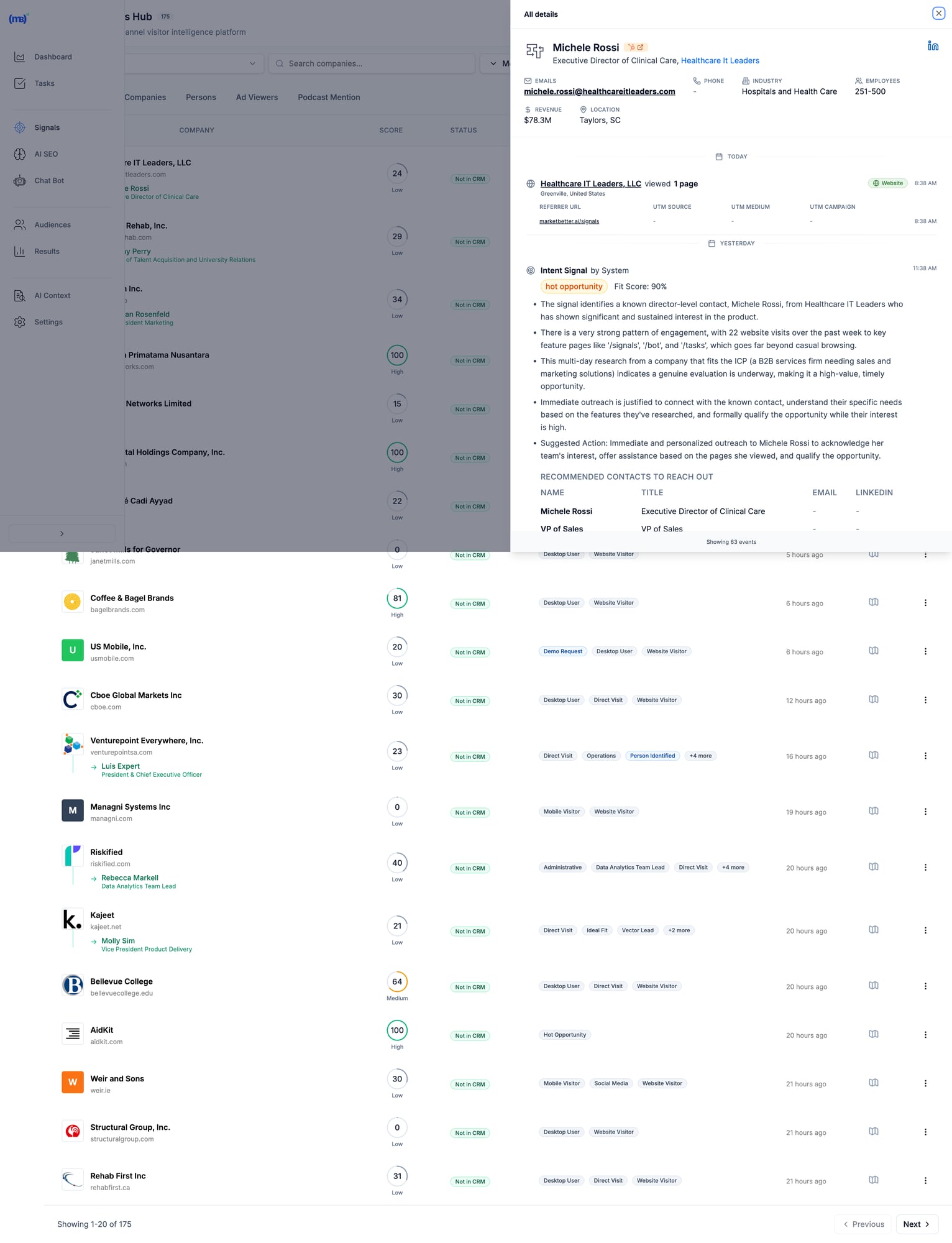 MarketBetter's Signals Hub shows AI-prioritized visitor signals with intent scoring, identified contacts, and suggested actions — all in one view.
Pricing
Custom based on team size and volume. Transparent pricing — no hidden fees or long-term contracts. Book a demo →
When MarketBetter Is Better
✅ You have an SDR team that needs to execute, not analyze ✅ You want one platform instead of 5+ tools stitched together ✅ Visitor data currently sits unused in dashboards ✅ You care about pipeline, not just "visibility" ✅ Speed-to-lead matters (90% faster lead response)
When To Look Elsewhere
⚠️ You only need raw data for your existing ABM stack ⚠️ Enterprise with 6sense/Demandbase already deployed and working ⚠️ Pure marketing use case with no SDR execution
Read more: MarketBetter vs Warmly | MarketBetter vs Apollo | MarketBetter vs ZoomInfo | MarketBetter vs 6sense
2. Warmly
Best for: Companies wanting real-time visitor engagement via chat
Warmly bundles visitor identification with AI chatbot engagement. Their strength is catching visitors while they're still on your site and starting conversations immediately. In 2026, they've expanded with an "AI Data Agent" tier that automates more of the outreach workflow.
Key Features
- 65% company-level identification (claimed) via 20+ data providers in a "data waterfall"
- 15-25% person-level identification via enrichment partnerships
- AI chatbot for real-time visitor engagement
- Slack/Teams alerts for high-intent visitors
- Bombora intent data integration
- Video calling widget for live sales conversations on-site
- Orchestrator for automated outreach sequences
Pricing
| Plan | Price | What You Get |
|---|---|---|
| Free | $0 | 500 visitors/mo, 10 Bombora signals/week |
| Startup | ~$700/mo | Higher limits, basic automation |
| Business | $1,440-1,740/mo | 10K-100K visitors, full features |
| AI Data Agent | $10,000/yr | Advanced AI features, automated outreach |
When Warmly Is Better
✅ Real-time chat engagement is your primary use case ✅ You already have outbound tools (Outreach, Apollo) and need signals ✅ Catching visitors while they're on-site matters most ✅ Budget of $700+/mo for a dedicated visitor ID tool
When To Look Elsewhere
⚠️ You need a full SDR workflow (no smart dialer, no daily task prioritization) ⚠️ Budget under $700/mo (free tier is very limited) ⚠️ You want person-level at scale (15-25% may not be enough) ⚠️ You need multi-channel execution beyond chat
Read more: MarketBetter vs Warmly Comparison | Warmly Review 2026 | Warmly Pricing Breakdown | Best Warmly Alternatives
3. Leadfeeder (Dealfront)
Best for: European companies prioritizing GDPR compliance
Dealfront (the merger of Leadfeeder and Echobot) focuses on the European market with strong GDPR compliance. Solid company-level identification with good CRM integrations at a reasonable price. They've been in the visitor ID game longer than most, which means deep integration partnerships.
Key Features
- Company-level visitor identification (IP-to-company)
- GDPR-compliant data handling — a real differentiator for EU companies
- Strong European company database (best coverage outside US)
- CRM integrations with Salesforce, HubSpot, Pipedrive
- Lead scoring and filtering by company attributes
- Google Analytics integration for enhanced insights
Pricing
| Plan | Price | What You Get |
|---|---|---|
| Free | €0 | 100 companies/mo, 7-day data retention |
| Paid | €99-165/mo | Unlimited companies, 365-day retention |
Annual billing gives 40% discount. The free tier is genuinely useful for testing.
When Leadfeeder Is Better
✅ European market focus (best EU company database in the category) ✅ GDPR compliance is non-negotiable for your team ✅ Budget-conscious teams wanting basic visitor ID to test the concept ✅ Already using Pipedrive or European CRMs
When To Look Elsewhere
⚠️ You need person-level identification (company-only) ⚠️ US market focus (weaker coverage than US-focused tools) ⚠️ You want SDR workflow, not just data and dashboards ⚠️ You need real-time alerts for high-intent visitors
4. RB2B
Best for: Freemium person-level identification (US traffic)
RB2B has become the go-to for teams wanting to test person-level identification without a big commitment. Their free tier is genuinely generous, and the Slack integration makes it easy to see results immediately. Founded by Adam Robinson, they've built strong community momentum on LinkedIn.
Key Features
- Person-level identification targeting 10-20% match rate
- Slack notifications with LinkedIn profiles (the "killer feature")
- Simple setup (just add a script tag — 5 minutes)
- Free tier with 150 credits/month
- Demandbase partnership for company-level fallback
- Coworker filtering on Pro plans (remove known contacts)
Pricing
| Plan | Price | What You Get |
|---|---|---|
| Free | $0 | 150 credits/mo, company-level only, LinkedIn profiles |
| Starter | $79/mo | Person-level identification, basic integrations |
| Pro | $349+/mo | Business emails, all integrations, coworker filtering |
Match Rates (Honest Assessment)
- Person-level: 10-20% (US traffic only)
- Company-level: 70-80% when combined with Demandbase fallback
- International: Not supported for person-level — this is a US-only tool
When RB2B Is Better
✅ You want to test person-level ID before committing serious budget ✅ US-focused B2B traffic (mandatory — doesn't work internationally) ✅ You have existing outreach tools and just need the names ✅ PLG company wanting LinkedIn profiles of engaged users
When To Look Elsewhere
⚠️ International traffic (US-only for person-level identification) ⚠️ You need workflow, not just names dropped in Slack ⚠️ Business emails required (need Pro at $349+/mo — significant jump) ⚠️ You want a complete SDR platform, not a point solution
5. Koala
Best for: PLG companies tracking product intent signals
Koala stands out by combining website visitor identification with product usage signals. If you have a freemium or trial product, Koala shows you which trial users are showing buying intent — a capability most visitor ID tools completely lack.
Key Features
- Website + product activity tracking in one unified platform
- Account scoring based on engagement patterns and product usage
- Real-time Slack alerts for high-intent accounts
- CRM sync with automatic enrichment
- Built for PLG motions (trial → paid conversion signals)
- ICP scoring to filter noise and focus on fits
Pricing
Custom pricing based on volume. Free trial available. Generally positioned between SMB tools and enterprise platforms.
When Koala Is Better
✅ You have a freemium/trial product (PLG motion is your core GTM) ✅ Product engagement signals matter more than just website visits ✅ You want to identify which trial users are ready for a sales conversation ✅ Engineering resources to implement product-level tracking
When To Look Elsewhere
⚠️ No freemium/trial product (pure sales-led GTM) ⚠️ You need full SDR workflow (no dialer, no sequences built in) ⚠️ Enterprise ABM programs (better options exist at that budget) ⚠️ Non-technical team (requires dev work to instrument product events)
6. 6sense
Best for: Large marketing teams running enterprise ABM programs
6sense is a full ABM platform with visitor identification as one component of a broader intent data suite. Powerful but complex — built for large marketing teams with dedicated ops resources. In 2026, they've added AI-powered "Revenue AI" features, though the core platform remains enterprise-focused.
Key Features
- Account identification via IP + intent signals
- Predictive buying stage scoring (Awareness → Decision) — genuinely useful for ABM
- Third-party intent data (Bombora + proprietary 6sense data)
- Multi-channel ABM orchestration (ads, email, sales activation)
- AI account summaries and recommendations (Revenue AI)
- Deep CRM integrations with Salesforce, HubSpot
- Audience creation for targeted advertising
Pricing
6sense doesn't publish pricing. Based on Vendr and third-party data:
| Tier | Typical Cost | What You Get |
|---|---|---|
| Free | $0 | 50 credits/mo, Chrome extension |
| Team | ~$25K-50K/yr | Basic platform, limited seats |
| Growth | ~$55K/yr (median) | Full platform, intent data |
| Enterprise | $100K-200K+/yr | Advanced features, custom integrations |
Source: Vendr reports median buyer pays $55,211/year. Implementation takes 1-3 months.
When 6sense Is Better
✅ Enterprise budget ($50K+ annually) and you can justify the ROI ✅ Marketing-led ABM programs where you're running coordinated campaigns ✅ You have ops resources to manage the platform (RevOps or dedicated admin) ✅ Multi-channel orchestration across ads + email + sales is the goal
When To Look Elsewhere
⚠️ SMB or mid-market budget (minimum ~$25K/yr) ⚠️ Sales-first teams (6sense is marketing-first, sales activation is secondary) ⚠️ You want simplicity (3-6 month implementation typical) ⚠️ Contact-level identification priority (6sense is company/account-level)
G2 reviewer feedback:
"My problem with 6sense is that the tool's visitor identification reveals only companies and not individuals."
Read more: MarketBetter vs 6sense | 6sense Review 2026 | 6sense Pricing Breakdown | Best 6sense Alternatives
7. ZoomInfo WebSights
Best for: Enterprise GTM teams already using ZoomInfo data
ZoomInfo is the 800-pound gorilla of B2B data. WebSights is their visitor identification product, plugging into their massive database of 320M+ contacts and 100M+ company profiles. If you're already paying for ZoomInfo, WebSights is a natural add-on. If you're not, the total cost makes this an enterprise play.
Key Features
- Account-level visitor identification with deep company intel
- Buyer intent signals (1B+ monthly data points)
- Deep CRM/MAP integrations (native Salesforce, HubSpot, Marketo)
- Form enrichment for progressive lead capture
- DSP integration for retargeting ads to identified accounts
- Copilot AI for account research and outreach drafting
Pricing
ZoomInfo bundles WebSights with their core platform. Expect:
| Component | Typical Cost |
|---|---|
| SalesOS | $15,000-25,000/yr starting |
| WebSights add-on | Included or ~$5K extra |
| Intent data | $9K-20K additional |
| Engage (sequences/dialer) | ~$15K additional |
Total cost for full suite: $40K-100K+/yr depending on seats and features. Annual contracts, difficult to exit mid-term.
When ZoomInfo Is Better
✅ Already a ZoomInfo customer (marginal cost is low) ✅ Enterprise data needs where database size matters ✅ Budget for $15K+ annually ✅ Dedicated ops team to manage the platform
When To Look Elsewhere
⚠️ SMB budget (minimum $15K/yr for the base platform) ⚠️ You want SDR workflow, not just data enrichment ⚠️ Quick implementation needed (enterprise complexity and training required) ⚠️ Contact data accuracy concerns (G2 reviews flag stale data as #1 issue)
Read more: MarketBetter vs ZoomInfo | ZoomInfo Review 2026 | ZoomInfo Pricing Breakdown | Best ZoomInfo Alternatives
8. Clearbit Breeze (HubSpot)
Best for: HubSpot users wanting native enrichment
Now owned by HubSpot, Clearbit excels at form enrichment and real-time company identification. If you're already in the HubSpot ecosystem, it's the most seamless option — no integration work, no data syncing issues. The rebranding to "Breeze Intelligence" has been a bit confusing, but the core product remains strong.
Key Features
- Real-time form enrichment (shorter forms, same data)
- Company and contact data appending to existing CRM records
- Native HubSpot integration (zero setup if you're already a customer)
- Reveal for anonymous visitor identification at account level
- API for custom enrichment workflows (developers love this)
- Auto-enrichment triggers based on lifecycle stage changes
Pricing
Credit-based system integrated into HubSpot. Contact HubSpot for details. Historically:
- Enterprise plans include Clearbit/Breeze credits
- Standalone was $12,000+/yr before acquisition
- Credits consumed per enrichment (form fill, reveal, or API call)
When Clearbit Is Better
✅ You're committed to the HubSpot ecosystem (this is a natural extension) ✅ Form enrichment is the priority (reduce form fields, increase conversions) ✅ You want seamless CRM data without export/import workflows ✅ Marketing-first use case with existing HubSpot workflows
When To Look Elsewhere
⚠️ Not a HubSpot user (ecosystem lock-in makes this pointless) ⚠️ Person-level visitor identification priority (better options exist) ⚠️ You need SDR workflow beyond enrichment (no dialer, no task lists) ⚠️ Budget-conscious (credit system can get expensive at scale)
9. Demandbase
Best for: Enterprise ABM with advertising + sales intelligence
Demandbase is a full ABM platform competing with 6sense at the enterprise level. Their strength is combining account identification with ABM advertising capabilities — if you're running targeted ads to identified accounts, Demandbase's DSP integration is best-in-class.
Key Features
- Account identification (AI-powered anonymous visitor reveal)
- Identity graph (cookies, IP, device IDs, cross-channel matching)
- Intent data + engagement scoring with proprietary signals
- ABM advertising platform with native DSP
- Sales intelligence with account insights and buyer journey mapping
- GDPR-safe global reach (better international coverage than 6sense)
Pricing
Demandbase doesn't publish pricing. Based on Vendr and third-party data:
| Tier | Typical Cost |
|---|---|
| Minimum | $18,000+/yr |
| Median | ~$65,000/yr |
| Enterprise | $100K+/yr |
When Demandbase Is Better
✅ Enterprise budget ($50K+ annually) ✅ ABM advertising is part of your strategy (best DSP integration) ✅ Global reach with GDPR compliance matters (stronger internationally than 6sense) ✅ Marketing + sales alignment on target accounts
When To Look Elsewhere
⚠️ SMB or mid-market budget ⚠️ Person-level identification priority (company/account-level focus) ⚠️ Quick implementation needed (enterprise onboarding) ⚠️ You need SDR workflow, not marketing dashboards
10. Instantly Pixel
Best for: Outbound-first teams already using Instantly for cold email
Instantly — best known as a cold email platform — has added website visitor identification via their "Instantly Pixel." If you're already using Instantly for outbound sequences, adding visitor ID data into the same workflow is seamless. It's not the deepest visitor ID tool, but the workflow integration is hard to beat for existing customers.
Key Features
- Website visitor identification via pixel tracking
- Built into Instantly CRM — visitor data flows directly into your outreach workflows
- Custom views for filtered visitor segments (e.g., pricing page visitors only)
- Contact enrichment from Instantly's B2B database
- Automated sequence enrollment — identified visitors auto-added to campaigns
- Multi-channel (email + call + SMS from one platform)
Pricing
Visitor identification is included in Instantly's CRM plans:
| Plan | Price | What You Get |
|---|---|---|
| Growth CRM | $37/mo | Basic CRM + visitor tracking |
| Hyper Growth CRM | $97/mo | AI features + advanced sequences |
Note: You may also need a sending plan ($30-78/mo) for the outreach side. Total cost: $67-175/mo for the full stack.
When Instantly Is Better
✅ Already using Instantly for cold email (natural extension, no new tools) ✅ Outbound-first GTM where visitor ID supplements cold outreach ✅ Budget-conscious (cheapest "all-in-one" option at $67-175/mo total) ✅ Want email + calling + visitor ID in one platform
When To Look Elsewhere
⚠️ Visitor ID is your primary need (Instantly's pixel is secondary to their email product) ⚠️ You need deep visitor analytics and segmentation (basic compared to Warmly or 6sense) ⚠️ Enterprise-grade identification with intent data (not their strength) ⚠️ Inbound-first GTM (Instantly is built for outbound)
11. Leadpipe
Best for: Person-level identification at scale with aggressive pricing
Leadpipe is a newer entrant focused on high-volume person-level identification. They claim 35%+ person-level match rates — aggressive but worth testing. Their pricing model is credit-based and straightforward, making it easy to forecast costs.
Key Features
- Person-level identification — names, emails, phone numbers, LinkedIn profiles
- Company + contact enrichment in one view
- Real-time visitor tracking with page-level behavior data
- Automated list building — identified visitors auto-exported to your email tool
- Simple pixel installation (similar to RB2B)
- No contract — month-to-month pricing
Pricing
| Plan | Price | Credits |
|---|---|---|
| Starter | $98/mo | 100 identified visitors |
| Growth | $147/mo | 500 identified visitors |
| Scale | $248/mo | 1,000 identified visitors |
| Pro | $398/mo | 2,000 identified visitors |
| Business | $819/mo | 5,000 identified visitors |
| Enterprise | $1,579/mo | 10,000 identified visitors |
Per-credit cost: $0.16-0.98 depending on volume. 200 free credits to test.
When Leadpipe Is Better
✅ Person-level identification is the priority (not just company names) ✅ You want transparent, predictable pricing per identified visitor ✅ High-traffic site where per-credit pricing scales well ✅ Need email addresses + phone numbers for outreach (not just LinkedIn profiles)
When To Look Elsewhere
⚠️ You need SDR workflow (data-only, no task management or dialer) ⚠️ International traffic (US-focused, like most person-level tools) ⚠️ Enterprise security requirements (newer vendor, less established) ⚠️ You want intent data beyond just page visits
12. Snitcher
Best for: Budget-friendly company-level identification
Snitcher is a straightforward, no-frills company identification tool starting at just $39/month. No person-level ID, no intent data, no AI — just solid IP-to-company matching with clean reporting. Sometimes simple is exactly what you need.
Key Features
- Company-level visitor identification via IP matching
- Google Analytics integration (enhances existing GA data)
- CRM integrations (Salesforce, HubSpot, Pipedrive)
- Custom alerts based on company attributes or page visits
- Clean dashboard with session-level detail
- GDPR-compliant (EU-based, privacy-first approach)
Pricing
Usage-based starting at $39/month, scaling with identified companies. Affordable option for teams testing the visitor ID concept before committing to larger platforms.
When Snitcher Is Better
✅ Budget under $200/mo and you want to test visitor identification ✅ Company-level is sufficient (you have separate tools for contact finding) ✅ European company wanting GDPR-compliant solution (EU-based) ✅ Clean, simple tool without enterprise complexity
When To Look Elsewhere
⚠️ You need person-level identification (company-only) ⚠️ You want SDR workflow or outreach automation ⚠️ US-focused team (US-centric tools have better North American coverage) ⚠️ Need intent data or buying stage signals
The Real Question: What Happens AFTER Identification?
Here's what most comparison guides won't tell you:
Identifying visitors is the easy part.
The hard part is turning that data into action. Most SDRs don't have time to:
- Research every identified company
- Find the right decision-maker
- Write personalized outreach
- Prioritize who to contact first
- Actually make the call
That's why 90% of visitor ID data goes unused. It sits in a dashboard. Nobody acts on it. And the tool becomes shelfware within 3 months.
The "Data vs Action" Gap
| Data-First Tools | Action-First Tools |
|---|---|
| Show you WHO visited | Show you WHO + WHAT TO DO |
| Require manual research | Auto-enrich with decision-makers |
| Leave prioritization to you | AI-prioritize by fit + intent |
| Integrate with your sequence tools | Include sequences + dialer |
| Dashboards for analysis | Tasks for execution |
| Value depends on SDR discipline | Value is built into the workflow |
Most tools on this list are data-first. They give you visibility. What happens next is your problem.
MarketBetter is action-first. We turn every visitor into a prioritized task with AI-drafted outreach and click-to-dial. Your SDR opens a list and executes. No research required, no prioritization paralysis.
The Multi-Tool Problem
Here's how most teams cobble together a visitor ID workflow today:
- Visitor identification (RB2B or Warmly) → $79-700/mo
- Contact enrichment (Apollo or ZoomInfo) → $49-$15,000/yr
- Email sequences (Outreach or Salesloft) → $100-150/seat/mo
- Dialer (Orum or Nooks) → $150-200/seat/mo
- CRM (HubSpot or Salesforce) → $50-150/seat/mo
Total: $500-2,000+/mo per SDR across 5 different tools, with manual data transfer between each one.
MarketBetter replaces tools 1-4 in one platform. Visitor identification, enrichment, sequences, and dialer — with AI connecting them so data flows into action automatically.
How to Calculate Visitor Identification ROI
Before investing in any visitor ID tool, run these numbers:
Step 1: Estimate Your Identifiable Traffic
| Metric | Your Number |
|---|---|
| Monthly website visitors | _______ |
| × Realistic match rate (use 15% for company-level) | × 0.15 |
| = Identified companies per month | _______ |
Step 2: Estimate Pipeline Impact
| Metric | Your Number |
|---|---|
| Identified companies per month | _______ |
| × % that fit your ICP (use 20%) | × 0.20 |
| = ICP-fit leads | _______ |
| × Outreach-to-meeting rate (use 5%) | × 0.05 |
| = Meetings booked per month | _______ |
Step 3: Calculate Revenue
| Metric | Your Number |
|---|---|
| Meetings per month | _______ |
| × Demo-to-close rate (use 20%) | × 0.20 |
| = New customers per month | _______ |
| × Average deal size | × $_______ |
| = Monthly revenue from visitor ID | $_______ |
Example Scenario
| Metric | Example |
|---|---|
| 10,000 monthly visitors | |
| × 15% company match rate | = 1,500 identified |
| × 20% ICP fit | = 300 ICP leads |
| × 5% meeting rate | = 15 meetings/month |
| × 20% close rate | = 3 new customers |
| × $15,000 ACV | = $45,000/month revenue |
Even at conservative rates, a tool costing $500-2,000/month that generates $45,000 in monthly revenue is a 20-90x return. The math almost always works — the question is whether your team will actually act on the data.
Implementation Guide: Getting Started in Under 30 Minutes
No matter which tool you choose, here's how to get maximum value fast:
Week 1: Install and Baseline
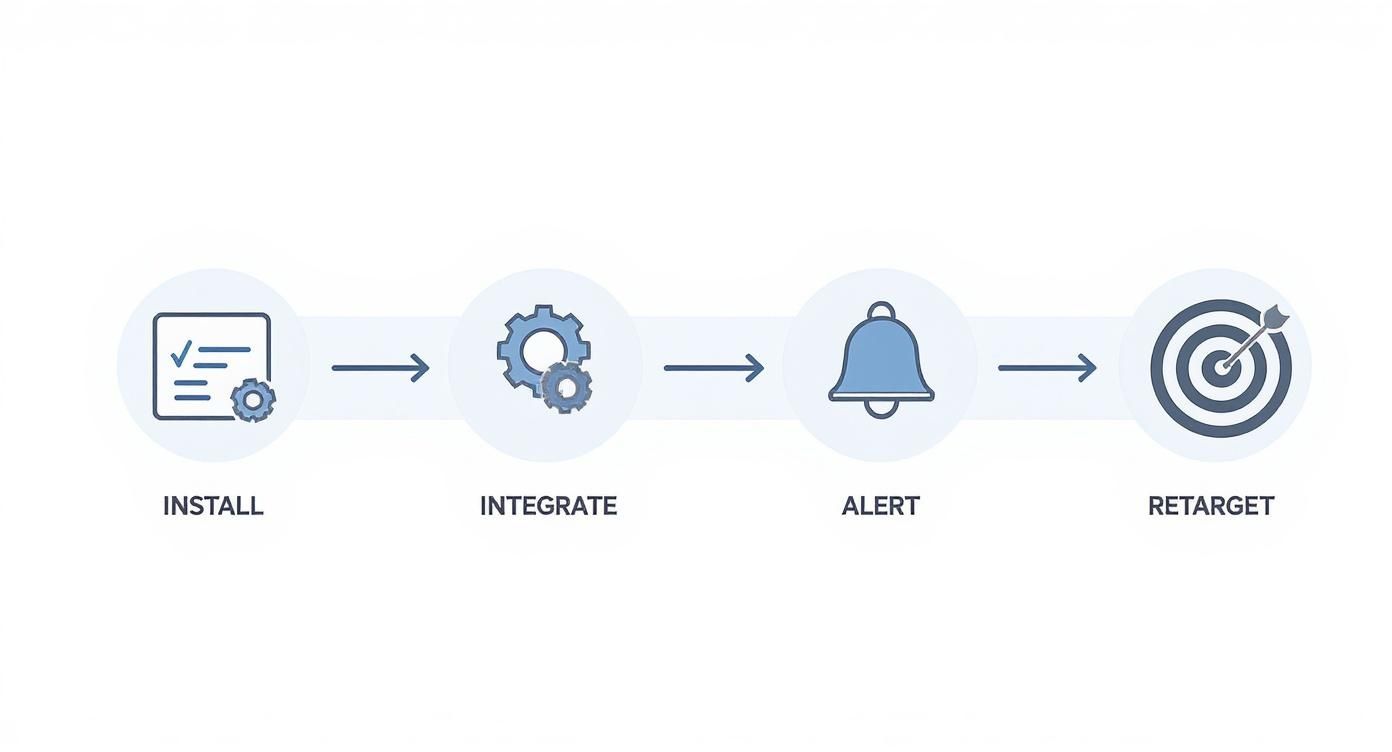
- Add the tracking pixel/script — Every tool on this list requires adding a JavaScript snippet to your site. Most take under 5 minutes.
- Connect your CRM — Sync identified visitors with your existing pipeline. HubSpot and Salesforce integrations are standard.
- Set up alerts — Configure Slack or email notifications for high-intent page visits (pricing page, demo page, comparison pages).
- Establish your baseline — How many visitors does the tool identify in the first week? What's your actual match rate?
Week 2: Prioritize and Filter
- Define your ICP filter — Set company size, industry, and geography filters so you only see relevant visitors. Without filters, your SDR drowns in noise.
- Set up lead scoring — Prioritize visitors by behavior: pricing page > blog > homepage. Multiple visits > single visit.
- Test outreach on 20 leads — Manually reach out to the first batch. Measure response rates. Refine your messaging.
Week 3-4: Automate and Scale
- Build sequences — Create automated email sequences triggered by visitor identification events.
- Assign territory rules — If you have multiple SDRs, set up round-robin or territory-based lead routing.
- Measure pipeline — Track how many identified visitors become meetings, opportunities, and closed deals.
Common Mistakes to Avoid
❌ Contacting every identified visitor — Most are researchers, not buyers. Filter by ICP and intent signals. ❌ Mentioning you tracked them — "I saw you visited our pricing page" is creepy. Frame outreach around their company's challenges. ❌ Setting and forgetting — Review match rates and outreach results monthly. Adjust ICP filters as you learn. ❌ Buying enterprise tools for SMB problems — A $55K/yr platform won't help if your team has 2 SDRs and 5,000 monthly visitors. ❌ Expecting person-level magic — Realistic person-level match rates are 5-20%. If your traffic is low, the absolute number of identified individuals will be small. Supplement with company-level identification + manual prospecting.
How to Choose the Right Visitor ID Tool
After evaluating all 12 tools, here are the three questions that matter:
1. Do You Need Data or Action?
If you have a mature ops team that can turn visitor data into SDR workflows (research, enrich, prioritize, sequence, call), tools like ZoomInfo, 6sense, or Warmly give you rich data to feed those workflows.
If you want visitors to become prioritized SDR tasks automatically — no manual research, no tool-switching — look at MarketBetter.
2. Company-Level or Person-Level?
- Company-level (30-65% match rate) = table stakes, every tool on this list does this
- Person-level (5-20% match rate) = harder, consider RB2B, Leadpipe, Warmly, or MarketBetter
If person-level is critical, verify the vendor's methodology. Many claim high rates by counting company matches in their headline number.
3. What's Your Budget?
| Budget | Best Options |
|---|---|
| Free/$0 | RB2B free, Leadfeeder free |
| Under $200/mo | Snitcher ($39), RB2B Starter ($79), Leadpipe Starter ($98) |
| $200-500/mo | RB2B Pro ($349), Leadpipe Growth ($147-248) |
| $500-2,000/mo | Warmly ($700+), MarketBetter, Instantly stack ($67-175) |
| $2,000+/mo | MarketBetter, Warmly Business |
| $25K+/yr | 6sense, ZoomInfo |
| $50K+/yr | 6sense Enterprise, Demandbase, ZoomInfo Enterprise |
Decision Framework
Choose MarketBetter if your SDRs need a daily playbook that tells them who to call, why, and what to say — not another dashboard to monitor.
Choose Warmly if real-time chat engagement while visitors are on-site is your highest priority.
Choose RB2B or Leadpipe if you just need person-level data piped into Slack and you'll handle outreach separately.
Choose 6sense or Demandbase if you're running enterprise ABM programs with $50K+ budgets and dedicated RevOps.
Choose ZoomInfo if you already have their data platform and want to add visitor ID as an incremental capability.
Choose Snitcher or Leadfeeder if you want affordable company-level identification to test the concept before scaling up.
Choose Instantly if you're already running cold email campaigns and want to layer in visitor identification without adding another vendor.
Frequently Asked Questions
What is the best free website visitor identification tool?
RB2B offers the best free tier for person-level identification (US traffic only, 150 credits/month with LinkedIn profiles). Leadfeeder offers free company-level identification (100 companies/month, 7-day retention). Both are limited but useful for testing the concept before committing budget.
What is a realistic match rate for visitor identification?
Expect 30-65% for company-level identification and 5-20% for person-level. Rates are higher for corporate office traffic and lower for remote workers. Any vendor claiming 80%+ contact-level match rates is likely counting company matches. Always ask: "What percentage of my traffic will you identify to a specific person with a verified email?"
Do I need visitor identification if I have Google Analytics?
Google Analytics shows you anonymous traffic patterns — pages visited, time on site, traffic sources, conversion funnels. Visitor identification reveals who those visitors are (company names, sometimes individual contacts with emails). They serve completely different purposes. Most teams use both: GA4 for marketing analytics, visitor ID for sales activation.
Is website visitor identification GDPR compliant?
It depends on the method. IP-to-company matching is generally compliant as it identifies organizations, not individuals. Person-level identification tools must ensure proper consent mechanisms and legal basis for processing. European-focused tools like Leadfeeder (Dealfront) and Snitcher prioritize GDPR compliance. If you operate in the EU, consult your legal team and look for tools with explicit GDPR documentation.
What's the difference between visitor identification and intent data?
Visitor identification tells you WHO visited your website specifically — first-party data. Intent data tells you WHO is researching your category across the web — third-party signals from publishers, review sites, etc.
Some tools (6sense, Demandbase, Warmly) combine both. Others focus on one or the other. Intent data is broader but noisier; visitor identification is narrower but higher-signal (they're on YOUR site, not just reading about the category).
How long does implementation take?
- Simple tools (RB2B, Leadpipe, Snitcher): 5-30 minutes (add a script tag)
- Mid-market tools (Warmly, Koala, MarketBetter): 1-2 weeks (includes CRM setup and workflow configuration)
- Enterprise tools (6sense, Demandbase, ZoomInfo): 1-3 months (training, custom integrations, change management)
Can I use multiple visitor ID tools together?
Yes, and many teams do. A common stack: RB2B for person-level identification (free tier) + Leadfeeder for company-level (free tier) to test both approaches. Then consolidate into one paid tool once you know which data type (person vs company) drives more pipeline for your specific business.
What's the biggest mistake teams make with visitor identification?
Buying the tool without a plan for what happens after identification. 90% of visitor ID data goes unused because there's no workflow to turn "Company X visited" into "SDR calls Jane at Company X with this pitch." Before choosing a tool, define your process: Who reviews the data? How fast do they act? What do they say? If you can't answer those questions, the tool won't help — you need a workflow-first platform like MarketBetter that handles this automatically.
Should I care about AI features in visitor ID tools?
In 2026, every tool has slapped "AI" on their marketing. What actually matters: AI for prioritization (which visitors to contact first), AI for personalization (writing outreach based on visitor behavior), and AI for automation (auto-enrolling high-intent visitors into sequences). Skip tools where "AI" just means a chatbot that answers FAQ. Look for AI that saves your SDRs 15-30 minutes per lead.
Try our AI Lead Generator — find verified LinkedIn leads for any company instantly. No signup required.
The Bottom Line
Website visitor identification is only valuable if someone acts on it.
The best tools don't just show you dashboards of anonymous visitors turned into company names. They turn those visitors into prioritized tasks your SDRs execute every day.
Ask yourself: Do you need another dashboard? Or do you need more booked meetings?
If the answer is booked meetings, you need a tool that bridges the gap between "identified visitor" and "SDR picks up the phone." That's what separates a data product from a revenue product.
Ready to turn anonymous visitors into pipeline?
Book a demo with MarketBetter →
We'll show you how visitor identification becomes SDR execution — not just another data source collecting dust.
Related reading:

 Okay, knowing the company name behind a visit is a huge win. But the real magic happens when you figure out why they’re on your site at all. This is where you graduate from identification to interpretation, shifting the focus from "who" to "what do they actually want?"