
2 posts tagged with "sales-workflow"

View All Tags

The Multi-Threading Playbook: Build a 5-Stakeholder Deal Team Before the Champion Goes Quiet [2026]

ยท 14 min read
sunder
Founder, marketbetter.ai

Most AEs treat multi-threading like a fire extinguisher: you only reach for it when something is already burning. Your champion went dark. Procurement appeared out of nowhere. Legal kicked the contract back with redlines that read like a different deal.

By then, multi-threading is damage control. You are scrambling to find allies inside an account that has already decided you are not a priority.

The reps who consistently hit 110% of quota do something different. They build the deal team before they need it โ€” usually inside the first two meetings โ€” and treat stakeholder coverage as a leading indicator of pipeline health, not a Q4 panic move.

This playbook is the system. Five roles to identify, four weekly cadences to keep them warm, a CRM hygiene model that flags single-threaded deals before they stall, and the exact messages that get a CFO or VP Engineering to take a 15-minute call when they have never heard of you.
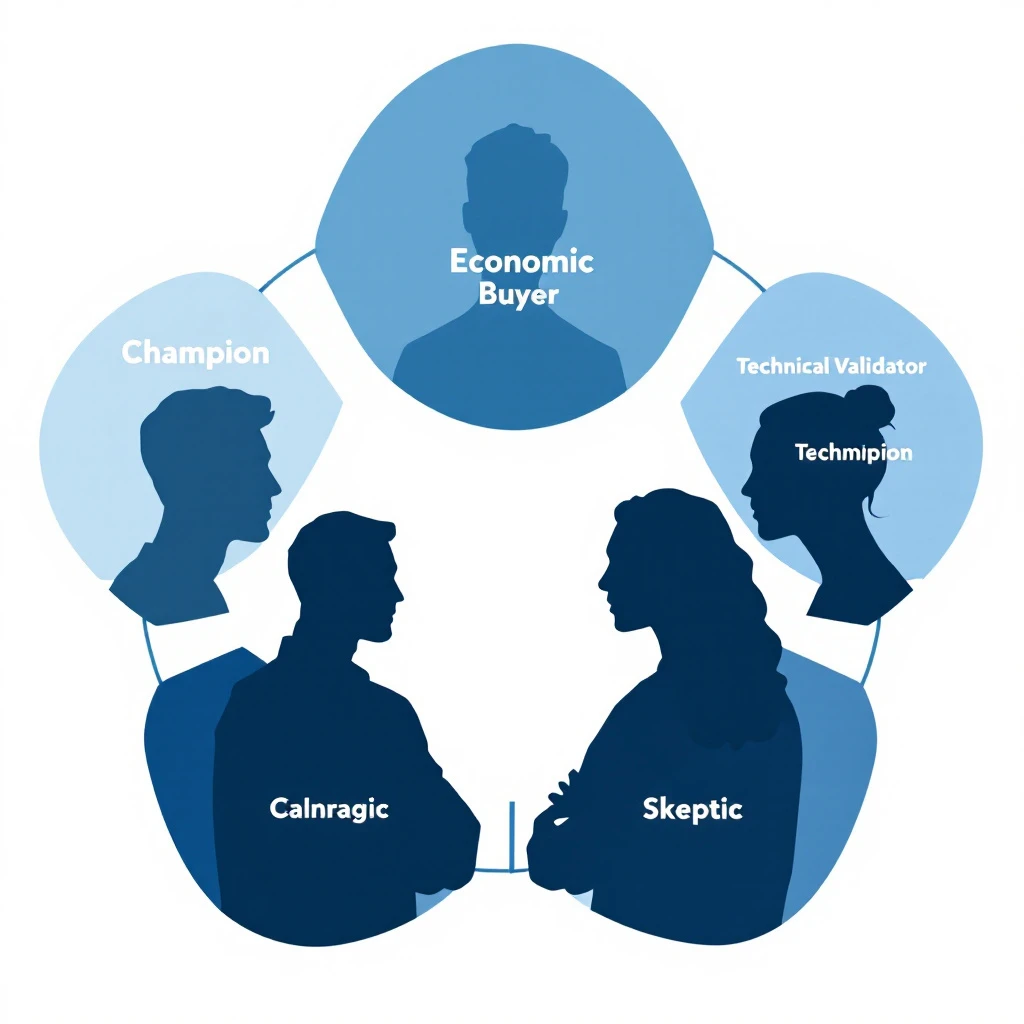
Five-stakeholder deal team diagram

Why single-threaded deals die quietlyโ€‹

Gartner's most-cited B2B buying research puts the average enterprise buying committee at 6 to 10 people. Forrester's data lands closer to 11. The deals that close involve the buyer talking to your team an average of 17 times across multiple stakeholders.

If your only relationship is with one champion, you are betting your forecast on three things going right at once:

  1. The champion never changes jobs, never gets reorged, never goes on parental leave
  2. The champion has the political capital and skill to sell internally without you in the room
  3. Every other stakeholder defers to the champion's recommendation without an independent opinion

Forrester says 86% of B2B deals are won or lost based on multi-thread coverage. If you have ever watched a deal you were "sure about" slip a quarter, the post-mortem almost always reveals the same thing: you had one relationship. The buyer had nine.

When the champion goes quiet โ€” which happens to roughly one in three enterprise deals โ€” your only signal is silence. We wrote a full re-engagement workflow for that case in our champion-quiet stalled deal playbook, but the better fix is upstream: never let a deal sit at one thread.

The 5 roles on every B2B deal teamโ€‹

Forget org charts. Buying committees don't show up on org charts. They form ad hoc around a project and dissolve when it closes. The roles below are functional โ€” one person can play two, two people can share one, but every winning deal has all five seats filled.

1. The Champion (the seller-internal-to-the-account)โ€‹

The person who wants you to win. They sell on your behalf in meetings you are not invited to. They know your roadmap, they can rattle off your pricing, they actively defend you against alternatives.

Most AEs stop here. That is the mistake.

A champion without backup is a single point of failure. If they go on PTO during the final week of the quarter, your deal slips. If they get poached by a competitor โ€” and B2B SaaS attrition averages 13% annually โ€” your deal restarts from zero.

Coverage signal: You have a champion. Good. That puts the deal at 20% stakeholder coverage. Not 100%.

2. The Economic Buyer (the budget owner)โ€‹

The person who signs the PO. In a 50-500 employee company, this is usually a VP or C-level. In enterprise, it could be a director with a discretionary budget below a threshold and an SVP above it.

The Economic Buyer's question is never "is this the best product?" It is "is this worth the opportunity cost of the budget?" They are weighing your line item against headcount, against another tool, against doing nothing.

You do not sell features to the Economic Buyer. You sell ROI math and risk reduction. And you sell it directly โ€” not through the champion. The champion's framing of your ROI is always weaker than yours, because they are not professionally trained to negotiate against a CFO's skepticism.

Coverage signal: If you have not had a 15+ minute conversation with the Economic Buyer by the second demo, the deal is not real yet.

3. The Technical Validator (the gatekeeper)โ€‹

VP of Engineering, Head of IT, Director of Security, Chief Architect. Whoever has the authority to say "we can't run this in our environment" and end the deal.

The Technical Validator is the most under-engaged stakeholder in B2B sales. Reps fear them, so they delay the introduction. Then in week 11 of a 13-week deal cycle, the security questionnaire arrives, the SOC 2 conversation happens, the integration concerns surface โ€” and the deal slips a quarter while you chase answers.

Bring them in early. Week two. Give them documentation before they ask for it. Make them feel respected as a peer reviewer, not an obstacle.

Coverage signal: A Technical Validator who has reviewed your docs and asked at least one clarifying question is a coverage point. A Technical Validator who has never been introduced is a hidden veto waiting to happen.

4. The User Champion (the end-user advocate)โ€‹

The person whose daily workflow your product changes. Usually different from the Champion. The Champion is often a manager or director โ€” the User Champion is the SDR, the marketer, the analyst who will actually log in every day.

Why they matter: in modern B2B sales, end-user adoption is a procurement criterion. CFOs ask, "will the team actually use this?" If the User Champion can answer yes in their own voice โ€” not through your champion โ€” the deal accelerates.

End-users also surface real objections faster than directors do. They will tell you in 60 seconds that your UI is confusing or that your CSV export is missing a column the team needs. That intel saves you from a 6-week stall later.

Coverage signal: Did the User Champion attend the demo? Did they ask questions? Have they tried the trial themselves? If no to all three, you are selling a director on a tool their team has not validated.

5. The Skeptic (the loyal opposition)โ€‹

Every deal has one. The person who is paid, structurally, to push back. CFO. Procurement. Legal. Sometimes a competing department head who wanted to build instead of buy.

You cannot avoid the Skeptic. You can only get to them first.

The mistake reps make is treating the Skeptic as the enemy. They are not. They are doing their job โ€” protecting the company from a bad procurement decision. Your job is to give them the answers they need before they have to dig for them.

Ask the champion: "Who is going to push back on this internally? Walk me through their concerns before the meeting." Then prep direct answers โ€” not deflections, not "let me get back to you," but the answer.

Coverage signal: Have you been told who the Skeptic is? Have you addressed their objection in writing? If no, the deal has a landmine you cannot see.

How to recruit each stakeholder (with what to say)โ€‹

Identification is the easy half. Getting on calendars is where most reps fail. Below is the exact ask for each role, tested in real outbound. Adjust the names and product specifics, but keep the structure.

Recruiting the Economic Buyerโ€‹

After demo 2 with the champion, ask:

"[Champion], based on where we are, I think this is the right time to bring [VP/CFO name] into the next conversation. I want to make sure they hear the ROI math directly from me, not summarized through you โ€” that protects you from any 'why didn't you push back on X' questions later. Can you make the intro this week? I will own the agenda and keep it to 15 minutes."

The framing matters. You are protecting the champion, not bypassing them. Champions accept this because it is true.

If the champion stalls on the intro for more than 7 days, that is itself a coverage signal: they either lack the political capital to make the intro, or the deal is less real than they have implied. Both are diagnostic. See our signal-decay framework for what to do when intent signals stop refreshing.

Recruiting the Technical Validatorโ€‹

Cold-introduce yourself directly. Do not wait for the champion. A 3-sentence message:

"Hi [Name] โ€” I am working with [Champion] at [Company] on evaluating [product category]. Wanted to introduce myself ahead of any security or integration conversations so we are not strangers when those come up. Happy to share our SOC 2 report and architecture overview now if useful. 15-minute intro call this week or next?"

Half will not respond. The other half will, because you have signaled three things: you know they exist, you respect their role, and you are not going to waste their time later.

Recruiting the User Championโ€‹

Get them into the demo. If the champion will not invite them, ask:

"We see a real difference in adoption when the daily users see the tool before procurement, not after. Can we do a 30-minute working session with 2-3 people from the [SDR/marketing/ops] team? It also gives me real product feedback before we get to pricing."

Buyers know this is true. Most will say yes.

Recruiting the Skepticโ€‹

You do not "recruit" the Skeptic โ€” you preempt them. As soon as you know who they are, send the champion a one-page document titled "[Skeptic role] FAQ" with the three objections they are most likely to raise and your written answers.

Then ask: "Can you forward this to [Skeptic] before our next meeting and ask them if there's anything else they'd want addressed?" This converts the Skeptic from an ambush into a structured conversation.

The weekly cadence: keeping the deal team warmโ€‹

Identifying stakeholders does not multi-thread the deal. Recurring contact does. Below is the cadence that separates AEs who hold 80% close rates from AEs who lose 40% of late-stage deals to "no decision."

StakeholderTouch FrequencyChannelMessage Type
ChampionWeeklySlack or textUpdate + question
Economic BuyerBi-weeklyEmailForwarded relevant insight
Technical ValidatorBi-weeklyEmailDocumentation + status
User ChampionWeekly during evalEmail or async videoProduct tip + feedback ask
SkepticAs-neededThrough championPre-emptive FAQ updates

The "forwarded relevant insight" pattern for the Economic Buyer is the highest-ROI touch in this entire playbook. You are not pitching. You are sending them a single article, benchmark, or customer story that addresses their specific concern. Three sentences. No CTA. Their reply rate to this pattern, in our internal data, is 4x higher than any "checking in" email.

For the User Champion, the highest-converting touch is asking for feedback on a specific feature โ€” not generic "how is the trial going." Specific feedback requests get specific replies. Specific replies build relationship.

CRM hygiene: how to flag single-threaded deals automaticallyโ€‹

You cannot multi-thread what you cannot see. Most CRMs let you log contacts but do not surface coverage gaps as a forecasting signal. Build the view yourself.

In your opportunity record, add three fields:

  1. Stakeholders Identified (number): How many of the 5 roles have a named person?
  2. Stakeholders Engaged (number): How many of those 5 have had a 1:1 conversation with you in the last 21 days?
  3. Coverage Risk (calculated): Red if Engaged is less than 3, yellow if 3-4, green if 5.

Run a weekly report filtering all opportunities forecasted to close this quarter where Coverage Risk is red. That list is your priority for next week's stakeholder outreach. It is also the list you bring to your manager's deal review.

This is the same operating principle behind our 14-day post-demo window playbook: make coverage visible, then make it accountable.

Multi-threading from inbound vs outbound dealsโ€‹

The playbook works for both, but the entry point differs.

Inbound deals start with a single contact who filled out a form. You do not yet know if they are the Champion, the User, or just someone doing research. Your first job is diagnosis. Use the first call to map: who else is involved in this evaluation? Who would sign the contract? Who needs to approve from a technical side?

Our inbound triage tier system flags hot inbound for 5-minute response โ€” multi-threading takes over from there in the post-demo phase.

Outbound deals start with you picking the entry point. Pick wrong and you spend two months selling to someone who has no authority to buy. We covered first-touch strategy in our signal-to-meeting 24-hour workflow and our visitor ID to outreach playbook โ€” multi-threading starts the moment the first meeting is booked, not after the demo.

What multi-threading does not solveโ€‹

This playbook is not magic. It does not:

  • Compensate for product-market fit gaps. If the prospect's pain is not real or your product is not the right shape for it, no stakeholder coverage will close the deal.
  • Replace strong discovery. You can multi-thread perfectly and still lose because the champion sold you on a vision the Economic Buyer never agreed was a priority.
  • Save deals from competitive switching costs. If the prospect is on a 3-year contract with your competitor and the cost of breaking it exceeds your annual price, more stakeholders does not change the math.

Multi-threading is the second-most-important variable in B2B win rate, behind discovery. Treat it accordingly.

The 60-second pipeline review questionโ€‹

Once you have built the playbook above, your pipeline reviews change shape. Stop asking "what is the status of this deal?" Start asking:

"Walk me through the deal team. Who has been engaged in the last 14 days? Who has not? What is the plan to engage them?"

Reps who can answer this in 30 seconds have real pipeline. Reps who cannot โ€” even on deals they are calling "committed" โ€” are running on optimism and a single contact. That is the deal you will lose in week 11, the one that becomes a champion-quiet re-engagement project, the one that turns into a closed-lost reopen attempt six months later (we wrote that workflow up in our closed-lost reopen playbook, but it is much cheaper to never get there).

How MarketBetter helps you multi-thread without burning hoursโ€‹

Manually maintaining a 5-stakeholder map across 30 active opportunities is a part-time job. The reason most reps do not multi-thread is not philosophical โ€” it is bandwidth.

MarketBetter pulls intent signals across your active accounts, tracks champion movements (job changes are a leading indicator of deal risk and a re-engagement opportunity โ€” we covered this in our buying committee post and our blind committee post), and surfaces which stakeholders in each account have engaged recently versus gone cold.

Instead of telling you who exists at the account, MarketBetter tells you which stakeholder to contact next, what to say based on their recent activity, and which deals have coverage gaps that are about to slip. The signal becomes the action โ€” not just data on a dashboard.

If you have ever lost a deal because the champion went on PTO during the final week, or because procurement showed up in week 10 with objections you could have addressed in week 2, the gap was not strategy. It was visibility.


Want to see how MarketBetter surfaces coverage gaps across your pipeline before they cost you a deal? Book a 20-minute demo โ†’

The Complete AI SDR Playbook: Putting It All Together

ยท 16 min read
MarketBetter Team
Content Team, marketbetter.ai

๐Ÿ† Series Difficulty: CAPSTONE (Part 10 of 10) โ€” Everything from Parts 1-9, assembled into your complete daily workflow.

You've made it. Parts 1 through 9 of this series gave you the individual tools and techniques. Now it's time to assemble them into a complete daily system.

This is the capstone of our Claude Code + MarketBetter series โ€” a minute-by-minute playbook for the AI-powered SDR. Not theory. Not "you could do this someday." This is what your actual day looks like when you put everything together.

Here's how every skill from the series maps to your daily routine:

Time BlockSeries SkillWhere You Learned It
Morning intelligenceProspect research๐ŸŸข Part 2
Outreach draftingPersonalized emails๐ŸŸข Part 3
LinkedIn power hourSales Nav workflow๐ŸŸก Part 4
Competitive checksCompetitor monitoring๐ŸŸก Part 5
Lead prioritizationLead scoring๐ŸŸก Part 6
Data maintenanceCRM cleanup๐Ÿ”ด Part 7
Pre-call prepMeeting briefs๐Ÿ”ด Part 8
Re-engagementFollow-up sequences๐Ÿ”ด Part 9

If you've been following the series from the beginning โ€” starting with the Basic skills, building through the Medium workflows, and mastering the Advanced techniques โ€” this playbook will feel natural. You've already practiced each piece. Now we're just putting them in the right order.

If you're jumping straight to this post, it'll still work โ€” but you'll get more value from each section if you've read the relevant earlier post. I'll link to them throughout so you can go deeper on any technique.

The AI-Powered SDR's Daily Scheduleโ€‹

7:45 AM โ€” Pre-Work Intelligence Gathering (15 minutes)โ€‹

Before you even sit down at your desk, spend 15 minutes on intelligence gathering. This is your competitive advantage โ€” most SDRs don't start thinking until 9 AM.

Open MarketBetter's dashboard and check:

  • Overnight website visitors โ€” who came to your site while you slept?
  • Return visitors โ€” any cold leads that came back to life? (This is your highest-priority signal. See Part 9.)
  • High-intent page visits โ€” anyone on pricing, case studies, or comparison pages?
  • Multi-person visits โ€” any companies with multiple visitors? (Buying committee forming)

Quick Claude Code prompt:

"Here are today's MarketBetter signals โ€” 14 companies visited our site overnight. 3 hit the pricing page, 1 is a return visitor from 3 months ago, and 2 companies had multiple visitors.

Prioritize these for me based on buying intent. Research the top 5 and give me a 3-sentence brief for each: what they do, what's notable, and the best outreach angle."

By 8:00 AM, you have a prioritized hit list for the day. Most SDRs are still making coffee.

8:00 AM โ€” The Morning Sprint (45 minutes)โ€‹

This is your most productive window. No meetings, no Slack distractions, pure execution.

8:00โ€“8:15: Batch Research

Take your top 10-15 accounts from the intelligence gathering and batch-research them:

"Research these 10 accounts in detail. For each, give me:

  • Company overview (one paragraph)
  • Key decision maker with LinkedIn profile
  • One personalization hook
  • Recommended first-touch channel (email, LinkedIn, or phone)

[list your 10 accounts]"

8:15โ€“8:35: Draft Outreach

Feed the research back to Claude Code for outreach generation:

"Write personalized cold emails for the top 5 accounts. Use the research you just provided. Rules: under 100 words, personal opening, one CTA, conversational tone. Also write LinkedIn connection request notes (under 300 characters) for the other 5."

Review the drafts. Fix anything that doesn't sound like you. This should take 5-10 minutes for 10 personalized touchpoints.

8:35โ€“8:45: Load and Launch

  • Load the email drafts into MarketBetter sequences
  • Set up multi-touch follow-up cadences for each prospect
  • Send LinkedIn connection requests
  • Queue any phone calls for the Call Block (coming up next)

Morning Sprint Results: 10 personalized outreach touches, researched and deployed. In 45 minutes. A traditional SDR would need 3-4 hours for this.

8:45 AM โ€” Call Block 1 (60 minutes)โ€‹

Now it's time to pick up the phone. This is where humans shine and AI can't replace you.

Pre-call prep (2 minutes per call):

Before each call, pull up your Claude Code research brief. But also check MarketBetter for any last-minute signals:

"Quick prep for my call with [Name] at [Company]. Give me:

  1. Their most recent LinkedIn post (topic)
  2. One personalized opening line
  3. The key pain point to explore
  4. A fallback question if the conversation stalls"

During the call:

Be human. Listen. Ask questions. Use the research as context, not a script. The AI prepared you; now it's your turn to build a relationship.

Post-call logging (1 minute per call):

After each call, quickly dictate or type your notes. At the end of the call block, batch-process them:

"Here are my raw notes from 8 calls this morning:

Call 1: Sarah at Acme โ€” interested, wants to loop in CRO, follow up Thursday Call 2: James at Beta โ€” not a fit, too small Call 3: David at Gamma โ€” no answer, left voicemail [etc.]

For each call, write:

  1. A structured CRM update (2-3 sentences)
  2. For interested prospects: a follow-up email to send today
  3. For no-answers: a follow-up email referencing the voicemail"

Your call block produced conversations. Claude Code handles the admin that follows.

10:00 AM โ€” LinkedIn Power Hour (30 minutes)โ€‹

Dedicated LinkedIn time, executed efficiently:

10:00โ€“10:10: Engage with Prospects' Content

Check which prospects posted on LinkedIn today. Use Claude Code to draft thoughtful comments:

"Here are 5 LinkedIn posts from my prospects today. Draft a genuine, non-salesy comment for each that adds value to the conversation. Keep each under 2 sentences."

Leave the comments. This warms up prospects before your outreach arrives.

10:10โ€“10:20: Sales Nav Search

Run your saved Sales Navigator searches for new leads. Feed new results into Claude Code for quick analysis:

"5 new leads from my Sales Nav search. Quick assessment: which 2-3 are worth pursuing? Why?"

Import the best ones into MarketBetter via the Chrome Extension. (Full workflow in Part 4.)

10:20โ€“10:30: Connection Request Follow-Ups

Check who accepted your connection requests. Draft personalized DMs:

"These 3 people accepted my LinkedIn connection requests this week:

  1. [Name, Title, Company]
  2. [Name, Title, Company]
  3. [Name, Title, Company]

Write a follow-up DM for each that:

  • Thanks them for connecting (briefly)
  • Offers a specific piece of value (insight, resource, introduction)
  • Ends with a soft conversation opener, NOT a meeting ask"

10:30 AM โ€” Meeting Prep (15 minutes)โ€‹

Check your afternoon calendar. If you have meetings, prep now while your brain is fresh:

"I have 2 meetings this afternoon:

  1. [Name], [Title] at [Company] โ€” 1:00 PM, discovery call
  2. [Name], [Title] at [Company] โ€” 3:00 PM, second meeting (follow-up from last week)

Generate one-page meeting briefs for each. [Full meeting prep prompt from Part 8]"

Layer in MarketBetter website visit data and you're set. (Complete meeting prep system in Part 8.)

11:00 AM โ€” Email and Sequence Management (20 minutes)โ€‹

Review responses:

  • Check for replies to your outreach from the past few days
  • Positive replies โ†’ Schedule the meeting immediately
  • Objections โ†’ Feed the objection to Claude Code for a thoughtful response
  • "Not interested" โ†’ Mark and move on (or add to long-term nurture)

Check sequence performance:

  • In MarketBetter, review your active sequences' open rates, click rates, and reply rates
  • Identify sequences that are underperforming
  • Ask Claude Code to analyze:

"My email sequence for [campaign] has a 45% open rate but only a 2% reply rate. The emails are about [topic] targeting [persona]. The subject lines are getting opens but the body isn't converting. Review my emails and suggest 3 specific changes to improve reply rate."

Manage follow-ups:

  • Check which prospects need manual follow-up today
  • Use Claude Code to draft personalized follow-ups based on the last interaction

11:30 AM โ€” Competitive Intel Check (10 minutes, twice per week)โ€‹

Twice a week (say, Monday and Thursday), do a quick competitive scan:

"Quick competitive update: what's new with [Competitor A], [Competitor B], and [Competitor C] this week? Check for product announcements, G2 reviews, leadership changes, funding, or social media discussions."

Update your competitive notes. Use any new intel to refine your outreach messaging. (Full competitive intel system in Part 5.)

12:00 PM โ€” Lunch Breakโ€‹

Step away. Seriously. The AI-powered SDR is more efficient, not more burned out. Eat food. Touch grass. Come back refreshed.

1:00 PM โ€” Afternoon Meetingsโ€‹

Execute your meetings with the briefs you prepped this morning. You're prepared. You're confident. You know things about this prospect that will surprise them.

Between meetings:

  • Quick post-meeting note capture
  • Claude Code processes notes into structured CRM updates and follow-up drafts

2:30 PM โ€” Call Block 2 (45 minutes)โ€‹

Second phone session of the day. Different prospects, same prep process.

Focus this call block on:

  • Warm follow-ups โ€” Prospects who engaged with your morning emails
  • Return visitors โ€” Cold leads that MarketBetter flagged as re-engaging
  • Time zone coverage โ€” West Coast prospects (if you're East Coast) or international leads

3:15 PM โ€” Cold Lead Reactivation (20 minutes, twice per week)โ€‹

Twice a week, work your cold pipeline:

"Review these 10 cold leads. Research what's changed since they went cold. Give me reactivation angles for the top 5 and draft reactivation emails."

Load the emails into MarketBetter reactivation sequences. (Complete reactivation system in Part 9.)

3:45 PM โ€” Admin and Data Hygiene (15 minutes)โ€‹

The unsexy but essential stuff:

  • Update CRM with today's activities (use Claude Code to process your raw notes)
  • Quick data quality check on new contacts added today
  • Verify email addresses before adding to sequences

Once a week, do a deeper cleanup session. (Full CRM cleanup workflow in Part 7.)

4:00 PM โ€” Tomorrow's Prep (15 minutes)โ€‹

End your day by setting up tomorrow:

"Based on what I learned today, here are the prospects I should prioritize tomorrow:

  1. [Prospect who replied positively โ€” need to schedule meeting]
  2. [Prospect from MarketBetter who showed high intent but I didn't get to today]
  3. [Follow-up from today's meeting]

Research each and give me a quick brief so I can hit the ground running at 8 AM."

Also queue any emails for early-morning delivery through MarketBetter. Your outreach is working before you wake up.

4:15 PM โ€” End of Day Reporting (15 minutes)โ€‹

Track your numbers. Use Claude Code to make it painless:

"Here are today's raw activity numbers:

  • Emails sent: 35
  • Calls made: 22
  • LinkedIn touches: 15
  • Meetings booked: 3
  • Meetings held: 2
  • Replies received: 7
  • Positive replies: 4

Calculate my:

  • Email reply rate
  • Call-to-meeting conversion rate
  • Total pipeline touches
  • Comparison to last week's averages

Any patterns you notice? What should I do differently tomorrow?"

This daily review takes 5 minutes but keeps you on track and continuously improving.

The Weekly Rhythmโ€‹

Beyond the daily routine, here's your weekly structure:

Monday:

  • Weekly planning โ€” set goals for meetings booked, emails sent, new accounts researched
  • Competitive intel update
  • Sales Nav search refresh

Tuesday-Thursday:

  • Full daily routine as outlined above
  • Focus on execution and pipeline movement

Friday:

  • CRM cleanup session (30 minutes) โ€” using Part 7 workflows
  • Weekly performance analysis with Claude Code
  • Cold lead reactivation batch
  • Plan next week's priority accounts
  • Update your lead scoring model with this week's conversion data (Part 6)

The Numbers: AI-Powered SDR vs. Traditional SDRโ€‹

Here's how the same day looks, quantified:

MetricTraditional SDRAI-Powered SDR
Accounts researched10-1540-50
Personalized emails sent15-2050-80
Calls with research context5-815-22
Meetings booked (avg/day)1-23-5
Time on research3-4 hours30-45 minutes
Time on admin1-2 hours15-30 minutes
Time actually selling2-3 hours5-6 hours

The AI-powered SDR doesn't work longer hours. They work better hours. The AI eliminates the time sinks so you can spend your day on what actually moves the needle: conversations with prospects.

Your AI SDR Toolkit Summaryโ€‹

Here's everything you need, in one place:

Claude Code โ€” Your research and writing engine

  • ๐ŸŸข Prospect research (Part 2)
  • ๐ŸŸข Email personalization (Part 3)
  • ๐ŸŸก LinkedIn outreach (Part 4)
  • ๐ŸŸก Competitive intelligence (Part 5)
  • ๐ŸŸก Lead scoring (Part 6)
  • ๐Ÿ”ด CRM cleanup (Part 7)
  • ๐Ÿ”ด Meeting prep (Part 8)
  • ๐Ÿ”ด Follow-up sequences (Part 9)

MarketBetter โ€” Your signal and execution engine

  • Website visitor identification (who's on your site right now?)
  • Person-level identification (not just companies โ€” actual people)
  • Return visitor alerts (cold leads coming back to life)
  • AI-powered email sequences (delivery, timing, follow-ups)
  • Chrome Extension (LinkedIn-to-pipeline imports)
  • Daily playbook (your prioritized hit list every morning)
  • Engagement tracking (who's opening, clicking, returning?)

Your Brain โ€” The irreplaceable element

  • Building relationships
  • Reading the room on calls
  • Making judgment calls on timing and approach
  • Asking the right questions
  • Closing

AI handles the preparation. You handle the performance.

Common Mistakes When Adopting This Playbookโ€‹

1. Trying to Do Everything on Day Oneโ€‹

Don't try to implement all 10 parts simultaneously. Follow the progression:

  • Week 1 โ€” Start with ๐ŸŸข Basic skills: Research (Part 2) and email writing (Part 3). Get comfortable with simple prompts.
  • Week 2 โ€” Move to ๐ŸŸก Medium workflows: LinkedIn pipeline (Part 4), competitive intel (Part 5), lead scoring (Part 6). Chain basic skills into multi-step processes.
  • Week 3 โ€” Tackle ๐Ÿ”ด Advanced systems: CRM cleanup (Part 7), meeting prep (Part 8), follow-up sequences (Part 9). Build automated routines.
  • Week 4 โ€” Run the ๐Ÿ† Full Playbook: This post. The complete daily routine.

The series was designed this way for a reason. Each tier builds on the skills from the previous one.

2. Over-Automatingโ€‹

AI should augment your work, not replace your judgment. Always review outreach before sending. Always add your own voice. Always verify key facts. The goal is to be more efficient, not to become a robot.

3. Ignoring the Dataโ€‹

The playbook improves over time โ€” but only if you track results and iterate. Your daily reporting isn't optional. It's how you learn what's working and what isn't.

4. Neglecting the Human Elementโ€‹

AI can research, write, and analyze. It can't build trust, read emotions, or navigate complex organizational dynamics. Never let AI efficiency replace human empathy. The best SDRs are the ones who use AI to free up time for more human connection, not less.

5. Skipping CRM Hygieneโ€‹

It's tempting to skip the "boring" stuff like data cleanup. Don't. Everything in this playbook depends on clean data. Garbage in, garbage out. Fifteen minutes a day keeps your data clean and your entire system functioning.

The 30-Day Implementation Planโ€‹

This plan follows the same Basic โ†’ Medium โ†’ Advanced progression as the series itself:

Week 1: ๐ŸŸข Foundation (Basic Skills)

  • Day 1-2: Set up Claude Code. Practice with basic research prompts from Part 2.
  • Day 3-4: Start writing personalized emails using the techniques from Part 3. Compare results to your templates.
  • Day 5: Do a CRM cleanup sprint using Part 7 โ€” yes, this is an Advanced skill, but clean data is foundational.

Week 2: ๐ŸŸก Workflows (Medium Skills)

  • Day 6-8: Implement the LinkedIn-to-Pipeline workflow from Part 4. This combines research + email writing into a multi-step process.
  • Day 9-10: Set up competitive intelligence monitoring from Part 5. Run your first competitor analysis.

Week 3: ๐ŸŸกโ†’๐Ÿ”ด Systems (Medium to Advanced)

  • Day 11-12: Build your lead scoring model from Part 6. Start prioritizing your daily list with scores.
  • Day 13-14: Implement the meeting prep system from Part 8. Prep for every meeting with one-page briefs.
  • Day 15: Run your first cold lead reactivation batch from Part 9.

Week 4: ๐Ÿ† Full System (Capstone)

  • Day 16-20: Run the complete daily routine from this playbook. Every technique, every time block. Track every metric.
  • End of week: Review results. What's working? What needs adjustment? Iterate.
Free Tool

Try our AI Lead Generator โ€” find verified LinkedIn leads for any company instantly. No signup required.

Try This Todayโ€‹

Here's your final action item for the series:

Tomorrow morning, run the complete Morning Sprint (7:45-8:45 AM):

  1. 7:45 AM โ€” Check MarketBetter for overnight signals
  2. 8:00 AM โ€” Batch-research top 10 accounts with Claude Code
  3. 8:15 AM โ€” Draft personalized emails for top 5
  4. 8:35 AM โ€” Load into MarketBetter sequences and send LinkedIn requests
  5. 8:45 AM โ€” Start your call block with full research context

One morning. One sprint. Compare your output to a typical morning. If you touch more accounts with better personalization in less time โ€” and you will โ€” you'll never go back.


This is Part 10 (๐Ÿ† Capstone), the final post in our 10-part series on Claude Code + MarketBetter for SDRs. If you haven't read the earlier posts, start with Part 1: The AI-Powered SDR (๐ŸŸข Basic) โ†’

Ready to build your AI-powered SDR workflow? Book a MarketBetter demo and see how signal-driven outreach, visitor identification, and AI sequences fit into your daily routine.
