
2 posts tagged with "sales efficiency"

View All Tags

Best Sales Productivity Tools for SDR Teams [2026]

· 20 min read
sunder
Founder, marketbetter.ai

Best sales productivity tools for SDR teams in 2026

The average SDR spends 65% of their time on tasks that aren't selling. Data entry. List building. Researching prospects. Switching between tabs. Updating the CRM. Attending meetings about updating the CRM.

That means a $60K/year SDR generates about $21K worth of actual selling activity. The rest is overhead.

Sales productivity tools exist to shift that ratio. But "productivity tool" has become a junk drawer category — it includes everything from CRM plugins to AI note-takers to Pomodoro timers. Most of those won't move the needle.

We focused on the tools that directly reduce time-to-first-touch, eliminate manual data entry, and help SDRs prioritize the right accounts. These are the 15 platforms that top-performing B2B SDR teams actually use in 2026.

What Actually Kills SDR Productivity?

Before buying tools, understand the problems:

Problem 1: Too many tabs. The average SDR switches between 8-12 tools daily — CRM, email, dialer, LinkedIn, enrichment tool, calendar, Slack, intent data platform. Each switch costs 23 minutes of refocus time (UC Irvine research). Over a day, that's hours lost to context-switching.

Problem 2: Manual research. SDRs spend 20-30 minutes per prospect researching company size, tech stack, recent news, and mutual connections. Multiply that by 50 prospects per day, and research alone consumes the entire workday.

Problem 3: No prioritization. Without intent signals, SDRs treat every lead equally. They work alphabetically, by import date, or by gut feel. Meanwhile, the prospect who visited the pricing page three times yesterday gets the same generic sequence as someone who downloaded a whitepaper six months ago.

Problem 4: Manual CRM updates. Reps hate updating CRMs because it takes time and delivers zero personal value. But managers need the data. This creates an adversarial dynamic where CRM data is always stale and incomplete.

The best productivity tools eliminate these problems at the root — not by adding another tab.

Related reading: Best AI SDR Tools 2026 · Best Sales Automation Software · Best Cold Email Software

Quick Comparison: 15 Sales Productivity Tools

ToolCategoryKey Time SaverStarting Price
MarketBetterAll-in-one SDR OSDaily playbook eliminates list-building$99/user/month
Apollo.ioProspecting + SequencesDatabase search → sequence in one clickFree–$119/user/mo
OutreachSales engagementMulti-step sequence automation~$100/user/mo
SalesLoftSales engagementCadence + Rhythm AI prioritization~$125/user/mo
GongConversation intelligenceAuto call notes + coaching insights~$100/user/mo
LavenderEmail coachingReal-time email scoring and rewriting$29/user/mo
LinkedIn Sales NavigatorSocial sellingAdvanced people/company search$99–$169/user/mo
CalendlyMeeting schedulingEliminates booking back-and-forthFree–$16/user/mo
ZoomInfoB2B intelligenceInstant contact data + intent signals~$15K+/yr
ClayData enrichmentWaterfall enrichment from 75+ sources$149–$800/mo
Chili PiperInbound routingInstant lead-to-meeting conversion$150–$300/mo
Close CRMCRM + dialerBuilt-in calling + SMS + email$29–$139/user/mo
Fireflies.aiMeeting notesAI transcription + action itemsFree–$29/user/mo
VidyardVideo prospectingPersonalized video at scaleFree–$59/user/mo
Troops/SalesforceCRM automationSlack-based CRM updates (no tab switch)Included in SFDC

1. MarketBetter — The Daily SDR Playbook

Category: All-in-one SDR operating system Time saved: 2-3 hours/day (eliminates list building, research, and prioritization)

Most productivity tools solve one piece of the SDR workflow. MarketBetter replaces the workflow entirely.

How it boosts productivity:

When an SDR logs in, they don't see a CRM dashboard they need to interpret. They see today's playbook — a ranked list of exactly who to contact, how, and why. Each task is backed by a specific signal:

  • "Call James at Acme Corp — visited pricing page 3x this week, company just raised Series B"
  • "Email Sarah at TechCo — her champion at your current customer just moved there"
  • "Follow up with Mike — opened your last email 4 times but hasn't replied"

This eliminates three massive time-sinks simultaneously:

  1. No list building — The platform identifies and prioritizes prospects automatically
  2. No research — Every lead is enriched with company data, signals, and context
  3. No tab-switching — Email, calling, and LinkedIn actions happen from one interface

The smart dialer is built directly into the platform. Click-to-call from the playbook, auto-log the outcome, and move to the next task. No switching to a separate dialer app, no manual call logging.

The AI chatbot handles website visitors 24/7 — qualifying leads, answering questions, and booking meetings while your SDRs sleep. Conversations are routed to the right rep based on territory and availability.

Real impact: MarketBetter customers report 70% less manual SDR work, 2x faster speed-to-lead, and 90% faster lead response times.

Pricing: $99/user/month, $1,500/mo (Growth, 5 seats), $3,000/mo (Scale, 10 seats).

G2 Rating: 4.97/5 — Top Performer across 15 lead generation categories.

See how the Daily Playbook works →

2. Apollo.io — Prospecting + Sequences in One

Category: B2B database with built-in sequencing Time saved: 1-2 hours/day (eliminates manual prospecting and list building)

Apollo is the Swiss Army knife for outbound SDRs. Search a 275M+ contact database, filter by any criteria imaginable, build a list, and drop prospects directly into an email sequence — without leaving the platform.

How it boosts productivity:

The database search eliminates the hours SDRs spend finding prospects manually. Filters include job title, company size, funding stage, tech stack, industry, and intent signals. Once you've built a list, one click drops the entire batch into a multi-step email sequence with personalization variables.

Apollo's Chrome extension pulls LinkedIn profile data directly into the platform, adding contacts to sequences while browsing LinkedIn. The email tracking shows opens, clicks, and replies in real-time.

Key limitation: Apollo is email-heavy. Phone and LinkedIn outreach require additional tools or manual effort. And there's no website visitor identification — you're finding new prospects, not leveraging existing website traffic.

Pricing: Free (10K email credits/mo). Basic $49/user/mo. Professional $79/user/mo. Organization $119/user/mo.

G2 Rating: 4.8/5

3. Outreach — Enterprise Sales Engagement

Category: Sales engagement platform Time saved: 1-2 hours/day (automates multi-step sequences across channels)

Outreach is the market leader in sales engagement for a reason — it handles the complexity of enterprise outbound at scale. Multi-step sequences combine email, phone, LinkedIn, and SMS into automated cadences that fire based on prospect behavior.

How it boosts productivity:

Sequences automate the follow-up process entirely. An SDR creates a sequence once, and Outreach handles the timing, channel selection, and personalization for hundreds of prospects simultaneously. The platform's analytics show which sequences perform best, which steps to optimize, and which prospects are engaging.

Outreach Kaia provides real-time conversation intelligence during calls — surfacing competitor mentions, objections, and talk-time ratios live, so reps can adjust on the fly.

Key limitation: Outreach is built for larger teams. The pricing reflects that — expect $100+/user/month with annual contracts. For teams under 10 reps, it may be overkill.

Pricing: Custom pricing. Typically $100-130/user/mo on annual contracts.

G2 Rating: 4.3/5

4. SalesLoft — Rhythm AI Prioritization

Category: Sales engagement platform Time saved: 1-2 hours/day (AI-prioritized task list across all channels)

SalesLoft's Rhythm feature is the closest any pure sales engagement tool gets to MarketBetter's playbook approach. Rhythm ingests signals from across your sales stack and generates a prioritized daily workflow — telling reps which actions to take first based on predicted impact.

How it boosts productivity:

Instead of working through sequences linearly, Rhythm dynamically reorders an SDR's task list based on real-time signals. If a high-value prospect just opened an email, that call moves to the top. If a deal's primary contact went dark, Rhythm surfaces the multithreading task.

The Deals dashboard gives managers visibility into pipeline health without reps manually updating stages. SalesLoft automatically captures activity data and maps it to deal stages.

Key limitation: SalesLoft's intelligence features require the full platform. Pricing has increased significantly (Vendr data shows $8K+ for 50 seats at the low end), and the add-on pricing for Deals, Conversations, and Analytics can push total cost above $200/user/mo.

Pricing: Custom pricing. Starting around $125-175/user/mo for full platform.

G2 Rating: 4.5/5

5. Gong — Conversation Intelligence

Category: Conversation intelligence and revenue intelligence Time saved: 30-60 minutes/day (eliminates manual note-taking, surfaces coaching insights)

Gong records, transcribes, and analyzes every sales conversation — calls, video meetings, and emails. The AI extracts key topics, competitor mentions, objections, next steps, and risk signals automatically.

How it boosts productivity:

SDRs stop taking notes during calls. Gong captures everything, generates a summary, and identifies action items. Managers use Gong to review calls at 2x speed, spot coaching opportunities, and understand why deals are winning or losing — without sitting in on every call.

The reality-based forecasting analyzes conversation patterns to predict which deals will close, independent of what reps put in the CRM. This eliminates the fiction of manually updated pipeline stages.

Key limitation: Gong is primarily useful for teams that do significant phone/video selling. If your SDR workflow is email-heavy, the ROI is lower. Pricing is also enterprise-focused — expect $100+/user/month.

Pricing: Custom pricing. Typically $100-150/user/mo.

G2 Rating: 4.8/5

6. Lavender — AI Email Coach

Category: Email writing assistant Time saved: 20-30 minutes/day (faster, better-performing emails)

Lavender sits inside your email client and scores every email before you send it. The AI analyzes subject line, length, reading level, personalization, and mobile readability, then suggests specific improvements. It's like having a writing coach for every email.

How it boosts productivity:

The average SDR sends 50+ emails per day. Lavender reduces writing time by providing real-time suggestions — shorter subject lines, simpler language, better opening lines. More importantly, it improves reply rates. Lavender claims their users see 2-3x higher reply rates from AI-scored emails.

The prospect research panel pulls LinkedIn data, recent news, and company info directly into the compose window, eliminating the research tab-switch.

Key limitation: Lavender helps you write better emails, but it doesn't automate sending or sequencing. It pairs well with Outreach, SalesLoft, or Apollo — it's not a standalone productivity solution.

Pricing: Free (5 emails/mo). Starter $29/user/mo. Team plans available.

G2 Rating: 4.9/5

7. LinkedIn Sales Navigator — Social Selling Intelligence

Category: Social selling and prospecting Time saved: 30-60 minutes/day (advanced search, lead recommendations, InMail)

Sales Navigator is a non-negotiable for most B2B SDR teams. Advanced search filters, lead and account alerts, and InMail access make it the primary tool for LinkedIn-based prospecting and research.

How it boosts productivity:

Lead recommendations surface prospects similar to your best customers. Account alerts notify you when key contacts change jobs, post content, or engage with your company's page. Saved searches automatically surface new prospects matching your ICP as they join LinkedIn.

The TeamLink feature shows warm paths to prospects through your colleagues' connections — turning cold outreach into warm introductions.

Key limitation: Sales Navigator is an intelligence tool, not an execution tool. You still need a separate platform to sequence, call, and manage leads. The data stays in LinkedIn — syncing to your CRM requires additional tools.

Pricing: Core at $99/user/month. Advanced at $149/user/mo. Advanced Plus at $169/user/mo.

G2 Rating: 4.3/5

8. Calendly — Meeting Scheduling

Category: Meeting scheduling automation Time saved: 15-30 minutes/day (eliminates scheduling back-and-forth)

Calendly seems simple, but the time savings compound. Every meeting booked without back-and-forth emails saves 5-10 minutes. For SDRs booking 5-10 meetings per week, that's 1-2 hours saved on scheduling alone.

How it boosts productivity:

Share a booking link in emails, sequences, or on your website. Prospects pick a time that works. Calendly handles timezone conversion, calendar conflicts, buffer time, and confirmation emails automatically. Round-robin scheduling distributes meetings across your team evenly.

The Routing feature (on Teams plan) qualifies leads via form questions and routes them to the right rep — turning inbound meeting requests into qualified, properly-routed demos.

Key limitation: Calendly is a point solution. It doesn't replace your CRM, sequencing tool, or dialer. But it eliminates one specific friction point so effectively that it's essentially mandatory.

Pricing: Free (1 event type). Standard $10/user/mo. Teams $16/user/mo. Enterprise custom.

G2 Rating: 4.7/5

9. ZoomInfo SalesOS — B2B Intelligence Platform

Category: B2B contact data + intent signals Time saved: 1-2 hours/day (eliminates manual research and data entry)

ZoomInfo is the enterprise standard for B2B contact and company data. Direct dials, verified emails, org charts, tech stack data, and intent signals — all searchable and exportable to your CRM.

How it boosts productivity:

Instead of manually researching each prospect, SDRs search ZoomInfo for contacts matching their ICP, export enriched records directly to CRM, and start sequencing immediately. Intent data shows which companies are actively researching your category, so SDRs focus on accounts that are actually in-market.

The Engage feature adds basic sequencing capabilities directly in ZoomInfo, though most teams pair it with Outreach or SalesLoft for execution.

Key limitation: ZoomInfo is expensive. Annual contracts typically start at $15,000+ and auto-renew. Data quality, while generally strong in the US, varies by region and industry. And the credit system means heavy users can burn through their allocation quickly.

Pricing: Custom. Typically $15,000-$30,000/year for small teams.

G2 Rating: 4.5/5

10. Clay — Waterfall Data Enrichment

Category: Data enrichment and workflow automation Time saved: 1-2 hours/day (automates multi-source research)

Clay is a data enrichment powerhouse. It connects to 75+ data providers and runs "waterfall" enrichment — trying multiple sources sequentially until it finds the data you need. Think of it as automated research that checks dozens of databases for each prospect.

How it boosts productivity:

Instead of an SDR manually checking LinkedIn, company websites, Crunchbase, and news sites for each prospect, Clay does it automatically. Import a list of companies, and Clay enriches them with contacts, emails, tech stack, funding data, recent news, and even AI-generated personalization snippets.

The table-based interface lets you build complex enrichment workflows visually. Add a column for "recent company news," another for "tech stack," and Clay populates both automatically.

Key limitation: Clay has a learning curve. The flexible interface means you need to build your own workflows, which takes time to set up. Credit-based pricing can also get expensive — heavy users report spending $500-800/mo on enrichment credits alone.

Pricing: Starter $149/mo. Explorer $349/mo. Pro $800/mo. Enterprise custom.

G2 Rating: 4.9/5

11. Chili Piper — Instant Inbound Routing

Category: Inbound lead routing and scheduling Time saved: Variable (eliminates lead response delay entirely)

Chili Piper's core insight: every minute between a form submission and a sales response reduces conversion probability. Their platform lets prospects book a meeting on the thank-you page immediately after submitting a form — cutting response time from hours to seconds.

How it boosts productivity:

When a lead fills out a form, Chili Piper qualifies them based on form responses, routes them to the right rep based on territory/round-robin rules, and presents available time slots immediately. No waiting for an SDR to review and respond. No lead sitting in a queue.

For SDR teams, this means fewer inbound leads slip through the cracks. The rep gets a qualified, scheduled meeting — not a cold lead they need to chase.

Key limitation: Chili Piper is specifically for inbound routing. It doesn't help with outbound prospecting, list building, or cold outreach. It's a focused tool that pairs with your CRM and marketing automation platform.

Pricing: Instant Booker at $150/mo. Handoff at $200/mo. Form Concierge at $300/mo. Distro at $150/mo.

G2 Rating: 4.6/5

12. Close CRM — Built for Inside Sales Speed

Category: CRM with native dialer Time saved: 1-2 hours/day (eliminates tool-switching between CRM and dialer)

Close CRM eliminates the biggest productivity killer for phone-heavy SDR teams: switching between CRM and dialer. The native Power Dialer auto-dials through a list, logs outcomes, and moves to the next call — all without leaving the CRM.

How it boosts productivity:

Smart Views create dynamic lead lists filtered by any criteria. The Power Dialer works through these lists automatically — dial, talk, log, next. The Predictive Dialer (Enterprise) dials multiple numbers simultaneously and connects reps only when someone answers, maximizing talk time.

Built-in SMS and email mean reps handle all communication channels from one interface. Activity logging is automatic — calls, emails, and SMS are tracked without manual entry.

Key limitation: Close is designed for inside sales teams doing high-volume calling. It lacks website visitor identification, advanced intent data, and the enterprise customization of Salesforce. For teams that don't do heavy phone outreach, it's overkill in some areas and light in others.

Pricing: Startup $29/user/mo. Professional $99/user/month. Enterprise $139/user/mo.

G2 Rating: 4.7/5

13. Fireflies.ai — AI Meeting Notes

Category: Meeting transcription and intelligence Time saved: 15-30 minutes per meeting (eliminates manual note-taking)

Fireflies joins your video calls, transcribes the conversation, and generates structured notes with action items, questions asked, and key topics discussed. For SDRs running 3-5 discovery calls per day, the time savings are significant.

How it boosts productivity:

No more typing notes during calls (which splits attention and makes you a worse listener). No more spending 10 minutes after each call writing up a summary. Fireflies does both automatically and pushes the summary to your CRM.

The AI search lets you find specific moments across hundreds of calls — "show me every time a prospect mentioned budget" or "find calls where competitors were discussed." This is gold for coaching and win/loss analysis.

Key limitation: Fireflies is a point solution for meetings. It doesn't help with prospecting, sequencing, or lead management. The transcription quality depends on audio quality and speaker accents.

Pricing: Free (800 min storage). Pro $10/user/mo. Business $19/user/mo. Enterprise $29/user/mo.

G2 Rating: 4.5/5

14. Vidyard — Video Prospecting

Category: Personalized video creation for sales Time saved: Variable (can increase reply rates 2-3x on targeted accounts)

Vidyard lets SDRs record and send personalized video messages embedded directly in emails. For high-value accounts where personalization matters, a 30-second video mentioning the prospect's name, company, and a specific insight dramatically outperforms text emails.

How it boosts productivity:

Record a video in your browser, and Vidyard generates a thumbnail, hosting link, and embed code automatically. Analytics show who watched, how long they watched, and whether they rewatched specific sections. Integration with Outreach, SalesLoft, and HubSpot embeds videos directly in sequences.

The AI script generator helps reps create personalized scripts quickly, and the teleprompter feature keeps them on track without looking scripted.

Key limitation: Video prospecting doesn't scale like email. It works best for high-value targets — using it for every prospect in a 500-person list isn't practical. The ROI depends heavily on your SDR team's comfort with video.

Pricing: Free (25 videos). Pro $29/user/mo. Plus $59/user/mo. Enterprise custom.

G2 Rating: 4.5/5

15. Troops (Salesforce Native) — CRM Updates from Slack

Category: CRM automation and Slack integration Time saved: 20-30 minutes/day (eliminates tab-switching to update CRM)

Troops (now part of Salesforce) brings CRM updates into Slack. Instead of switching to Salesforce to update a deal stage, log a call, or check pipeline — reps do it directly from Slack with structured prompts. Alerts notify teams when deals move, new leads arrive, or key metrics change.

How it boosts productivity:

The biggest CRM productivity killer is the tab switch. Reps don't want to stop what they're doing, open Salesforce, navigate to the right record, and update fields. Troops puts that workflow in Slack — where reps already live. Structured prompts make updates take seconds instead of minutes.

Revenue signals push alerts to relevant channels when deals need attention, reducing the lag between something happening in the pipeline and someone acting on it.

Key limitation: Troops is Salesforce-only. If you use HubSpot, Pipedrive, or another CRM, this isn't an option. It also requires Slack as your team communication tool.

Pricing: Included with Salesforce for basic features. Advanced features require Salesforce Premium or Enterprise editions.

See also: Best Sales Engagement Software · Best Sales Prospecting Tools · Best Lead Management Software

Building Your SDR Productivity Stack

No single tool solves every productivity problem. The goal is a stack that eliminates the four killers: tab-switching, manual research, no prioritization, and CRM data entry.

The Consolidated Approach

Use a platform that combines multiple capabilities instead of buying point solutions for each:

MarketBetter covers visitor identification, lead enrichment, prioritization (daily playbook), sequencing, dialing, and chatbot — eliminating the need for 4-5 separate tools. For teams that want to reduce stack complexity, this is the most efficient path.

The Best-of-Breed Approach

If you prefer specialized tools, here's the minimum viable SDR stack:

  1. CRM: HubSpot (free) or Salesforce (enterprise)
  2. Data: Apollo ($49/user/mo) or ZoomInfo ($15K+/yr)
  3. Engagement: Outreach ($100/user/mo) or SalesLoft ($125/user/mo)
  4. Scheduling: Calendly ($10/user/mo)
  5. Calling: Close ($99/user/month) or native dialer in engagement platform

Total cost per rep: $260-$350/month in tool costs alone, plus CRM.

Compare that to a consolidated platform at $100-300/user/month that covers all five capabilities. The economics of consolidation are compelling — and that's before accounting for the productivity gains from not switching between five separate tools.

The "Can't Afford Anything" Stack

Every tool below is free:

  1. Apollo Free — 10K email credits, basic sequences
  2. HubSpot Free — Contact management, email tracking
  3. Calendly Free — One event type scheduling
  4. Fireflies Free — 800 minutes of transcription
  5. Vidyard Free — 25 video messages

This stack costs $0/month and covers basic prospecting, CRM, scheduling, note-taking, and video. It's not ideal — you'll outgrow it fast — but it works for a solo SDR or very early-stage team.

The One Metric That Matters

Every tool on this list should be evaluated against one question: does it reduce the time between a buying signal and your SDR's first touch?

If a prospect visits your pricing page at 10am and your SDR doesn't reach out until 3pm, no amount of email optimization or CRM automation will overcome that 5-hour lag. Speed-to-lead is the single most correlated factor with conversion rates in B2B sales.

The tools that win in 2026 aren't the ones with the most features. They're the ones that detect signals faster and put actionable tasks in front of reps sooner.

Free Tool

Try our AI Lead Generator — find verified LinkedIn leads for any company instantly. No signup required.

Ready to Give Your SDRs a Daily Playbook?

MarketBetter consolidates visitor identification, lead enrichment, AI prioritization, sequencing, and dialing into one daily SDR workflow. No more 8-tab mornings.
Book a 15-minute demo →

Sales Rep Productivity: Why Your SDRs Spend 72% of Their Day NOT Selling (And How to Fix It)

· 22 min read

Improving a sales team's productivity isn’t about cracking a whip; it’s about clearing a path. The core challenge is that most reps are drowning in administrative tasks, leaving only a sliver of their day for the work that actually generates revenue.

This playbook provides an actionable, step-by-step process to fix that.

Confronting the Hidden Drain on Sales Rep Productivity

Every sales leader knows the feeling. The team is grinding, the activity logs are full, but the pipeline isn't growing at the same pace. This isn't a new problem—it's the old productivity paradox. But simply asking reps to work harder is a losing strategy. The "more is more" approach, a holdover from traditional sales floors, fails when compared to modern, efficiency-focused methods.

The issue is a painful imbalance between selling and non-selling work. Reps spend only 28-30% of their week actually selling. Think about that. A staggering 70% of their time gets eaten up by manual research, CRM data entry, and internal meetings. It’s a statistic that has barely budged, showing that traditional solutions aren't working.

A Day in the Life: Traditional vs. Modern SDRs

To see how deep the problem runs, let's compare how a typical SDR spends their day in two different systems. The table below breaks down the time suck of a traditional workflow compared to a modern, integrated one.

| A Day in the Life: A Traditional vs. Modern SDR | | :--- | :--- | :--- | | Activity | Traditional SDR (Hours/Day) | Modern SDR (Hours/Day) | | Prospect Research & Prep | 2.5 | 0.5 | | Email & Call Execution | 3.0 | 5.5 | | CRM Data Entry & Admin | 2.0 | 0.5 | | Internal Meetings & Planning | 0.5 | 0.5 | | Total Revenue-Generating Time | ~3.0 | ~6.5 |

The difference is stark. A traditional SDR starts their day sifting through a massive lead list, juggling a dozen browser tabs for research, and then trying to write compelling emails from scratch. After every single call, they have to manually log notes in the CRM—if they even remember to. This constant context-switching is a productivity killer.

In contrast, a modern, tech-enabled SDR logs in and sees a prioritized task list built from real buyer signals. AI helps draft a personalized email. A native CRM dialer lets them make calls with one click, and it logs the activity automatically.

The goal is to shift your team from just being busy to being effective. That means obsessively optimizing their workflow to maximize time spent on what we call Revenue-Generating Activities (RGAs)—the specific actions that build pipeline and close deals.

Why Revenue-Generating Activities (RGAs) Are All That Matter

RGAs are the lifeblood of your sales team. They are the high-impact tasks that separate the top performers from everyone else. This focus is a cornerstone of any high-functioning team, a topic we explore more in these sales enablement best practices.

Here’s an actionable way to define your RGAs:

  • Prospecting & Outreach: Making cold calls, sending personalized first-touch emails, and engaging with prospects on social media.
  • Buyer Conversations: Running discovery calls, giving demos, and presenting proposals.
  • Nurturing Relationships: Following up with qualified leads and staying connected with key stakeholders in active deals.

Everything else—from pulling internal reports to manual CRM updates—is secondary. While these tasks might feel necessary, they should be minimized or automated out of existence. For more on this, check out these effective strategies to drive sales productivity.

The rest of this playbook will walk you through exactly how to diagnose your team's workflow gaps and build a system that keeps your reps locked in on RGAs.

How to Pinpoint the Friction in Your Sales Workflow

Before you can fix rep productivity, you have to become a detective. Your sales process is the crime scene, and hidden friction points are the culprits stealing your team's most valuable asset: time. A hands-on productivity audit is the only way to figure out what's actually slowing your reps down.

This isn't about micromanaging. It's about mapping their daily journey from the moment a buy signal pops up to the second they log a conversation. Generic advice won't cut it. You need to get granular and ask the tough questions that expose the tiny inefficiencies that snowball into massive productivity drains.

From Buyer Signal to First Conversation

First, you need to see the workflow for what it is. Don't assume you know how your reps spend their day—actually watch them. Actionable Step: Sit with a top performer, a mid-tier rep, and a new hire for one hour each. Document every click, tab switch, and tool they touch to complete a core task, like prepping and making five cold calls.

Your map should trace these key moments:

  • Signal Identification: How do they know who to call? Is it a new lead from marketing? An inbound? Or are they acting on proactive triggers? For a deeper look at this, you can dig into what intent data is and how it can kick off the whole process.
  • Research & Prep: What info are they gathering before the first touch? And where are they finding it?
  • Execution: What does the actual act of sending an email or making a call look like, step-by-step?
  • Logging & Follow-up: How does the activity get into the CRM? How is the next step scheduled?

Asking the Right Questions to Find the Bottlenecks

Once you have the map, it's time to interrogate the process. The goal is to find and quantify "workflow friction"—any action that forces a rep to slow down, switch context, or do a manual, low-value task.

Workflow friction is the silent killer of sales momentum. A process that requires ten clicks to log a single call might seem minor, but across 50 calls a day and an entire SDR team, you're losing hundreds of hours of selling time each month.

Use these questions as your guide:

CategoryQuestions to Ask
Context SwitchingWhere do reps have to leave the CRM to find information? How many browser tabs are open during prospect research?
Manual Data EntryHow many clicks does it take to log a call or email? How often is activity data incomplete because logging is a pain?
Tool FragmentationAre they using a separate dialer or email tool that doesn’t sync automatically with your CRM?
Decision FatigueHow much time is spent each morning just trying to decide who to contact first from a giant, unsorted list?

Let me give you a real-world example. A B2B SaaS company I know ran this exact audit and found something shocking. Their reps were spending an average of four minutes per prospect just bouncing between LinkedIn Sales Navigator, their CRM, and a company news site to prep for a single cold call.

For a rep making 50 calls a day, that’s over three hours of dead time. Every single day. By bringing in a tool that put all that context right inside the CRM, they reclaimed over ten hours per rep each week. That time went straight back into actual conversations. That’s how you turn diagnostics into dollars.

How to Build a Frictionless, Signal-Based Workflow

Alright, you’ve dug in and found the friction points slowing your sales team down. What's next? You need to build a system that gets rid of them for good.

The whole point is to shift your reps away from staring at overwhelming, static lead lists and move them toward a dynamic, prioritized task queue. A queue that literally tells them the next best person to contact, right now. This is the single biggest lever you can pull for rep productivity.

Let's compare the old way to the new. In a traditional system, reps look at a list of 500 names and the internal monologue starts: "Who do I call first? Who’s even going to pick up? Who actually needs what we sell today?" That hesitation, that constant low-grade decision-making, is a massive productivity killer.

A modern, signal-based workflow flips that entire model on its head. Instead of reps pulling from a list, the system pushes prioritized tasks to them based on what buyers are doing in real-time.

From Static Lists to Dynamic Tasks

The magic here is turning buyer signals into immediate, context-rich tasks.

When a high-value prospect hits your pricing page, a task should instantly pop into the right rep's queue. A key champion at a target account just changed jobs? That’s another trigger. You're building a workflow that’s proactive and intelligent, not reactive and manual.

The difference is night and day:

Classic 'Spray and Pray' CadenceSignal-Based Prioritized Workflow
Reps manually dig through long, static lead lists.Tasks are auto-generated from real-time buyer signals.
Prioritization is a gut feeling or based on simple demographics.Prioritization is driven by intent, engagement, and ICP fit.
High potential for decision fatigue and wasted time.Reps are always focused on the "next best action."
Context is scattered across a dozen browser tabs.All relevant context is embedded directly within the task.

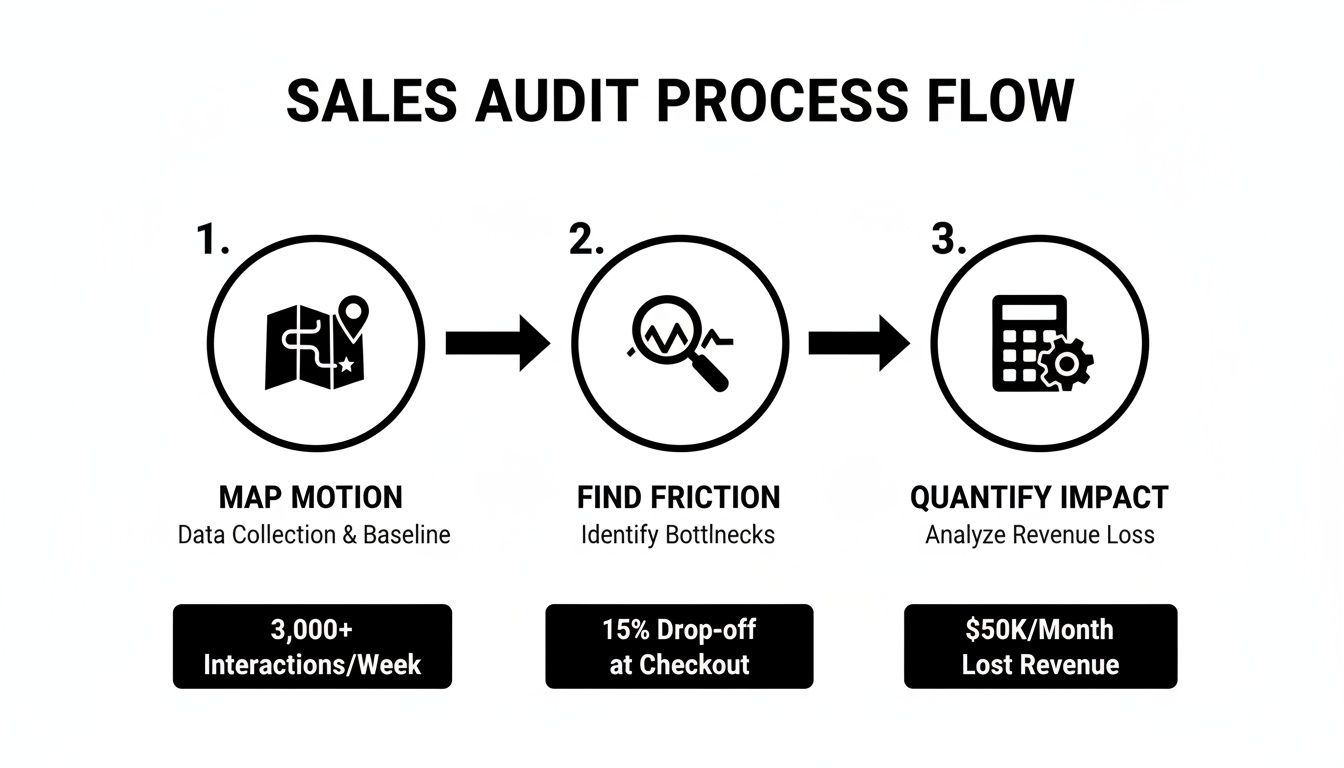
This process flow shows the kind of audit you need to run first—mapping your current motion, finding the friction, and putting a number to the impact—before you can build a better workflow.

A sales audit process flow diagram showing three steps: map motion, find friction, and quantify impact, with data examples.

As you can see, a truly productive system doesn't just start with new tech; it starts with a deep understanding of what's broken in your current process.

Embedding Context to Eliminate Research Time

Think about one of the biggest time sucks for any SDR: research. The constant screen-switching just to figure out who someone is and why they should care is exhausting. A genuinely actionable workflow kills this problem by putting all the necessary context right inside the task itself.

When a rep gets a task to call a prospect, they shouldn't have to open four new browser tabs. Actionable Step: Define the 3-5 key data points your reps need for every call (e.g., job title, a recent LinkedIn post, company tech stack, triggering event). Then, find a way to surface those data points directly within their CRM task view. The task should tell them everything they need to know at a glance:

  • The Triggering Signal: Why this, why now? (e.g., "Visited pricing page 15 minutes ago.")
  • Key Persona Details: Job title, relevant skills from their LinkedIn, and recent posts.
  • Account Information: Company size, recent funding news, and their current tech stack.
  • Past Interactions: A quick log of previous emails and calls with others on their team.

By putting the "why" and the "what" directly into the task, you eliminate nearly all of the manual prep time. Reps can stop being glorified researchers and focus their energy on executing high-quality, relevant outreach.

Modern platforms are designed to automate this entire process, turning your CRM from a passive database into an active execution engine. For any sales leader, exploring the many workflow automation benefits is a critical step toward freeing up reps to focus on what they do best: selling.

Using AI to Craft High-Quality Outreach That Scales

Let’s be honest, the hesitation around AI in sales is completely understandable. Most leaders I talk to are worried it’s going to turn their carefully crafted, human outreach into a firehose of generic, robotic spam.

But that fear compares outdated AI with modern generative tools. It’s not about replacing your reps; it’s about giving them a co-pilot to scale their best work, not their worst.

When used right, AI is an amplifier. It gives your reps the power to be more relevant and timely, boosting sales rep productivity without ever sacrificing quality. The key is to stop thinking of AI as an autopilot and start treating it like a hyper-efficient research assistant that handles the soul-crushing grunt work of research and drafting.

This frees up your team to focus on what humans do best: building real rapport and closing deals.

From a Blank Page to a Smart First Touch

Think about a typical SDR’s morning. They’re staring at a blank email draft, getting ready to start the research grind. They have to bounce between their CRM, a prospect’s LinkedIn profile, and the company’s "News" page just to find one relevant nugget to build an email around. The whole process is painfully slow and wildly inconsistent from rep to rep.

Now, contrast that with an AI-assisted workflow.

The AI, which you’ve already pointed at your CRM and key personas, can generate a genuinely relevant first-touch email in seconds. It instantly pulls in things like recent company funding news, a prospect’s latest LinkedIn post, or specific pain points common to their industry and role.

The rep’s job completely changes. They go from being a writer to being an editor.

  • Traditional Method: "Hi [Name], I saw you work at [Company] and wanted to introduce our solution..." (Generic, low-impact)
  • AI-Assisted Method: "Hi [Name], noticed on LinkedIn that your team at [Company] is hiring more data analysts. That usually points to a challenge with scaling insights. Our platform helps teams like yours automate reporting without adding more headcount."

See the difference? The AI-generated version isn't just "personalized" with a name tag; it’s rooted in a real business signal, making it exponentially more likely to earn a reply.

The real power of AI isn't its ability to write a perfect email. It's the ability to consistently produce a high-quality, relevant first draft that a sharp rep can quickly polish into something exceptional. This is how you scale your A-player’s best practices across the entire team.

Your AI-Powered Call Prep Partner

The same logic holds true for call preparation. Let’s face it, for most reps, call prep is either rushed or skipped entirely. They jump on the phone with minimal context, hoping to "wing it." We all know how that ends: generic discovery questions and fumbling when a tough objection comes up.

An AI-powered system completely changes the game by acting as an on-demand research analyst.

Actionable Step: Before your next team call blitz, have reps use an AI tool to generate three key talking points and one potential objection for each of their top five prospects. Compare the quality and speed of this prep to your team's usual manual process. An AI can instantly generate:

  • Key Talking Points: Pulled from the prospect’s role, industry, and previous interactions logged in the CRM.
  • Likely Objections: Common pushback you hear from similar personas, along with proven ways to handle them.
  • Smart Questions: A list of open-ended questions designed to uncover specific pain points.

This isn’t about handing reps a rigid script. It's about arming them with the intel they need to walk into every conversation with confidence.

And when the call is over? The AI can summarize the notes, highlight action items, and log everything cleanly back into the CRM. That alone solves one of the biggest data hygiene headaches sales teams have struggled with for years. Teams that deploy this kind of automation see an average 14.5% increase in productivity. High-performing teams use nearly three times as much sales tech as underperforming ones. If you want to dig in more, you can check out tons of other statistics on sales team performance that confirm the trend.

Impact of AI on SDR Outreach Activities

This table clearly compares the productivity gains you can expect when moving from a manual approach to an AI-assisted workflow.

MetricManual ApproachAI-Assisted WorkflowProductivity Gain
Email Personalization Time5-10 minutes per email< 30 seconds per email~95% reduction in time
Call Prep Time10-15 minutes per call1-2 minutes per call~85% reduction in time
Daily Outreach Volume50-75 personalized touches150-200+ personalized touches200-300% increase in capacity
CRM Data Entry30-60 minutes dailyAutomated in real-time100% elimination of manual entry
Meeting Book Rate1-2% on average3-5% on average2-3x improvement

Ultimately, implementing AI for outreach comes down to a choice. The old mindset sees technology as a threat to human skill. The smarter, modern one sees it as an amplifier. By embracing AI as a co-pilot, you empower your reps to do more of what they were hired to do: sell.

Integrating Native Tools to Drive Real Adoption

Even the most powerful AI co-pilot is useless if your reps refuse to fly the plane. Low user adoption is the graveyard where expensive sales tools go to die.

The primary culprit is almost always friction. If a tool forces a rep to leave their primary workspace—the CRM—it's already fighting a losing battle. This is why focusing on native tool integration isn't just a "nice-to-have." It’s fundamental to boosting sales rep productivity.

The moment you ask a rep to open another tab, log into a separate system, or manually copy-paste information, you've introduced a workflow disruption that kills their momentum.

The Hidden Costs of Non-Native Tools

External dialers and standalone logging tools look like a quick fix, but they often create more problems than they solve. A rep working through a task list in Salesforce has to stop, switch apps to make a call, and then remember to come back and manually log the outcome.

This constant context switching leads directly to real business problems:

  • Incomplete Data: Reps inevitably forget to log calls or rush through notes, leaving your CRM with massive data gaps.
  • Wasted Time: The cumulative effect of these extra clicks adds up. Over a week, you're losing hours of precious selling time per rep.
  • Frustrated Reps: Forcing reps into clunky, inefficient workflows is a surefire way to hurt morale and increase churn.

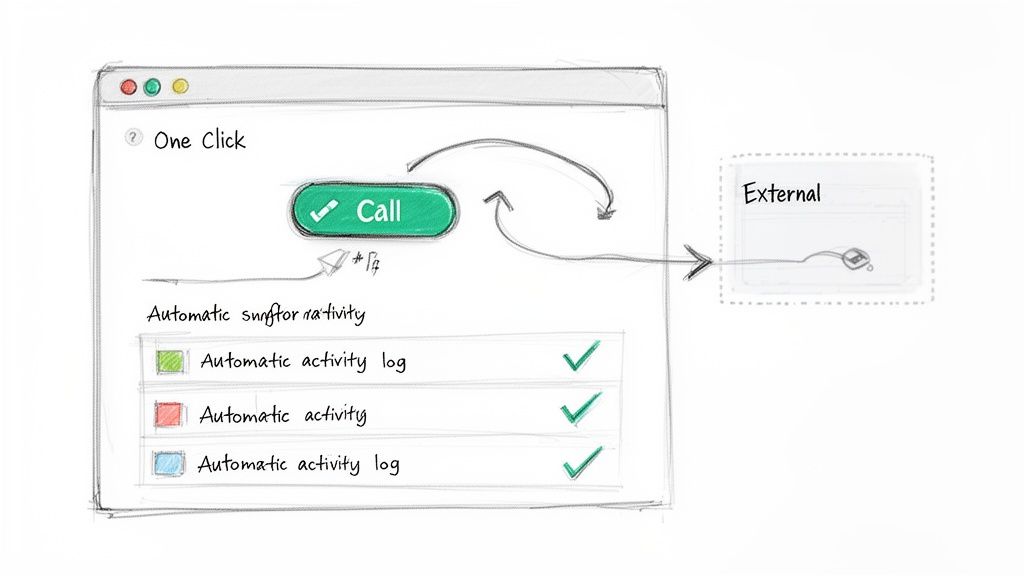
In contrast, a native CRM dialer lives inside the CRM. A rep sees a task, clicks a button, and the call starts. The activity and notes are automatically logged. The difference is a fundamentally better way to work.

The best sales tools don't feel like separate tools at all. They feel like a natural extension of the CRM, enhancing the core workflow instead of disrupting it. This is the key to driving real, sustained adoption.

A sketched UI shows a 'Call' button, automatic activity logging, and integration with an external system.

Comparing Workflows: A Native vs. External Dialer

Let's get practical and compare the exact steps for making and logging a single cold call with both approaches. The difference is stark.

Native CRM Dialer WorkflowExternal Dialer Workflow
1. Click "Call" on the contact record.1. Open the external dialer application.
2. Talk to the prospect.2. Search for the contact's phone number.
3. Add notes and select outcome in CRM.3. Copy the number.
Total Clicks ~3-44. Paste the number into the dialer.
Time Spent ~10-15 seconds (post-call)5. Talk to the prospect.
Data Accuracy High (auto-logged)6. Switch back to the CRM.
7. Find the correct contact record.
8. Manually create a new activity log.
9. Add notes and select the outcome.
Total Clicks ~10-15
Time Spent ~60-90 seconds (post-call)
Data Accuracy Low (prone to human error)

The numbers don't lie. For a rep making 50 calls a day, that external tool costs them nearly an hour of extra administrative work.

That’s an hour they could have spent having more conversations. By consolidating your tech stack around tools that live inside the CRM, you’re not just buying software; you’re buying back your team's time.

How to Measure Your New Productivity Engine

Look, implementing a new workflow is just the start. The real work is proving it actually moves the needle. To measure the impact on sales rep productivity, you have to get past the fluffy vanity metrics and dig into the numbers that directly build pipeline and drive revenue.

It's so easy to get fixated on raw activity—calls dialed, emails sent. But those numbers don't tell you a thing about effectiveness. I've seen reps make 100 junk calls and book zero meetings, while another makes 40 sharp, targeted calls and books five. The second rep is infinitely more productive.

Moving Beyond Vanity Metrics

Your measurement framework has to shift from the quantity of raw activity to the quality and outcomes of that activity. That’s the only way to get a clear picture of your team's efficiency.

Here’s a direct comparison of old vs. new productivity metrics:

Old Metric (Measures Busyness)New KPI (Measures Productivity)Why It Matters
Total Dials MadeConversations-to-Meetings RateThis tells you if your reps are connecting with the right people and having real conversations, not just burning through a call list.
Emails SentPipeline Generated Per RepThe ultimate gut check. This ties a rep’s day-to-day grind directly to the bottom line, showing their true impact on the business.
Tasks CompletedDaily High-Value Actions Per RepThis tracks whether reps are actually executing the specific, revenue-generating activities you’ve prioritized.

The Secret Weapon: Slashing New Hire Ramp Time

One of the most powerful ways to prove the ROI of a better system is by tracking new hire ramp time. This has always been a slow, expensive grind for sales teams.

The data is pretty staggering—it can take a new sales rep 11 months to become fully productive. In their first quarter, they’re often hitting just 10% of a veteran’s productivity. You can dive into the empirical data on sales rep ramp time yourself.

A streamlined, tech-enabled workflow can completely change this game.

When new hires are guided by a system that prioritizes their tasks, tees up call prep, and automates the admin nonsense, they start contributing to the pipeline in months, not quarters. Proving you can cut ramp time from nearly a year down to just three or four months builds an undeniable business case for your new productivity engine.

This metric, combined with those outcome-focused KPIs, gives you a repeatable playbook for scaling your team’s performance without burning everyone out.

Free Tool

Try our AI Lead Generator — find verified LinkedIn leads for any company instantly. No signup required.

Common Questions from the Sales Floor

Rolling out a new process always brings up good questions. Here are some of the most common ones I hear from sales leaders, with actionable answers based on what actually works.

How Do I Get My Team to Actually Use New Tools?

Getting reps on board with new software is where most initiatives fall flat. The classic mistake is talking about features, not freedom.

Actionable Tip: Don't just demo the tool; show them the before-and-after of their own workflow. Sit down and map it out: "Right now, it takes you seven clicks and four minutes to log a call. With this, it's one click, zero minutes. That's an extra hour a week you get back for selling."

Even better, run a small pilot with a couple of your reps first. Let them be the heroes. When they start booking more meetings because they're not bogged down in research, their success stories will do more to convince the rest of the team than any top-down mandate ever could.

We Need to Boost Productivity. Where Do We Start?

Before you even think about buying a new tool, you need to do a workflow audit. Seriously, grab a coffee and sit with your reps. Watch them work. Map out every single step, click, and tab-switch it takes to get from a fresh lead to a logged call in the CRM.

I guarantee you'll find some shocking black holes of wasted time.

Actionable Tip: Once you see the friction, put a number on it. It’s not just "prep is slow." It's "It takes an average of seven minutes and four browser tabs to prep for one cold call." That data is gold. It gives you a crystal-clear business case and points you directly to the biggest fire you need to put out first.

Which KPIs Actually Matter for Productivity?

Stop chasing vanity metrics like raw dial numbers. It just encourages busywork. You need to measure what actually moves the needle and puts pipeline on the board.

Actionable Tip: If you're starting out, focus on these three powerful KPIs:

  • Daily High-Value Actions Per Rep: Are they spending time on revenue-generating tasks, or are they just clicking around? This tells you.
  • Conversation-to-Meeting Rate: This is the ultimate test. It shows whether your team is having quality conversations that lead to next steps, not just dead-end chats.
  • New Hire Ramp Time: A clean, efficient workflow is the fastest way to get new reps productive. If this number goes down, your process is working.

Ready to eliminate the busywork and let your reps focus on what they do best? See how marketbetter.ai turns buyer signals into prioritized tasks and helps your team execute flawlessly with an AI-powered task engine and a native CRM dialer. Learn more at marketbetter.ai.