
The Chatbot Now Recognizes People Who Already Filled Out Your Forms

A buyer fills out your demo request form on Tuesday. On Thursday they're back on your site with a real question — pricing, security review, rollout timeline — and they open the chat widget. The first thing your chatbot says to this warm, self-identified, already-in-your-CRM prospect:
"Can I get your email so the team can follow up?"
They already gave it to you. Your CRM knows them. Your marketing automation is mid-sequence on them. The only system on your website that doesn't know they exist is the one talking to them.
We measured how often this happens across our own CRM-connected chatbot deployments: over a 90-day window, 13% of chatbot leads were already a contact in that customer's CRM, and 5% had already submitted a form on that same website. The bot asked every single one of them for their details again.
Today that stops. The MarketBetter chatbot now recognizes visitors who already submitted one of your website forms — and there's a second half to this release that matters just as much: what we deliberately didn't turn on, and the accuracy bar it has to clear first.
What ships today
The chatbot now notices when a visitor has already submitted one of your forms — your existing forms, not ours. That covers HubSpot forms (including the current embed generation), Salesforce Web-to-Lead, Pardot forms, and plain HTML forms that collect an email. There's nothing to migrate and no form rebuild: recognition happens at the moment of submission, in the visitor's browser, whatever tool renders the form.
Once a visitor is recognized, four things change:
1. The bot stops re-asking. No contact form mid-conversation, no "what's your email?" The visitor gets the conversation they came for, and when contact details would normally be requested, the bot acknowledges the team already has what they submitted.
2. Handoffs carry the submitted details. When the visitor asks for a human — or the bot decides a human should take over — the follow-up goes out tied to the email they actually typed into your form, not to a second, possibly mistyped copy of it.
3. Your rep sees the context. The alert your team gets (Slack, Teams, or the inbox) says what the visitor submitted, on which page, and when — and whether that identity is verified or just observed. A rep opening the conversation knows in one glance this is Tuesday's demo request coming back with a question, not a brand-new anonymous lead.
4. No duplicate leads. This one quietly matters most for CRM hygiene. Previously, a form fill plus a chat conversation produced two leads — and duplicate records have real costs once routing and attribution get involved. Now the chat is recorded as a continuation of the form submission. One person, one thread, one record.
Two levels of trust, because "probably you" isn't good enough
Here's the design decision at the center of this feature, and the reason it works the way it does.
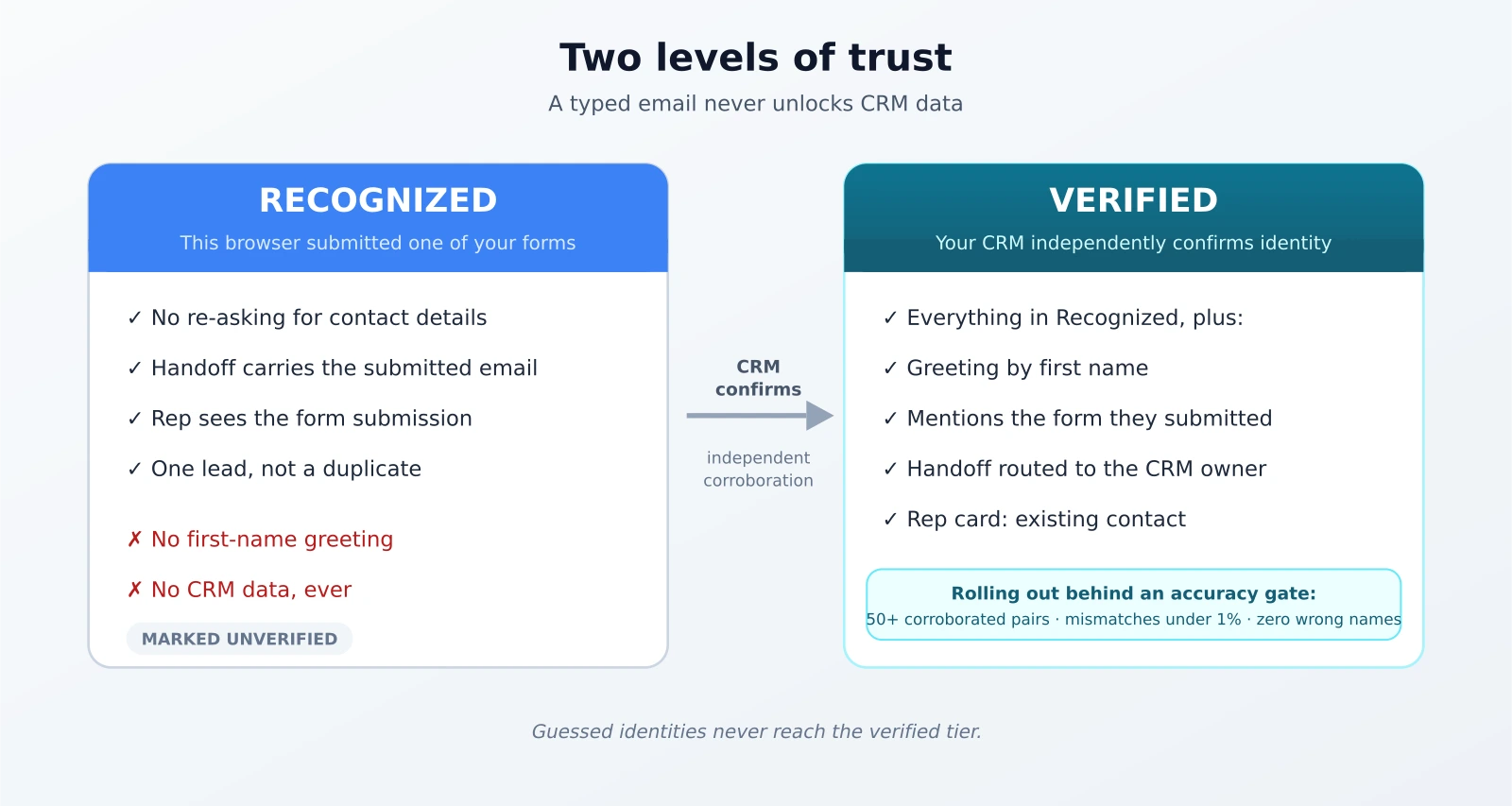
Recognition has two levels, and they unlock very different things:
| Level | What it means | What it unlocks |
|---|---|---|
| Recognized | This browser submitted one of your forms | The bot stops re-asking. Handoff carries the submitted details. Your rep sees the submission — marked unverified. |
| Verified | Your CRM independently confirms who this is | Greeting by first name. Mentioning which form they filled. Routing the handoff to the contact's owner in your CRM. Rep card shows existing contact. |
The rule that separates them is simple and absolute: an email typed into a form never unlocks CRM data. Recognition is a convenience tier. Anyone could, in theory, type someone else's email into a form — and if they do, the only thing they've gained is not being asked for an email. No name, no history, no account details come back. Verification requires your CRM to independently corroborate the identity — either through your marketing platform's own tracking confirming this browser belongs to that contact, or the form submission arriving through your CRM's webhook and matching what we observed, within minutes of each other.
If you've read us on human-in-the-loop AI, you'll recognize the shape: the AI acts on what it can prove, and holds back on what it merely believes.
Why chatbots get identity wrong: the guessing problem
The common industry approach to connecting a form fill with a website visitor is a heuristic: find a visitor who was on the site shortly before the form arrived, in roughly the same location, and call it a match.
We ran that exact heuristic, so we can tell you how it performs. Across 487 form fills in a 30-day window on live traffic, only 51% had a single candidate visitor in the matching window. The rest had two, three — in a fifth of cases four or more — plausible visitors who could have been the submitter. The heuristic doesn't know which one. It picks.
That's fine for anonymous analytics. It is not fine for anything a visitor can see. A chatbot that greets people by name off a coin-flip match will eventually greet your prospect with their colleague's name, or a stranger's — once, in front of the exact buyer you most wanted to impress. Website visitor identification at the account level tolerates ambiguity; putting a person's name in a chat message does not.
So the new system doesn't guess. When a form submission can be linked to the exact browser that filled it, that link is recorded as fact. When it can't, the old heuristic still runs for analytics — but it can never trigger a greeting, because guessed identities never reach the verified tier.
The part we're not turning on yet — and the bar it has to clear
The verified tier's visible effects — greeting a returning prospect by first name, mentioning the form they submitted, routing them straight to their account owner — are built, shipped, and currently held back while the verification pipeline proves itself on live traffic in shadow mode: computing verdicts, logging them, changing nothing a visitor sees.
The shadow data has already justified the caution. Within the first handful of independently corroborated identities, we caught one where the marketing cookie in the browser belonged to a colleague of the person who typed the form — same company, different person. Shared machines, forwarded links, and autofill make this a real-world case, not a hypothetical. The system did exactly what the two-tier design demands: the identity stayed at recognized, nothing was personalized, nobody got greeted with the wrong name.
That failure mode is why the rollout gate is numeric, not vibes:
- at least 50 independently corroborated identity pairs on live traffic,
- a mismatch rate at or below 1%,
- and zero cases of naming a different person at the same company.
Until the data clears that bar, no visitor gets greeted by name. When it does, the verified experience turns on for CRM-connected workspaces — and we'd rather ship the greeting weeks late than wrong once.
Privacy is the default, not a setting
A feature that recognizes people has to be boring about privacy, so here are the defaults:
- The AI model never sees your CRM. CRM fields are not placed in the model's context — at most, a verified first name and a form name. Ask the bot "what's my phone number?" or "what deal stage am I in?" and it has nothing to answer with, because it was never given any of it. A chatbot that can leak your CRM to whoever's typing is a liability we designed out, not a prompt we hope holds.
- Global Privacy Control is honored. A browser sending the GPC signal gets nothing stored. Not stored-then-deleted — not stored.
- EU and UK visitors are consent-gated. The marketing-cookie verification path only runs where analytics consent allows it.
- Recognition expires. A form submission stops identifying a browser after 30 days.
- "Not you?" resets everything. Shipping with the verified tier: one click clears the recognition, for shared machines and borrowed laptops.
Where it fits: the inbound mirror of showing your work
We've been building toward the same idea from two directions. Outbound, it's proof-of-effort artifacts — a landing page generated for each target account in your own brand. Inbound, it's this: the visitor already did the work of telling you who they are. Acting like they didn't is the inbound equivalent of sending the generic brochure.
The play it slots into is speed-to-lead: a form fill triggers fast follow-up, and when the prospect comes back with questions before the meeting, the chat picks up the thread instead of restarting it. If they go quiet afterward, a Loop carries the follow-up — and everything we learned about nurture in Loops' first month applies to recognition too: relevance earns attention, repetition burns it.
It's also a different answer than the chat-first platforms give. We've written comparisons of Qualified and Drift before, and the honest difference here isn't that they can't personalize chat — it's where the trust bar sits. Our position: personalization that depends on identity should be provably right or absent. There is no "probably" tier a visitor can see.
What it doesn't do
The honest edges, as always:
- It's per-browser. The same prospect on their phone, or in a different browser, is a stranger until verification catches up. We deliberately did not build a cross-device identity graph for this — that's a different product, with different privacy economics, and most of them are creepy.
- It doesn't make the bot a CRM terminal. Reps get CRM context in their own tools. Visitors don't, even about themselves, even when verified. By design.
- It doesn't greet anyone by name today. See the gate above. If you see a competitor demo doing first-name chat greetings off a form-fill heuristic, now you know the failure rate question to ask them.
- It doesn't replace your forms. Visitors who never submitted anything get the normal conversation, including the contact ask, exactly as before.
See it on your own site
Form-filler recognition is live now for MarketBetter chatbot customers — if your chatbot and your HubSpot or Salesforce forms are both connected, it's already working, and your reps have started seeing submitted a form context on handoffs. The verified tier lights up as deployments clear the accuracy gate.
If your current chatbot still asks your pipeline for their email address, bring your website to a call and we'll show you what it looks like when it stops.