
A Guide to AI Sales Assistants for High-Performing SDRs
Let's cut through the noise. When you hear "AI sales assistant," don't picture a robot replacing your top SDR. It's not about that. The reality is much more practical—and a lot more powerful.
What Are AI Sales Assistants and Why Do They Matter Right Now?
Think of an AI sales assistant as an execution engine that lives right inside your CRM, whether that's Salesforce or HubSpot. Its job is brutally simple: take all the data, buyer signals, and noise, and turn it into a clear, prioritized list of actions for your reps. It’s the co-pilot that handles the grunt work so your sellers can focus on selling.
This isn't just another nice-to-have tool. It's become essential. Your SDRs are probably drowning in admin tasks—logging calls, researching prospects on LinkedIn, and just trying to figure out who to contact next. The AI assistant slices right through that chaos.
To make this actionable, let's compare a standard CRM to one enhanced with an AI assistant.
A standard CRM, on its own, is like a map. It shows you all the possible leads, but it doesn't tell you the best route to your destination (hitting quota). An AI sales assistant acts like a GPS for that map. It does a few critical things:
- Analyzes real-time traffic: It monitors buyer signals like website visits, content downloads, or email opens.
- Finds the fastest route: It prioritizes the leads most likely to convert right now, showing you the most efficient path to a closed deal.
- Warns you about dead ends: It helps de-prioritize unresponsive or disqualified leads so reps don't waste time.
- Gives you turn-by-turn directions: It serves up the "next best action" for your rep, removing all guesswork.
This shift from a passive database to an active guide is what eliminates the wasted time that plagues most sales floors.
The Big Shift Toward Intelligent Automation
The explosion of these tools isn't a random trend. It's a direct answer to a sales world that can't afford to have expensive sellers buried in manual data entry. We need smarter, more efficient workflows, and that need is driving insane growth. The market for this software is set to jump from USD 3.46 billion in 2026 to a wild USD 20.5 billion by 2035.
This isn't just hype. Modern AI can finally deliver on its promises inside the messy reality of B2B sales. If you want to dig deeper into the "why now," this podcast on why AI could replace your sales team is worth a listen, as it unpacks how these roles are fundamentally changing.
The real magic of an AI sales assistant isn't just automation. It’s prioritization at scale. It makes sure every single action a rep takes is the most strategic one they could be taking at that exact moment—based on data, not just a gut feeling.
At the end of the day, these assistants are about making your human talent better. By taking over the repetitive, soul-crushing tasks, they free up your SDRs to do what they were hired for: building relationships, having real conversations, and closing deals. And that's how you build a high-performing sales team today. Learn more about how to apply AI for sales prospecting in our deep-dive guide.
Comparing AI Sales Assistants to Your Existing Sales Tools
Your sales stack is probably crowded. With so many tools promising to boost productivity, it’s fair to ask where another one could possibly fit. Is an AI sales assistant just a fancier email writer? Or another flavor of your sales engagement platform?
The short answer is no. It fills a very specific—and very important—gap that other tools simply weren't built to address.
The key difference is that a true AI sales assistant is execution-focused and CRM-native. It isn't another tab your reps have to open. Instead, it lives right inside Salesforce or HubSpot to turn buyer signals into immediate, actionable tasks. That subtle shift, from a separate app to an embedded co-pilot, completely changes how your SDRs work.
This map gives you a good visual of how it all connects.
As you can see, the assistant’s whole job is to automate the grunt work, surface the next best action, and deliver insights without making the rep leave their main workspace.
Let's break down how this is different from the tools you're already using.
AI Assistants vs. AI Email Writers
Plenty of sales teams use AI tools like HubSpot's Breeze Assistant to draft email copy. These are great for getting past writer's block or quickly spinning up a first draft. But at their core, they're content creation tools.
An AI email writer helps you answer the question, "What should I write?"
An AI sales assistant answers a much bigger question: "Who should I contact right now, why should I contact them, and what's the fastest way to get it done?"
Actionable Comparison: An AI writer can help you polish a follow-up email. By contrast, an AI sales assistant sees that a key prospect just hit your pricing page, automatically creates a "High-Priority Follow-Up" task in your CRM, drafts a smart email that references their visit, and queues it up for your rep to send with a single click. No context switching, just action.
AI Assistants vs. Sales Engagement Platforms
Sales Engagement Platforms (SEPs) like Salesloft or Outreach are absolute beasts for managing large-scale outbound sequences. They’re designed for structured, multi-step campaigns and are fantastic for casting a wide net.
But their focus is on the pre-planned sequence, not on reacting to new buyer signals in real time. Reps end up living inside the SEP, which often leads to annoying data sync issues and a workflow that feels disconnected from your CRM—the actual system of record.
An AI sales assistant doesn't replace your SEP; it makes it smarter. It acts as the intelligent front-end that tells your sequences who to engage right now, ensuring reps strike at the moment of peak interest.
AI Assistants vs. Standalone Dialers
Standalone dialers are built to do one thing: make a ton of calls, fast. They excel at that. Their biggest limitation, however, is that they're isolated. They’re another app, another login, and another place where reps have to manually log call notes and outcomes back into the CRM. All that friction leads to messy data and wasted time.
An AI sales assistant with a CRM-native dialer completely eliminates this problem. The dialer is just part of the workflow. A rep sees a prioritized task, clicks to call directly from the contact record, and the assistant automatically logs the call, outcome, and notes. No more app-switching.
To make these differences crystal clear, here’s a quick comparison of how these tools stack up.
AI Sales Assistants vs Standard Sales Tools
| Tool Category | Primary Function | Workflow Integration | Key Limitation Addressed by AI Sales Assistants |
|---|---|---|---|
| AI Email Writer | Generates email copy based on prompts. | Often a separate tool or feature within a larger platform. | Lacks context-driven task prioritization and seamless CRM execution. |
| Sales Engagement Platform (SEP) | Manages and automates pre-built outreach sequences. | A separate platform that syncs with the CRM, but reps work within the SEP UI. | Relies on static sequences rather than dynamic, real-time buyer signals. |
| Standalone Dialer | Facilitates high-volume calling. | A separate application requiring manual data transfer back to the CRM. | Creates workflow friction and leads to inconsistent activity logging. |
| AI Sales Assistant | Prioritizes tasks and assists with execution. | CRM-native, embedding tasks, email, and calling directly into Salesforce or HubSpot. | Unifies the workflow, eliminates app-switching, and ensures perfect data hygiene. |
When you look at it this way, you can see that AI sales assistants aren't here to replace your stack. They're here to provide the intelligent execution layer it's been missing, finally connecting the dots between your data, your tools, and your reps' daily actions.
The Core Capabilities That Supercharge SDR Productivity
So, beyond the buzzwords, what does an AI sales assistant actually do to make a sales development representative (SDR) more effective? The real magic isn't in one killer feature. It's how a few core capabilities work together to take the friction and guesswork out of an SDR's day, freeing them up to have more, better conversations.
Think about the typical salesperson's day. It's a mess of non-selling activity. One recent analysis found that reps spend just 25% of their time actually selling. The other 75% gets eaten up by manual data entry, prospect research, and logging notes in the CRM.
This is exactly where AI assistants step in. They can automate up to 65% of that administrative slog and cut the time spent on manual work by 40%. The result? Teams often see a 25% jump in sales productivity and find 25-35% more qualified leads.
The Prioritized Task Engine
The single biggest time-waster for most SDRs is staring at a long list of leads and asking, "Okay, what now?" They scroll through their CRM, check their inbox for replies, and try to stitch together a plan for the day. It's inefficient and riddled with missed opportunities.
A core feature of any modern AI sales assistant is a prioritized task engine. This isn't just another to-do list. It's a dynamic, living queue that pulls in buyer signals from all over the place—website visits, content downloads, CRM data, and third-party intent signals—to automatically build and rank the next best actions.
- Pain Point Solved: It kills indecision and "analysis paralysis."
- Actionable Example: Instead of a generic list of 100 leads to call, the AI surfaces a single task: "Call Jane Doe at Acme Corp. She just viewed the pricing page for the second time this week." The rep knows exactly who to call, why, and has the context to open the conversation with confidence.
An engine like this transforms your CRM from a passive library of data into an active coaching tool. It serves up the "next best action" based on what's happening right now, making sure reps are always focused on the accounts most likely to engage.
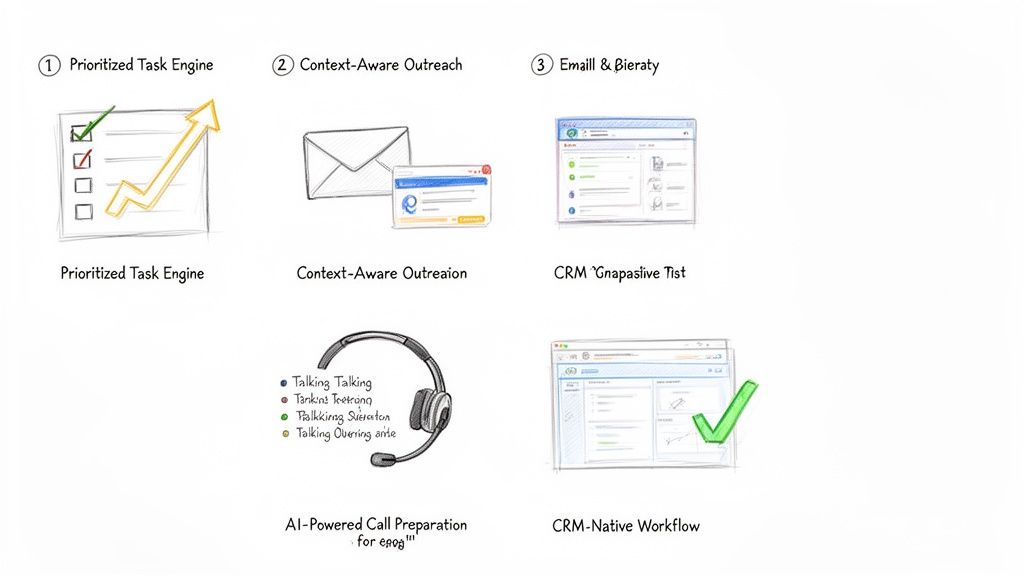
The real power here is the blend of clarity and context. The rep doesn't just see the "what" (call or email); they see the "why" (the buyer just did something important). That's what allows them to act decisively.
Context-Aware AI Outreach
We all know it: generic, templated emails go straight to the trash. Real outreach needs to be relevant. But who has time to write dozens of highly personalized messages every single day? It's a massive time sink.
AI sales assistants fix this with context-aware AI outreach. The system connects directly to your CRM and pulls in key details—the prospect’s title, their industry, recent activities, or past account history—to draft hyper-relevant emails and call scripts on the fly. It's not just generating random copy; it's using your own data to make the message land.
- Pain Point Solved: It crushes writer's block and the temptation to blast out generic messages.
- Actionable Example: Let's say the prospect is in manufacturing. The AI drafts an email that references a common challenge for plant managers, pulls in a link to a relevant case study, and suggests a specific, pointed call to action. The SDR just has to give it a quick review, maybe add a personal touch, and hit send.
AI-Powered Call Preparation
Nothing kills a cold call faster than a rep who sounds like they're winging it. Fumbling for information or getting stumped by a basic objection destroys credibility in seconds. This is why the best platforms now include AI-powered call preparation.
Before a rep even picks up the phone, the assistant generates a quick, scannable brief. It includes key talking points, likely objections with suggested responses, and the latest company news or LinkedIn activity. If you want to go deeper on this, we've covered how to streamline your workflow with AI sales call prep automation in another guide. This feature turns what used to be a 15-minute research task into a 30-second review.
CRM-Native Workflow
Finally, and this might be the most important part, is the CRM-native workflow. Too many sales tools force reps to live in a nightmare of open tabs: the CRM, the dialer, their email client, a research window. Every time they switch contexts, they lose a little focus and momentum. Worse, data gets lost along the way.
An AI sales assistant that lives inside your CRM—whether that's Salesforce or HubSpot—keeps reps in one place. They can click-to-call, send an AI-drafted email, and log every touchpoint without ever leaving the contact record. This simple change ensures every single activity is captured perfectly, which gives sales leaders a crystal-clear picture of what's working and keeps the CRM the undisputed source of truth.
A Practical Guide to Implementing an AI Sales Assistant
Bringing new tech into the sales floor can feel like open-heart surgery. Productivity is on the line, reps are skeptical, and nobody has time for a three-month science project. But rolling out an AI sales assistant isn't like that. It’s less of a massive overhaul and more like giving your team a cheat sheet.
The key is to aim for quick, noticeable wins. We're not talking about a "rip and replace" of your CRM. This is about adding a layer of intelligence right on top of what you already use, making your SDRs smarter and faster from day one. A good rollout plan cuts through the noise and gets your team productive, fast.
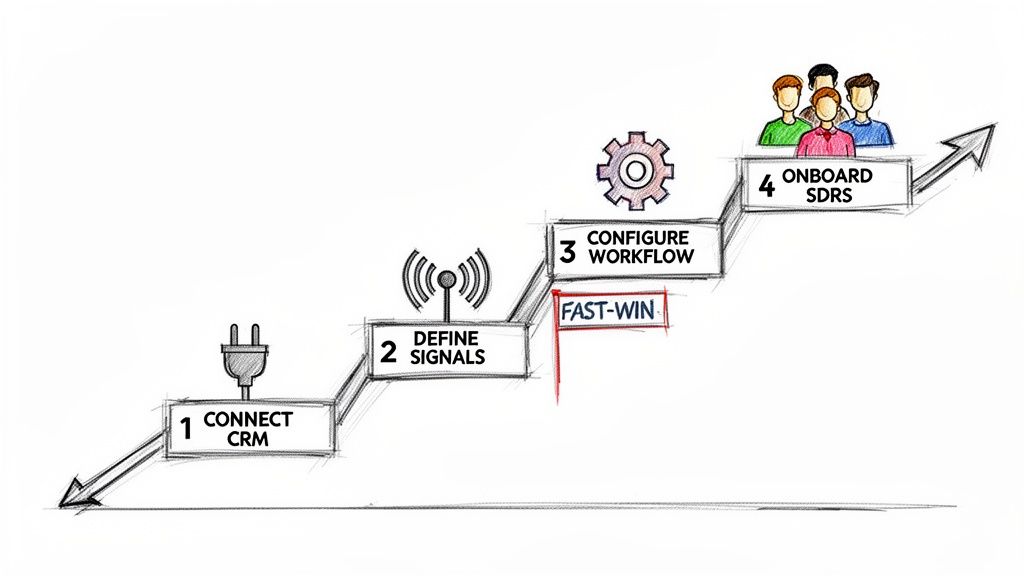
Here’s a simple, four-step playbook to get it done right.
Step 1: Securely Connect Your CRM
Everything starts here. An AI sales assistant is only as good as the data it can access, which means it needs a solid, secure connection to your CRM—whether that’s Salesforce or HubSpot. Think of your CRM as the central nervous system of your sales motion; the assistant needs to plug directly into it.
Actionable Tip: Before connecting, perform a quick data audit. Check for duplicate contacts or outdated account information. Clean, reliable CRM data is the fuel for the AI engine; a bad connection or messy data will starve it before it can even get started. This part is usually simple, often using secure OAuth. Loop in your RevOps or IT team to confirm the tool gets read-and-write access to the right objects—Leads, Contacts, Accounts, and Activities.
Step 2: Define Your High-Impact Buyer Signals
Once you're connected, you have to tell the AI what to look for. What are the tell-tale signs that a prospect is ready for a conversation? Don't try to boil the ocean. Start with just a handful of high-impact triggers that are easy to spot and even easier to act on.
Actionable Tip: Pick signals that scream "intent" and map directly to a specific SDR action. Start with these three:
- Website Engagement: A prospect from a target account hits your pricing page.
- Content Downloads: Someone from a key account downloads a bottom-of-funnel case study.
- Time-Based Triggers: It’s been 90 days since you last talked to a high-value account.
The goal is simple: turn your sales playbook's "if-then" logic into automated triggers. If a prospect does X, the AI creates a task for an SDR to do Y. This gets reps out of the business of manual monitoring for good.
Step 3: Configure Your First High-Value Workflow
Now it's time to build something. For your first workflow, pick a simple, high-impact use case that solves an SDR's biggest daily headache: figuring out who to call next. An AI-prioritized task list is the perfect place to start.
Actionable Tip: Configure the assistant to take the signals from Step 2 and automatically create and rank tasks. For example, a "Pricing Page Visit" signal should instantly generate a "High-Priority Call" task, complete with context about what that person looked at. This first workflow needs to feel like an immediate upgrade from a generic CRM task list. It’s a quick win that proves the tool's value by saving SDRs time and pointing them straight to the warmest leads. For a deeper look at how this fits into your tech strategy, check out the build vs. buy debate for your AI SDR stack.
Step 4: Onboard and Coach Your SDRs
A tool is only as good as its adoption. A great rollout starts with the "why," not the "how." Show your SDRs that this assistant is here to kill their most boring tasks so they can focus on what matters—and hit their numbers faster.
- Launch with a Pilot Group: Start small. Pick a few of your most motivated SDRs to be the pioneers. Their feedback and success stories will build momentum and help you iron out the kinks before going team-wide.
- Focus on One Workflow: In the first training session, talk only about the prioritized task list. For the first week, their only job is to work through their new, intelligent to-do list. Nothing else.
- Provide a Cheat Sheet: Give them a one-page guide that shows the new workflow. Make it visual, simple, and focused on the exact actions they need to take.
- Coach, Don't Just Manage: Use your 1:1s to review their AI-powered task list. Ask questions like, "Why do you think the AI flagged this account?" This builds their trust in the system and reinforces the data-driven mindset.
Measuring the ROI of Your AI Sales Assistant
Look, any time you bring a new tool into the sales floor, the CFO is going to ask one question: "What's the ROI?" It's not enough to say the team feels more productive. You need to show leadership the hard numbers that connect the dots between the software and real business results.
To build a rock-solid business case, you have to move past vanity metrics. The trick is to track KPIs across three critical areas, showing a clear progression from daily rep activity all the way to bottom-line pipeline growth.
Activity and Efficiency Gains
The first place you'll see a return is in pure, raw output. An AI sales assistant is built to kill the tedious, time-sucking tasks that drain an SDR's day. We're talking about removing the friction that keeps them from their most important job: selling.
Actionable Metrics to Track:
- Daily Outbound Actions Per Rep: How many calls are they making? How many emails are they sending? Compare the before-and-after numbers. A good task engine should light a fire under these metrics.
- Time Spent on Manual CRM Logging: This one is huge. When call notes, outcomes, and task updates log automatically, you get time back. Even saving 30 minutes per rep per day adds up to a massive payroll saving across the team.
The real goal here is to quantify reclaimed time. If your AI assistant helps each SDR make 15 more calls and send 20 more emails every single day, you have a direct, powerful metric that proves its value from week one.
Quality and Engagement Improvements
More activity is great, but smarter activity is what wins deals. This is where an AI sales assistant starts to separate itself from a simple dialer. It gives reps the context they need, right when they need it, so they can have truly relevant conversations.
Actionable Metrics to Track:
- Connect Rate: When reps call a prospect the moment they hit the pricing page, guess what? More people pick up the phone. You're no longer just burning through a cold list; you're calling with intent.
- Meeting Booked Rate: Keep a close eye on the percentage of conversations that turn into a booked discovery call. Higher-quality outreach and better talking points should push this number up.
This is where the assistant's intelligence really pays off. It's arming your reps with AI-powered talking points and objection-handling tips, helping them turn more cold "hellos" into qualified meetings.
Pipeline and Revenue Impact
At the end of the day, every sales tool lives or dies by its ability to generate pipeline. This is the final, most important piece of the ROI puzzle. While more calls and better conversations are great leading indicators, new pipeline is the metric that gets executives to sign the check.
Actionable Metrics to Track:
- Qualified Opportunities Sourced: How many new, sales-accepted opportunities is the SDR team generating? This is the clearest measure of their contribution to the business.
- Sales Cycle Velocity: Track how quickly leads sourced by the AI assistant move through the early funnel stages. Faster is always better.
Actionable Tip: Build a custom dashboard in Salesforce or HubSpot. Create a report that pits a group of SDRs using the assistant against a control group that isn't. Tracking their KPIs side-by-side creates a powerful, data-backed story that leaves no doubt about the tool's impact on the bottom line.
Common Questions on AI Sales Assistants
Even with all the excitement, it's smart to ask tough questions before bringing a new tool into your sales motion. Here are the straight answers to the questions sales and RevOps leaders ask us most.
Will an AI Sales Assistant Replace My SDRs?
Absolutely not. The real goal is to make your existing team better, not smaller. An AI sales assistant is like a co-pilot for each rep, handling the soul-crushing admin work that eats up their day—logging calls, updating fields, and basic research.
This frees your SDRs to do what humans do best: build real relationships, have smart conversations, and crush their quota. Think of it as giving every rep a personal operations assistant, allowing them to be more strategic and way more effective.
We Already Use a Sales Engagement Platform. Do We Need This Too?
Yes, because they solve two different problems that actually feed each other. A Sales Engagement Platform (SEP) like Salesloft or Outreach is fantastic for building and managing long-term, pre-planned sequences. It’s a system for campaigns, but it forces reps to live in a separate tab, pulling them away from their CRM.
An AI sales assistant is the execution layer that sits inside your CRM and makes your SEP sequences even smarter. While your SEP runs the long-term plan, the assistant uses real-time buyer signals to tell reps the single most important action to take right now. It helps them execute that call or email instantly from within Salesforce or HubSpot and logs everything perfectly, closing the gap between your planned campaigns and the opportunities that pop up today.
How Do AI-Generated Emails Avoid Sounding Robotic?
The good ones don't use generic templates. The key is the data they pull from. Instead of working off a simple prompt, a modern AI assistant dives deep into your CRM, analyzing account history, buyer personas, recent company news, and past conversations.
The best platforms don't just spit out a finished email. They provide a smart first draft that the SDR can review and tweak in seconds. This preserves their unique voice and expertise while still saving a ton of time.
This ensures the outreach is hyper-relevant right from the get-go, not just another piece of generic spam.
How Quickly Can We Expect to See a Return on Investment?
You'll see an immediate ROI on pure efficiency, often in the first few weeks. This shows up as a jump in the number of outbound activities per rep, per day, and a massive improvement in your CRM data quality as tasks like call logging get automated.
The bigger, strategic ROI—the stuff your CFO cares about, like more pipeline and revenue—starts to become clear within one to two quarters. That's the result of your reps consistently connecting with more of the right people and turning those conversations into qualified meetings. We always suggest tracking the initial efficiency gains first, then mapping them directly to pipeline growth to build an undeniable business case.
Ready to stop the busywork and start building more pipeline? marketbetter.ai turns buyer signals into prioritized tasks and helps your SDRs execute instantly with an AI-powered dialer and email writer inside Salesforce and HubSpot. Learn more and book a demo.