
A Practical Guide to Logging Phone Calls in Salesforce and HubSpot
Let's be blunt: most sales reps hate logging phone calls. It feels like boring admin work you have to do after the real work of selling is over. But skipping this step sends ripples of chaos through the entire sales operation.
So, what exactly is call logging? It’s the process of recording the key details of a call—duration, outcome, notes—right inside your CRM. Think of it as creating a reliable history for every conversation with a prospect. Done manually, it's a chore. Done automatically, it's your secret weapon.
Why Consistent Call Logging Is Non-Negotiable
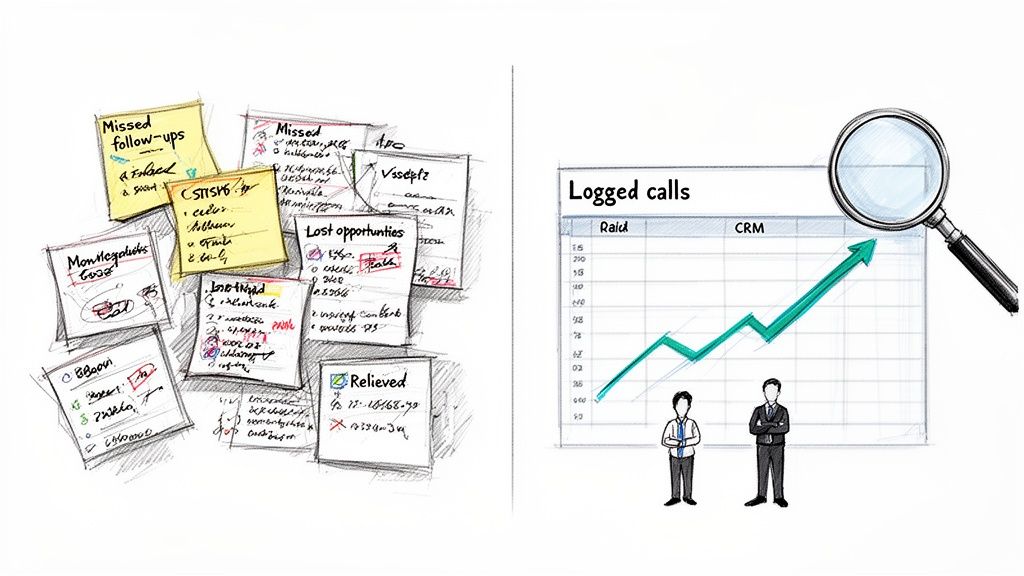
When reps don't log their calls, you get a mess. Inconsistent data entry leads to wildly inaccurate forecasts, deals that fall through the cracks, and managers who are completely blind to what’s actually happening on the ground.
Every unlogged call is a missing piece of the puzzle. Without that data, you lose priceless intel on customer objections, what competitors are up to, and the subtle buying signals that tell you a deal is ready to close.
The Contrast Between Chaos and Clarity
Picture two different sales floors.
On the first, reps rely on a messy mix of handwritten notes, random spreadsheets, and their own memory. A manager trying to coach a struggling rep has zero data to figure out what's going wrong. Compare this to a team with a clean, well-maintained CRM where every call is logged. A sales leader can see which scripts are actually converting prospects into meetings. They can spot team-wide weaknesses based on common objections and coach reps effectively. That's the difference between guessing and knowing.
Actionable Tip: Audit your team's logged calls from last week. Can you confidently explain why a key deal stalled just by reading the CRM history? If not, you have a clarity problem that consistent logging can solve.
Proper call logging is the engine for a scalable, data-driven sales process. It transforms individual effort into collective intelligence, empowering everyone from the SDR on the front lines to the VP of Sales in the boardroom.
The Scale of the Problem
The need for smart call logging is only getting bigger. Globally, an incredible 13.5 billion calls are made every single day. For sales teams, that massive volume makes the pain of manual data entry feel even worse. Reps end up wasting hours that could have been spent selling.
This isn't just a time-suck; it's a costly mistake. Poor data hygiene is a huge financial drain on businesses, and inconsistent call logging is one of the main culprits. Consider this comparison: a clean database is like a well-oiled machine, where every outreach is precise. A messy one is like trying to drive with a foggy windshield—you're moving, but you can't see where you're going.
Clean data is the fuel for a high-performing sales machine. You can explore our guide on sales enablement best practices to see just how critical it is. When done right, call logging turns raw activity into predictable pipeline and attributable revenue.
Choosing Your Workflow: Manual vs. Automated Call Logging
When it comes to logging calls in your CRM, you’re at a fork in the road. Do you stick with the old-school, manual process baked into Salesforce or HubSpot, or do you bring in automation? This isn’t just about saving a few clicks—it’s a fundamental choice that impacts your team's rhythm, productivity, and the quality of your data.
Manual logging is that clunky, multi-step shuffle every rep has had to learn. In contrast, an automated system makes the process invisible. Let's compare the two approaches directly.
The Gritty Reality of Manual Entry
Let’s walk through a real-world scenario. An SDR just wrapped up a discovery call. To log it in Salesforce, they have to:
- Navigate away from their call list to find the contact's page.
- Hunt for and click the "Log a Call" button.
- Fill in the subject line, recall the key conversation points for notes, and just hope they don't forget a critical detail.
- Scroll through a dropdown to find a disposition like "Connected" or "Meeting Booked."
- Click save, then navigate all the way back to their list to find the next person to dial.
That whole sequence can easily take two to five minutes. Multiply that by dozens of calls per day, per rep, and the lost productivity is staggering. Even worse, the data quality tanks. When rushed, reps scribble vague notes or pick the wrong disposition, making the data totally useless for managers trying to spot trends or coach effectively.
The biggest flaw in manual call logging is that it relies on perfect discipline after every single interaction. In the real world of sales, that’s an unrealistic expectation. It sets both reps and leaders up for failure with incomplete, unreliable data.
The Alternative: Automated Logging
Automated logging, on the other hand, is all about making the process invisible. When you use an integrated dialer that lives right inside your CRM, the system does the admin work for you. A rep clicks to dial from a contact record, and the tool is already primed to capture everything.
The moment the rep hangs up—bam. The call is instantly logged to the right contact with the duration, time, and outcome recorded automatically. This is a night-and-day comparison to the manual scramble. The best tools even use AI to generate structured call summaries and pull out next steps, completely wiping out the need for manual note-taking.
This workflow doesn't just save time; it enforces consistency. Adoption skyrockets because the easiest path is finally the correct one. Reps stay locked in on selling, and managers get the clean, reliable data they need to coach, forecast, and win.
Manual vs. Automated Call Logging Workflow Comparison
Looking at the two workflows side-by-side really brings the differences into focus. It's not just about speed; it's about the entire operational impact on your sales team.
| Feature | Manual Logging (Standard CRM) | Automated Logging (Integrated Dialer) |
|---|---|---|
| Rep Workflow | Post-call data entry; requires navigating to different screens | Click-to-call from the CRM record; logging happens in the background |
| Time Per Call Log | 2-5 minutes of administrative work | ~5-10 seconds; instant and automatic |
| Data Accuracy | Prone to human error, incomplete notes, and incorrect dispositions | Highly accurate; captures call time, duration, and outcome perfectly |
| Note Taking | Relies on rep's memory; often rushed and inconsistent | AI-generated summaries, transcripts, and action items |
| Adoption Rate | Low; seen as a chore that slows reps down | High; becomes the path of least resistance for reps |
| Data Consistency | Varies wildly from rep to rep, making analysis difficult | Standardized format for all logged calls, enabling clean reporting |
| Productivity Impact | Drains selling time and creates constant context switching | Maximizes selling time by eliminating administrative tasks |
Ultimately, the table tells the story. Manual logging is a constant tax on your team's time and your data's integrity. An automated, integrated system pays dividends by keeping your sellers focused on what they do best: selling.
How to Automate Your Call Logging in Salesforce and HubSpot
Let's be honest: moving away from manual call logging is all about getting your team's time back. Ditching the sluggish, post-call admin work frees them up to do what you hired them for—sell.
The key is finding an integrated dialer that lives inside your CRM. It needs to make logging phone calls a completely invisible background process, not another chore on the to-do list.
The best tools plug right into Salesforce or HubSpot via their API. Compare this to external tools that force reps to open another tab or fire up a separate app. The goal is a zero-click action where the system handles all the grunt work.
Configuring Your Automated Workflow
Setting up automation isn’t just flipping a switch. It’s about molding the system to fit your actual sales process. Once you’ve connected your dialer, the first real step is mapping your call dispositions. This is where you tell the system exactly what to do when a rep marks a call with a specific outcome.
Actionable Tip: Get your sales leaders and top-performing reps in a room for 30 minutes. Map out your 5-7 most critical call outcomes and define a clear automated action for each.
- When a call is marked "Connected," the system should instantly create a completed call activity on the contact’s record.
- If the outcome is "Left Voicemail," it can log the call and automatically create a follow-up email task for the next day.
- A "Meeting Booked" disposition is the big one. This should automatically update the contact's lifecycle stage and create a calendar event.
This kind of setup turns simple call outcomes into powerful workflow triggers. Your CRM data suddenly becomes not just complete but genuinely actionable.
This flowchart lays out the stark difference between the tedious, multi-step manual process and a slick, single-click automated one.
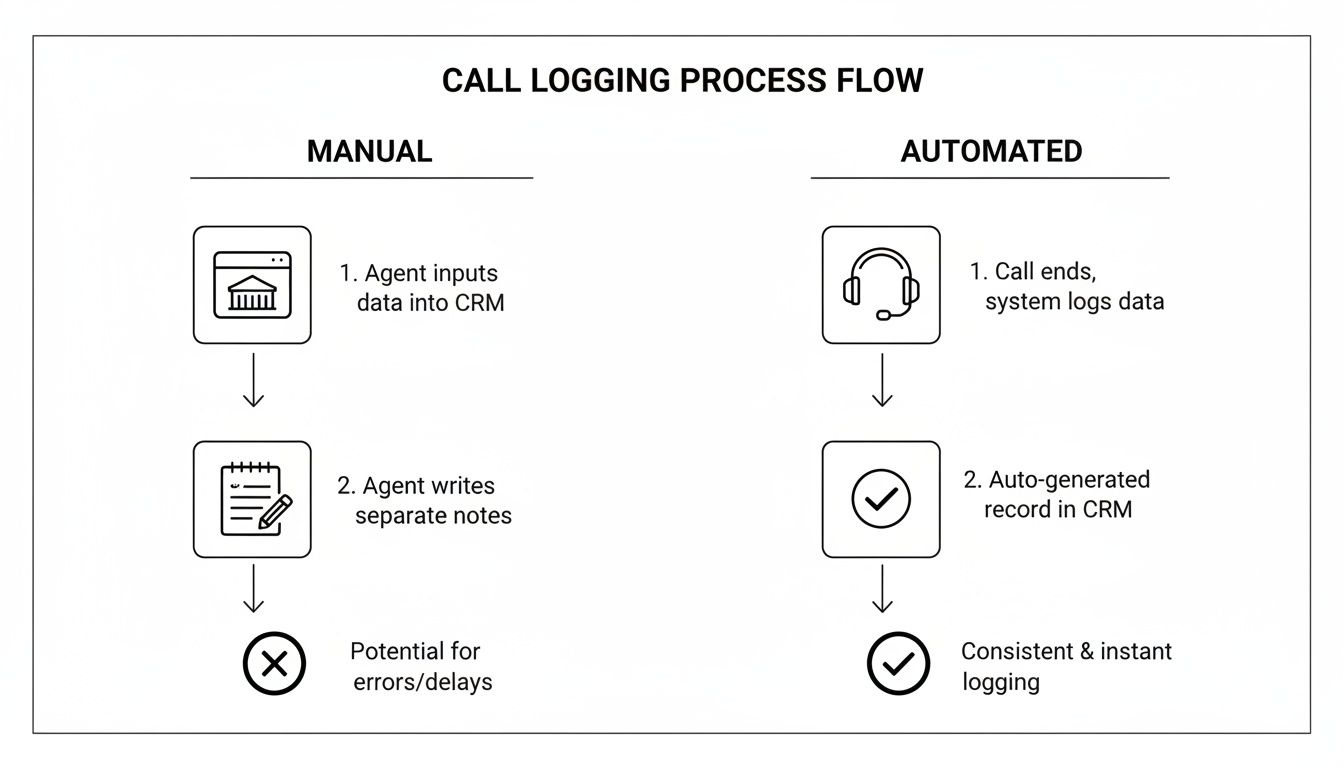
As you can see, automation just wipes out all the administrative friction. Reps can move straight from one call to the next without breaking their focus or losing momentum.
Leveraging AI for Smarter Call Notes
Real automation goes way beyond just logging that a call happened. Modern tools use AI to create structured call summaries, turning what used to be a five-minute scramble to type up notes into an instant action.
Compare the old way—reps struggling to recall key details—to the new way, where AI can transcribe the entire call and pull out the good stuff:
- Key customer objections
- Mentions of specific competitors
- Explicitly defined next steps
- Critical budget and timeline information
By using AI-powered templates, you ensure every single call summary is consistent, structured, and actually useful. This isn't just about saving a few minutes here and there; it's about building a uniform dataset that sales leaders can use to spot trends, coach reps, and refine their strategy.
An AI-powered system like MarketBetter, for instance, can generate these summaries and log them to the correct Salesforce or HubSpot record automatically. Our guide to AI for cold calls digs into how this technology is completely changing the game for rep productivity.
The result is a workflow so seamless your reps won’t just use it—they’ll wonder how they ever survived without it. It's the kind of built-in efficiency that turns good reps into great ones by letting them focus 100% on selling.
Crafting High-Quality Call Notes and Dispositions
Let's be blunt: just logging that a call happened is useless. A checkmark in your CRM doesn't tell you anything. It’s the intelligence inside that log that fuels your whole sales motion.
Compare a log that says "Connected" with one that details a specific budget objection. The first is a data black hole; the second is actionable coaching material. That’s what separates the teams that guess from the teams that know.
Think of call notes as the story of the conversation. Vague entries like "Good chat" are a waste of keystrokes. A good note is a scannable brief for your future self or the new AE who takes over the deal in six months.
A Framework for Actionable Call Notes
To get this right across the whole team, you need a framework. It’s not complicated, but it turns rambling thoughts into strategic assets.
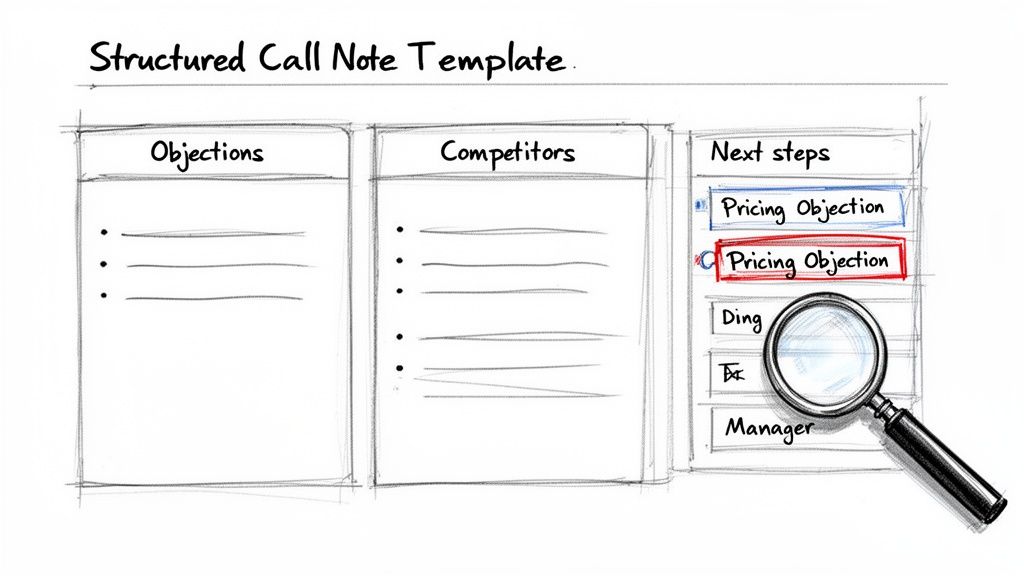
Actionable Tip: Create a mandatory, three-part template in your CRM for all call notes. Train your team to use it for one week and measure the difference in data quality. The template should capture:
- Key Objections: What roadblocks came up? "Pricing Objection" or "Timing Isn't Right"? Documenting this helps managers spot trends.
- Competitor Mentions: Did they name-drop a rival? Note who it was and why. This is pure gold for your product and marketing folks.
- Explicit Next Steps: Never write "follow up." Define the action. "Send case study on Project Management integration by EOD Thursday; schedule 15-min follow-up for next Tuesday." That’s a plan.
This structure transforms every CRM entry from a chore into a piece of competitive intelligence.
Why Structured Dispositions Are a Manager’s Best Friend
While notes give you the story, call dispositions give you the data. Dispositions are just the standardized labels you stick on every call—think 'Connected,' 'Left Voicemail,' 'Wrong Number.'
Used the right way, they become a sales manager's most powerful reporting tool. Imagine your team's connect rate suddenly tanked. Compare the nightmare of reading thousands of individual call notes to the ease of filtering by disposition. With structured data, you can instantly see a spike in "No Answer - Direct Line," pointing you straight to a problem with your data provider.
A well-designed set of dispositions lets you slice and dice your call data instantly. A manager can pull a report of every call with a 'Pricing Objection' disposition to see which reps need coaching on value selling. Raw activity becomes a targeted training plan.
The AI Advantage in Capturing Call Details
So, what's the catch? The biggest problem with getting high-quality notes and dispositions is the mountain of admin work it dumps on reps after every call. This is where modern AI tools completely change the game.
Compare a rep's memory and typing speed to an AI that transcribes the call, pinpoints key topics, and fills out your note template without the rep lifting a finger. It yanks out objections, competitor names, and action items, then summarizes the whole conversation.
This guarantees every call log is consistent, detailed, and captured the second the call ends. The human bottleneck is gone. Your team can maintain perfect data hygiene while spending 100% of their time actually selling. It’s the bridge between what reps should do and what they actually have time to do.
Navigating Call Logging Compliance and Security
Let's be blunt: how you log calls is just as critical as why. In a world filled with data privacy regulations and skeptical customers, your approach to compliance and security isn't just about checking a legal box. It's the foundation of trust.
This isn't just about dodging fines; it’s about respecting your customers' privacy. The second you hit "record" on a call, you're wading into a complex legal landscape shaped by consent laws that change dramatically from one place to the next.
Understanding Call Recording Consent Laws
The first thing every sales leader needs to drill into their team is the difference between one-party and two-party consent. This single distinction dictates how your reps must handle the start of every recorded conversation.
- One-Party Consent: In these states or countries, only one person on the line—your sales rep—needs to know the call is being recorded.
- Two-Party (or All-Party) Consent: In these regions, everyone on the call has to give their explicit permission. That familiar "This call may be recorded for quality assurance" isn't just a courtesy; it's a legal requirement.
Actionable Tip: Create a simple cheat sheet that lists the consent laws for your top 10 sales territories. Make it a mandatory part of your new-hire onboarding and require reps to review it quarterly.
Navigating compliance isn't just a box-ticking exercise. It's about creating an auditable record that protects your business and proves your commitment to ethical communication, building customer confidence in the process.
Securing Your Call Data
Once you have the recording and notes, your responsibility has only just begun. You have to protect that data.
Regulations like GDPR in Europe and CCPA in California are incredibly strict about how customer data is stored, processed, and secured. When you log call details in your CRM, that information must be guarded with the same intensity as any other sensitive customer data. You can explore how data management intersects with CRM tools in our article on customer data platform integration.
This job is made harder by the rampant distrust in phone calls today. One report flagged a staggering 13.7 billion suspected spam calls in a single quarter. It’s no wonder SDRs face a 79% unanswered rate for unidentified calls.
Using a professional, integrated system for logging calls helps secure that data and protects your team from potential disputes down the line. Beyond the big-name regulations, your overall information security posture matters. Frameworks like the ISO 27001 and ISO 27002 standards offer a rock-solid playbook for managing security risks.
Try our AI Lead Generator — find verified LinkedIn leads for any company instantly. No signup required.
Call Logging FAQs
Even the best-laid plans run into questions on the ground. When you're rolling out a new system for logging calls, here are some of the most common things that pop up for sales leaders, reps, and ops managers.
How Long Should It Take a Rep to Log a Call?
Manually, you’re looking at anywhere from two to five minutes per call. That’s the time it takes to find the right contact, create the activity, type out notes, and pick a disposition. Compare that to an automated system, where the log is created instantly in the background the second the call ends. Those few minutes saved on every single call quickly turn into hours of additional selling time each week, for every rep on your team.
Does Call Logging Software Work with VoIP Systems?
Yes, absolutely. Most modern call logging tools are built specifically for Voice over Internet Protocol (VoIP) systems. In fact, the best solutions—the ones that live right inside your CRM—often use VoIP to power their own click-to-call features.
Actionable Tip: When evaluating a tool, ask this specific question: "Does your software operate as a native element within the Salesforce/HubSpot UI, or does it run in a separate tab or iFrame?" A tool that’s embedded in Salesforce or HubSpot is infinitely better than one that forces reps to juggle multiple apps.
Can We Automatically Log Calls from Microsoft Teams?
You can. Plenty of teams are using Microsoft Teams for external calls, and there are integrations that connect it back to your CRM to log those activities. But there's a catch.
Let's compare the performance: A native dialer built for your CRM logs data in real time. In contrast, many third-party connectors have a significant delay. For instance, HubSpot's own documentation points out that call data can take an average of 15 minutes to sync. When speed and data accuracy are everything, "eventually" isn't good enough.
What’s the Best Way to Get Reps to Adopt a New System?
Make the right way the easiest way. It’s that simple. If your new call logging process has fewer clicks, less typing, and less friction than the old way, your reps won't just adopt it—they'll thank you for it.
Actionable Tip: Don't just announce a new tool. Run a pilot with a few reps. Have them track their time spent on admin before and after. Use that data to demonstrate the time savings to the rest of the team. Show them it removes work from their plate; don't just add another meeting to their calendar.
Ready to kill manual data entry and give your reps back hours of selling time? marketbetter.ai puts an AI-powered dialer and task engine right inside Salesforce and HubSpot, making perfect call logging an automatic process that runs in the background.
See how you can boost rep productivity and finally get clean CRM data by visiting https://www.marketbetter.ai.