
A Guide to Sales Process Optimisation That Actually Works
Think of sales process optimisation as a continuous tune-up for your sales engine. It’s the practice of methodically refining your sales motion to cut out friction, automate the soul-crushing admin tasks, and free up your reps to do what they do best: sell.
It’s about finding and fixing all the "leaks" in your sales pipeline so more deals close, and they close faster. The whole point is to build a repeatable, predictable system for bringing in revenue.
Why Your Sales Process Is Leaking Revenue
Picture your sales process as a high-pressure water pipeline. Ideally, every drop of water that goes in one end—every single lead—comes out the other as a signed deal. But let's be real, most sales pipelines are riddled with tiny leaks. These aren't dramatic pipe bursts; they're the slow, steady drips that silently drain your revenue potential day after day.
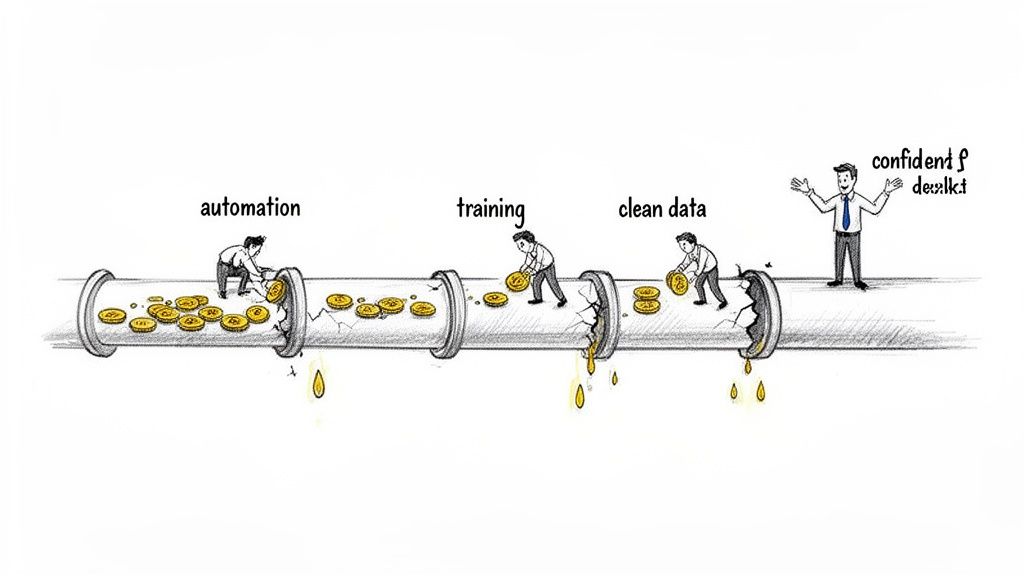
This is the central challenge staring down sales leaders right now. If you're seeing inconsistent rep performance, flat win rates, and a CRM that feels more like a graveyard than a goldmine, you've got a leaky pipeline. Sales process optimisation isn't about finding one massive crack; it's about systematically sealing up all the small, costly holes.
The Ad-Hoc Mess vs. The Optimised Machine
Too many teams run on what I call an ad-hoc sales process. Reps freestyle their outreach, managers have zero visibility into what's actually working, and CRM data is a chore nobody wants to do. The result? Chaos. Success is random, and scaling is a pipe dream.
An optimised sales process, on the other hand, is engineered for predictability. It’s a clean, unified motion that the entire team understands and executes.
Let’s look at the difference on the ground:
- The Unoptimised Process: Your reps burn hours every morning just figuring out who to call. They manually log activities (or forget to) and throw spaghetti at the wall to see which messaging sticks. The activity numbers look high, but the results are all over the map.
- The Optimised Process: Your reps log in to a prioritized task list, automatically surfaced by real buyer intent signals. They fire off calls and emails from right inside the CRM, and every single touchpoint is logged for them. Their actions are targeted, efficient, and—most importantly—measurable.
It’s the difference between leaving your team to figure it out alone and giving them a system that guides them to the most valuable action, every single time.
How to Actually Start Fixing Things
So, how do you start patching these leaks? First, you have to accept that optimisation isn't a one-and-done project. It's a continuous cycle of diagnosing bottlenecks, simplifying workflows, and using smart tech to automate the grunt work.
- Actionable Step: Instead of just shouting "make more calls!" from the sales floor, implement a native CRM dialer. This one change eliminates clicks, automates activity logging, and gives each rep back hours of admin time every week. That's time they can spend purely on conversations that close deals.
This guide is your roadmap to finding those leaks and sealing them for good.
Diagnosing Your Sales Process Bottlenecks
Before you can optimize anything, you have to play detective. Fixing a sales process isn't about throwing new software at the problem and hoping it sticks. It's about finding the exact points of friction—the spots where deals stall, reps get stuck, and revenue leaks out.
Think of it like a doctor. You wouldn't get a prescription without a diagnosis, right? The same goes for your sales engine. Guesswork and gut feelings won't cut it. You need to figure out precisely what's broken before you can start to fix it. That process always begins with listening.
Asking the Right Diagnostic Questions
The absolute best source of truth is your team on the front lines. They live and breathe the process every day and know exactly where the cracks are. Sit down with your SDRs, AEs, and managers to get a real, on-the-ground view of what's happening.
You can uncover a lot by asking a few targeted questions:
- Task Prioritization: "Walk me through your morning. How do you decide who to call first?"
- Outreach Effectiveness: "How long does it take you to personalize an email? Do you feel like your messages are actually landing?"
- Data & CRM Hygiene: "Show me exactly how you log a call. How many clicks does it take? How much time does it eat up?"
- Handoffs & Transitions: "What happens after you book a meeting? Describe the handoff to an AE. Where do things get dropped?"
- Technology & Workflow: "How many tabs do you have open right now? What's your workflow for finding a lead and making that first call?"
- Actionable Step: Don't just ask these questions in a meeting. Schedule a 30-minute "ride-along" with one of your reps. Ask them to share their screen and work as they normally would. The visual evidence of them toggling between 10 browser tabs to log a single call is more powerful than any verbal complaint.
This is the qualitative proof you need to build a case for change. For a deeper dive into structuring these stages, check out our guide on the B2B sales funnel.
This is precisely the kind of chaos that a tool like marketbetter.ai is designed to solve. Instead of leaving reps to guess, its AI-driven task engine turns buyer signals into a simple, prioritized to-do list.
That screenshot says it all. Reps know exactly what to do next, ensuring they're always working on the highest-value actions, not just the easiest ones.
Comparing Broken vs Optimised Realities
Once you have those frontline stories, it's powerful to frame the problem by showing what "good" looks like. The difference between a broken process and an optimized one isn't subtle—it’s the difference between daily frustration and streamlined execution. The numbers don't lie: process-led teams see 25-30% higher win rates. Even better, teams with clear stage criteria forecast with a tight 10% variance, a world away from the 30-50% errors that plague disorganized teams. You can find more on these commercial excellence stats over at heimdallpartner.com.
A side-by-side comparison makes the value of change crystal clear to everyone, from leadership to the reps themselves.
A broken process forces reps to be administrators who occasionally sell. An optimised process empowers them to be sellers who barely notice the administration.
Here’s a look at what separates a struggling sales process from a high-performing one. See where your team fits.
Broken vs Optimised Sales Process: A Side-by-Side Comparison
This table highlights the common symptoms of an inefficient process versus the outcomes you can expect from a well-oiled machine. It’s a great way to identify exactly where your team is on the spectrum.
| Breakdown Area | Symptom in a Broken Process | Outcome in an Optimised Process |
|---|---|---|
| Lead Prioritization | Reps manually scan long lists, relying on gut feel to pick leads. | AI surfaces the top 5-10 accounts to contact based on intent data. |
| Outreach Quality | Generic, one-size-fits-all email templates get low reply rates. | AI-assisted outreach provides relevant talking points for every call/email. |
| CRM Data Entry | Activity logging is manual, inconsistent, and often forgotten. | Calls and emails are auto-logged from a native dialer inside the CRM. |
| Tech Stack Friction | Reps jump between 5+ tabs (CRM, Dialer, Email, LinkedIn). | All core actions (call, email, log) happen within a single CRM screen. |
| Manager Visibility | Coaching is based on incomplete data and anecdotal evidence. | Managers have clean activity data to coach on what actually drives results. |
By diagnosing these specific symptoms, you move past the vague feeling that things are "broken" and get to the heart of what needs fixing. This clarity is the essential first step in any successful sales process optimisation effort.
A Five-Phase Roadmap to High-Performance Sales
Once you’ve figured out where the friction is, the next step is turning those insights into action. A real sales process optimisation effort isn’t a chaotic scramble; it's a structured journey.
This five-phase roadmap is a battle-tested framework for getting from diagnosis to a high-performance sales engine, ensuring you build momentum without completely overwhelming your team.
Think of it like building a house. You don’t just start throwing up walls. You need a blueprint (Diagnose & Map), a simplified architectural plan (Design & Simplify), the right power tools (Instrument & Automate), skilled workers who know how to use them (Train & Enable), and a system to check your work (Measure & Iterate).
Phase 1: Diagnose and Map
The foundation of any good plan is understanding exactly where you’re starting from. This phase is all about documenting your current state—not what you think it is, or what it says in a dusty playbook, but how your reps actually work day-to-day.
Your goal is to create a visual map of your entire sales process, from the first touchpoint with a lead all the way to a closed deal. Interview your SDRs and AEs. Watch them work. Get them to share their screen and show you their typical workflow. Count the clicks it takes just to log a call or find a piece of info.
- Actionable Step: Use a simple flowchart tool (like Miro or Lucidchart) to map out every single action and decision point. Color-code the steps that cause the most friction in red. This visual makes the pain points impossible to ignore.
- Common Pitfall: Assuming the process documented in your wiki is the one being followed. The truth is almost always messier.
This exercise will shine a bright light on the bottlenecks you found earlier, showing you precisely where the friction lives.
The visual below outlines a simple diagnostic flow to help you find, validate, and understand these sticking points.
This simple three-step diagnostic—finding friction, talking to your team, and comparing it to what's really happening—is the core of any effective initial audit.
Phase 2: Design and Simplify
Okay, now that you have a map of the messy reality, it’s time to design the future. The guiding principle here is ruthless simplification. Every single step in your new process must have a clear purpose and add tangible value. If it doesn’t, cut it.
For instance, if your current process forces reps to manually copy-paste call notes from a separate dialer into the CRM, your new design should kill that step completely. The goal is a workflow so intuitive that your reps want to follow it because it makes their lives easier, not harder.
Just look at the difference in mindset when designing a process:
| Flawed Design Approach | Effective Design Approach |
|---|---|
| Adding more steps to account for every edge case. | Focusing on the 80% of common scenarios first. |
| Building the process around the technology. | Choosing technology that serves the ideal process. |
| Creating complex rules nobody will ever remember. | Designing clear, simple exit criteria for each stage. |
The best sales process optimisation isn't about adding complexity; it's about systematically removing it.
Phase 3: Instrument and Automate
With a clean, simplified process designed, you can now pick the tools to bring it to life. This is where you instrument your workflow with tech that automates the low-value grunt work and guides reps to the next best action. The key is choosing tools that slot seamlessly into the core workflow, not ones that create more silos.
For example, instead of a standalone dialer living in a separate browser tab, implement a native dialer that lets reps click-to-call directly from a Salesforce or HubSpot record. This single change automates activity logging, kills tab-switching, and keeps your data clean.
Your tech stack should enforce the process, not fight it. The right tools make the path of least resistance the path of greatest productivity.
Phase 4: Train and Enable
A brilliant process is completely useless if nobody knows how to use it. This phase is all about enablement, and it’s way more than a one-hour training session. It’s about providing ongoing support, clear documentation, and practical coaching.
- Actionable Step: Create short, digestible training materials for the new workflow. Record 2-minute screen-share videos of your top performers executing the new process and build a library of best-practice examples. This is far more effective than a 50-page PDF nobody will read.
Most importantly, managers have to be equipped to coach to the new process, using the clean data from your new tech stack to spot performance gaps and help reps improve.
Phase 5: Measure and Iterate
Finally, remember that sales process optimisation is not a one-and-done project. It's a continuous loop of improvement. In this final phase, you establish the key performance indicators (KPIs) that tell you if your changes are actually working.
Track metrics directly tied to the bottlenecks you pinpointed back in Phase 1. For example:
-
If low activity was the problem: Measure daily dials and emails per rep.
-
If outreach was ineffective: Track reply rates and meetings booked.
-
If ramp time was too long: Measure how quickly new hires hit their quota.
-
Actionable Step: Schedule a recurring 30-minute "Process Check-in" every two weeks with your sales leaders. Review a dashboard with these core KPIs. If a metric is trending the wrong way, that becomes the single focus for the next two weeks.
This iterative approach ensures your sales engine is always being tuned for peak performance, adapting as your market and team evolve.
Building a Tech Stack for Execution-First Optimisation
A slick process design is just a theory until you have technology that actually drives action. The right tech stack doesn't just track what your sales reps do; it actively pushes them to execute the right actions, faster and more consistently. That's the whole game in sales process optimisation.
But building this stack always leads to a big question: Do you bet on a massive, all-in-one platform or assemble a team of specialized, best-in-class tools? Each path has its pros and cons.
Comparing Tech Stack Philosophies
Choosing your tech isn't just about features; it’s about what fits your team's real-world workflow. The debate between consolidated platforms and specialized tools is at the heart of this decision.
| Approach | Key Advantage | Major Drawback |
|---|---|---|
| All-in-One Platforms | A single, unified system promises seamless data flow and one interface to learn. | Often a "jack of all trades, master of none." Core execution tools like dialers can feel like an afterthought. |
| Specialized Tools | Best-in-class performance for specific jobs, giving you deeper capabilities for things like dialing or email. | Can create data silos and force reps to constantly toggle between apps, killing their momentum. |
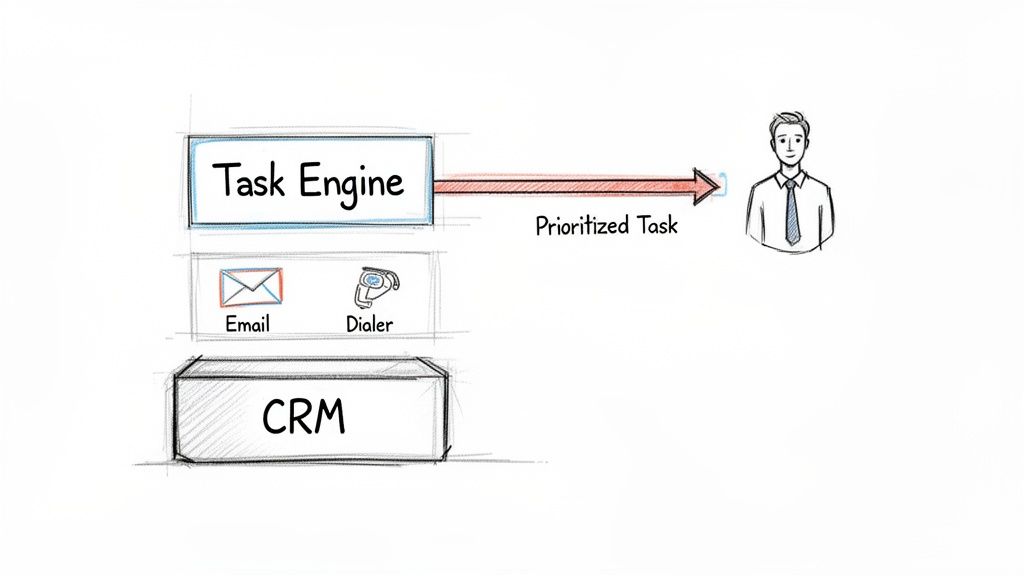
The real answer isn't always one or the other. It’s about finding technology that creates an "execution layer" on top of your CRM, bridging the gap between your strategy on a whiteboard and a rep's daily grind.
The Missing Layer: Rep Execution
Plenty of sales engagement platforms are great at sequencing and reporting. But they often fall short on the most critical piece of the puzzle: helping reps execute their daily tasks with speed and precision. This is exactly the gap that tools like marketbetter.ai were built to fill.
Instead of ripping out your whole stack, an execution-first tool makes it better by zeroing in on the moment of action. It answers the question every rep asks themselves each morning: "Okay, what should I do right now?"
An execution-first tech stack transforms your CRM from a passive database into an active, intelligent work surface that guides reps to their next revenue-generating activity.
This shift in focus makes a massive difference. By 2026, AI-driven sales process optimisation is expected to deliver 20-35% productivity surges and 15-25% higher win rates. It's also projected to slash time reps spend on data entry by 65% while boosting time spent talking to customers by 48%. These aren't just small tweaks; they're fundamental changes to how sales teams operate.
How an AI Task Engine Drives Action
An execution-first platform like marketbetter.ai uses an AI-driven Task Engine to turn buyer signals—like website visits, content downloads, or ICP triggers—into a simple, prioritized to-do list right inside Salesforce or HubSpot. It instantly solves the "what's next?" problem for your reps. If you want to dive deeper, we have a detailed breakdown on how to improve sales rep productivity.
Here’s how it works in the real world:
- Prioritization: The AI Task Engine analyzes all the signals and surfaces the highest-value tasks for each rep, completely eliminating the guesswork.
- Execution: Reps use native dialers and AI-assisted email workflows directly within their CRM screen. No more switching tabs or manually logging every little thing.
- Data Hygiene: Every call, email, and outcome is automatically logged back to the right record. Your CRM data stays pristine, and your reporting becomes dead-on accurate.
For teams looking to integrate the most advanced AI, understanding the capabilities of Large Language Models (LLMs) is a game-changer. This is the technology that powers the intelligent workflows that turn a standard CRM into a dynamic selling machine. By focusing on this execution layer, you get dramatically more value from the tools you already have and build a sales process that actually performs.
Measuring the True Impact of Optimisation
Optimising your sales process feels good, but feelings don't show up on a balance sheet. To justify the effort and truly understand what’s working, you have to look past feel-good numbers like "total calls" and zero in on the key performance indicators (KPIs) that directly impact revenue.
If you can't measure it, you can't manage it. It's an old saying because it's true.
Effective measurement is the difference between guessing which changes moved the needle and knowing for sure. This demands clean, reliable data—a near-impossibility when your reps are stuck manually logging every single activity. Tools that automatically capture every call and email are the foundation for any real reporting, giving leaders a clear view into what actually drives results.
Beyond Vanity Metrics: Key KPI Categories
To get the full picture, you need to track metrics across three distinct but connected categories. This framework helps you see not just how much work is being done, but how well it’s being done and how efficiently your team is operating.
- Activity KPIs: This is the raw output. Are your reps putting in the effort?
- Effectiveness KPIs: This measures the quality of that output. Is the effort turning into real conversations and moving deals forward?
- Efficiency KPIs: This tracks the resources needed to get results. How quickly and cost-effectively is your team performing?
Let's break down the must-have metrics in each category and see what they look like in a broken process versus an optimised one.
Activity and Effectiveness KPIs
Activity metrics are the starting point, but they’re useless without the context of effectiveness. A rep making 100 generic calls with a 1% connect rate is getting smoked by a rep making 50 targeted calls with a 10% connect rate. This is where optimisation proves its worth.
Here’s a quick comparison:
| KPI Category | Metric to Track | In a Broken Process | In an Optimised Process |
|---|---|---|---|
| Activity | Daily Actions Per Rep | High volume of untargeted dials and emails with no real strategy. | Consistent, targeted actions focused on high-intent leads surfaced by an AI engine. |
| Effectiveness | Connect & Reply Rates | Abysmal rates thanks to generic messaging and calling at the worst possible times. | Higher rates driven by AI-assisted, relevant outreach and signal-based timing. |
| Effectiveness | Stage Conversion Rate | Deals get stuck in early stages; conversion is a random, unpredictable mess. | Smooth, predictable progression from one stage to the next with clear exit criteria. |
| Effectiveness | Sales Cycle Length | Deals drag on for months, often ending in a frustrating "no decision." | The time from first touch to close is measurably shorter and more consistent across the team. |
By tracking both sets of KPIs, you can diagnose problems with surgical precision. High activity but low effectiveness points to a messaging or targeting problem. Low activity across the board might signal a workflow or motivation issue. Understanding how to properly connect actions to outcomes is a key step, which you can learn more about in our guide to attribution modeling.
Efficiency KPIs: The Hidden ROI
Efficiency metrics are where the ROI of sales process optimisation really comes alive. They measure the "cost" of your sales efforts in time and resources, showing just how much faster your team can generate revenue.
An optimised process doesn't just make reps work harder; it makes their hard work count for more by slashing wasted effort and accelerating their path to productivity.
Think about these critical efficiency indicators:
- Time Spent on Admin: In a clunky, unoptimised world, reps can burn up to a third of their day on manual data entry. With auto-logging tools, this drops to practically zero, freeing up hours for actual selling.
- SDR Ramp Time: This is how long it takes a new hire to become fully productive. A streamlined process with clear guidance and AI assistance can literally cut this time in half.
The impact here is massive. Recent sales productivity stats show that only 43.5% of reps hit their quota in early 2024. Yet, a whopping 94% of businesses report productivity boosts after implementing a CRM-centric process, seeing gains like 29% in sales and 34% in overall productivity. The data is clear: fixing the process pays off.
Your Sales Process Optimisation Checklist
Turning a good strategy into a great reality is where most plans fall apart. Think of this checklist as the bridge from concept to execution. It’s your step-by-step guide for taking all the ideas we’ve covered and making them real—the pre-flight check before your sales engine really takes off.
Foundational Planning
Before you touch a single workflow, you need to lay the groundwork. Skipping this is like building a house on sand. Getting the initial audit and stakeholder alignment right isn’t just about getting permission; it’s about gathering the street-level intel you need to make smart calls.
- Secure Stakeholder Buy-In: Get your leadership and reps on board by showing them the "why." Use the numbers from your diagnosis phase to put the cost of doing nothing next to the ROI of getting this right.
- Conduct a Full Process Audit: Map out your actual sales process, from the first touch to the final signature. The key here is to interview your team to find the real friction points, not just the ones you see from a spreadsheet.
- Define Clear Sales Stage Exit Criteria: Kill the ambiguity. What specific, verifiable action proves an opportunity is ready to move from "Discovery" to "Proposal"? Write it down.
The whole point of this first phase is clarity. A fuzzy starting point guarantees a messy journey and a disappointing finish. Nail this, and everything else gets easier.
Execution and Enablement
With a solid plan in hand, it’s time to build, train, and launch. This is where you bring your new process to life with the right tech and give your team the skills to run with it. It’s all about choosing tools that solve real problems and creating resources that people will actually use.
- Select and Configure Your Tech Stack: Pick tools that fix the headaches you uncovered in your audit. Go for an execution-first setup—things like a native CRM dialer or automated task lists that make a rep's day genuinely easier.
- Develop Training Materials and Playbooks: Nobody will follow a process they don’t understand. Create short, simple guides and quick video tutorials for the new workflow. Make it impossible to ignore.
- Establish a Continuous Feedback Loop: Set up regular check-ins with the sales team to hear what they’re experiencing. Compare their stories to the hard data from your KPIs. This gives you the full picture of what’s working and what needs tweaking.
Got Questions? We've Got Answers.
Here are a few common questions that come up when leaders start digging into sales process optimization.
Where Do I Even Start with Optimizing My Sales Process?
The first step, always, is diagnosis. Before you change a single thing, you need a crystal-clear picture of what's happening right now.
That means mapping your current process from the first touch to a closed deal. Talk to your reps—find out where they get stuck and what admin work eats their day. Then, dig into your CRM data to find the exact stages where deals slow down or die. Anything else is just guesswork.
How Does AI Actually Help an SDR Team?
Think of AI as a force multiplier for your SDRs. It automates the high-effort, low-return tasks that burn them out. For example, AI can instantly prioritize who to call based on real buying signals, draft a surprisingly good first-touch email, or pull up the perfect talking points mid-conversation.
It gets your reps out of the data-mining business and into the relationship-building business. They spend their time on actual conversations, not digging through CRM records. It also means new hires get up to speed in weeks, not months.
Can I Optimize My Process if My CRM Data Is a Mess?
Yes, and you absolutely should. In fact, a messy CRM is usually a giant red flag that your process needs optimization. A core goal here is to fix your data hygiene by making it dead simple for reps to log their activity correctly.
Start small. Implement a tool with automatic call and email logging, like a native dialer that lives inside your CRM. The moment it’s easier to do the right thing than the wrong thing, your data quality will improve. Better data leads to better insights, which fuels the next round of optimization.
Stop letting a messy CRM and manual grunt work kill your pipeline. marketbetter.ai turns rep guesswork into a prioritized to-do list, with AI-assisted outreach and a native dialer right inside Salesforce and HubSpot.
See how you can get more activity and cleaner data at https://www.marketbetter.ai.